
Debt Relief Landing Pages: Build a Funnel That Converts
Debt is one of the few verticals where a higher conversion rate can make you less money. Fill your form with people who owe $3,000 on one card and your buyer rejects most of the file. Ask for a phone number on the first screen and you lose the people who actually owe $40,000. Skip …

Debt is one of the few verticals where a higher conversion rate can make you less money.
Fill your form with people who owe $3,000 on one card and your buyer rejects most of the file. Ask for a phone number on the first screen and you lose the people who actually owe $40,000.
Skip the consent record and a buyer who does pay well will not take the lead at all.
So the question is not how to get more form fills on a debt relief landing page. It is how to get the right ones, in an order people will actually finish, with the proof attached that buyers need.
The short answer
A debt funnel that works follows the same order almost every time. Cheap taps first, typing later, phone number last.
- Debt amount, as tappable ranges
- Debt type (credit cards, medical, personal loans)
- Payment status or hardship
- State or ZIP code
- A short result screen that confirms they may qualify
- First and last name
- Phone number, consent language, and verification
Everything below is why that order beats the alternatives, and how to build and route it.
The page and the form have different jobs
Treat them as two separate things and both get better.
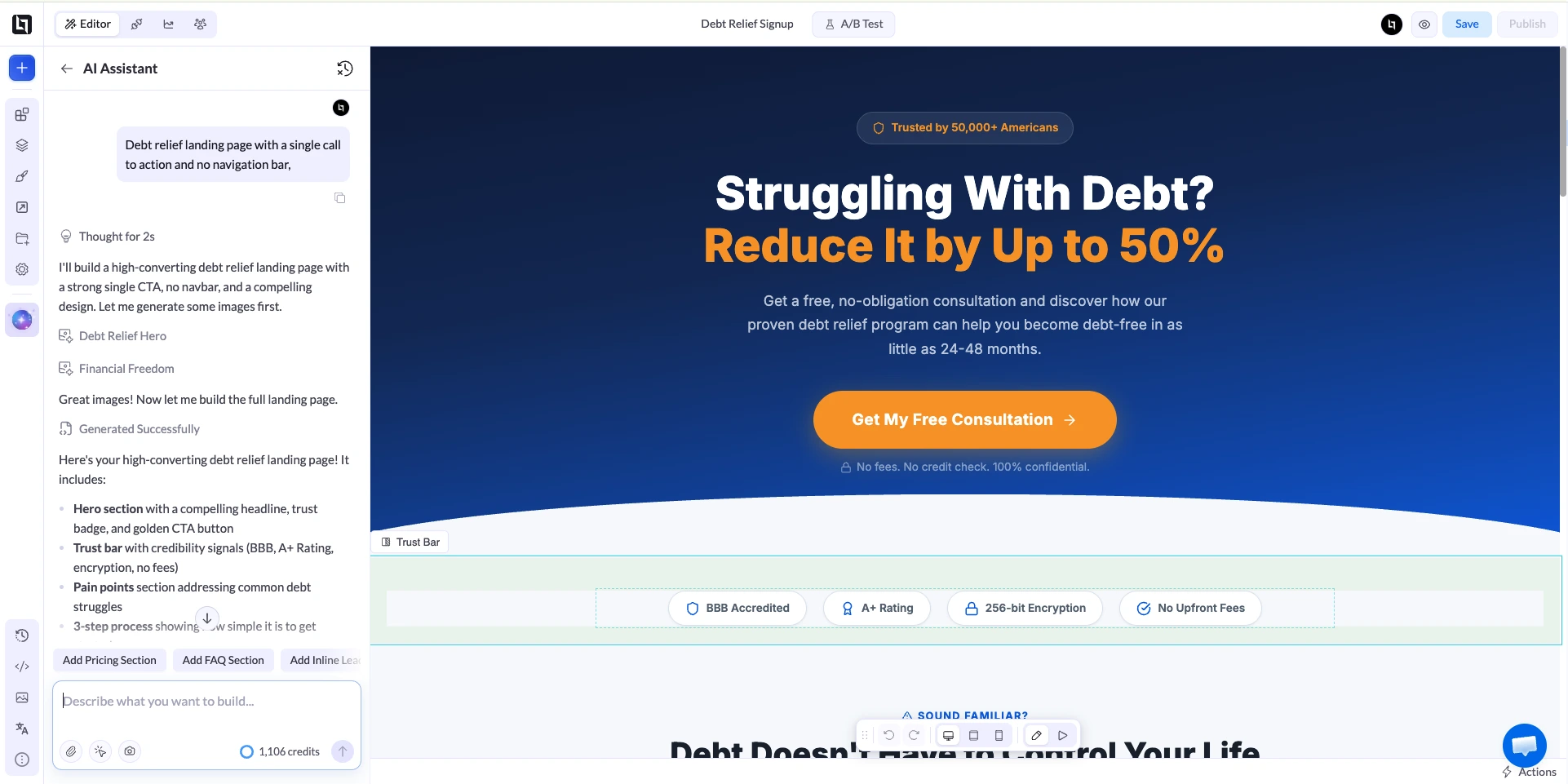
A debt relief landing page sets context. It matches the promise in the ad, explains what the program is in plain terms, and gives one reason to start.
It should not try to capture anything except attention. No navigation bar, no second offer, no newsletter box in the footer.
The form qualifies. Its job is to find out, in as few taps as possible, whether this person fits the program your buyer is paying for.
If you have not read our guide on building a lead generation funnel, that split is the single idea worth taking from it.
Why the step order matters more than the step count
Splitting a long form into steps usually helps. Venture Harbour, who publish results from their own tests, moved a business-to-consumer finance form from 11% to 46% by switching to a multi-step layout, and reported similar lifts across other properties.
Other published comparisons point the same way, though the size of the gain varies a lot by traffic source.
The gain is not magic. It comes from three things you control.
Start with the question that qualifies
In debt, that is the balance. Most programs need a floor of roughly $7,500 to $10,000 in unsecured debt before the economics work for anyone, so the first question should sort on that.
Ask it as ranges, not as a text box. Under $10,000, $10,000 to $20,000, $20,000 to $35,000, $35,000 to $50,000, over $50,000.
A range is one tap. A number is typing plus a decision about whether to be honest, and people abandon on both.
Put the expensive asks last
Rank every field by what it costs the visitor. Tapping a button is cheap. Typing a ZIP code is more. Typing an email is more again.
Handing over a phone number, on a page about money problems, is the most expensive thing you will ask for all day.
By the time you ask for it, the visitor should have already answered four questions and seen a screen telling them they may qualify.
That is not a trick. It is the same reason nobody puts the payment page first in a checkout.
Give unqualified traffic somewhere to go
Someone with $4,000 in debt is not a settlement lead. They are also not worthless.
Route them to a budgeting resource, a credit counseling offer, or a different advertiser instead of a dead end. You already paid for the click.
Building it, step by step
The walkthrough below builds a debt relief landing page and the funnel behind it in LanderLab, but the structure transfers to any builder that supports conditional steps.
1. Generate the page and the funnel
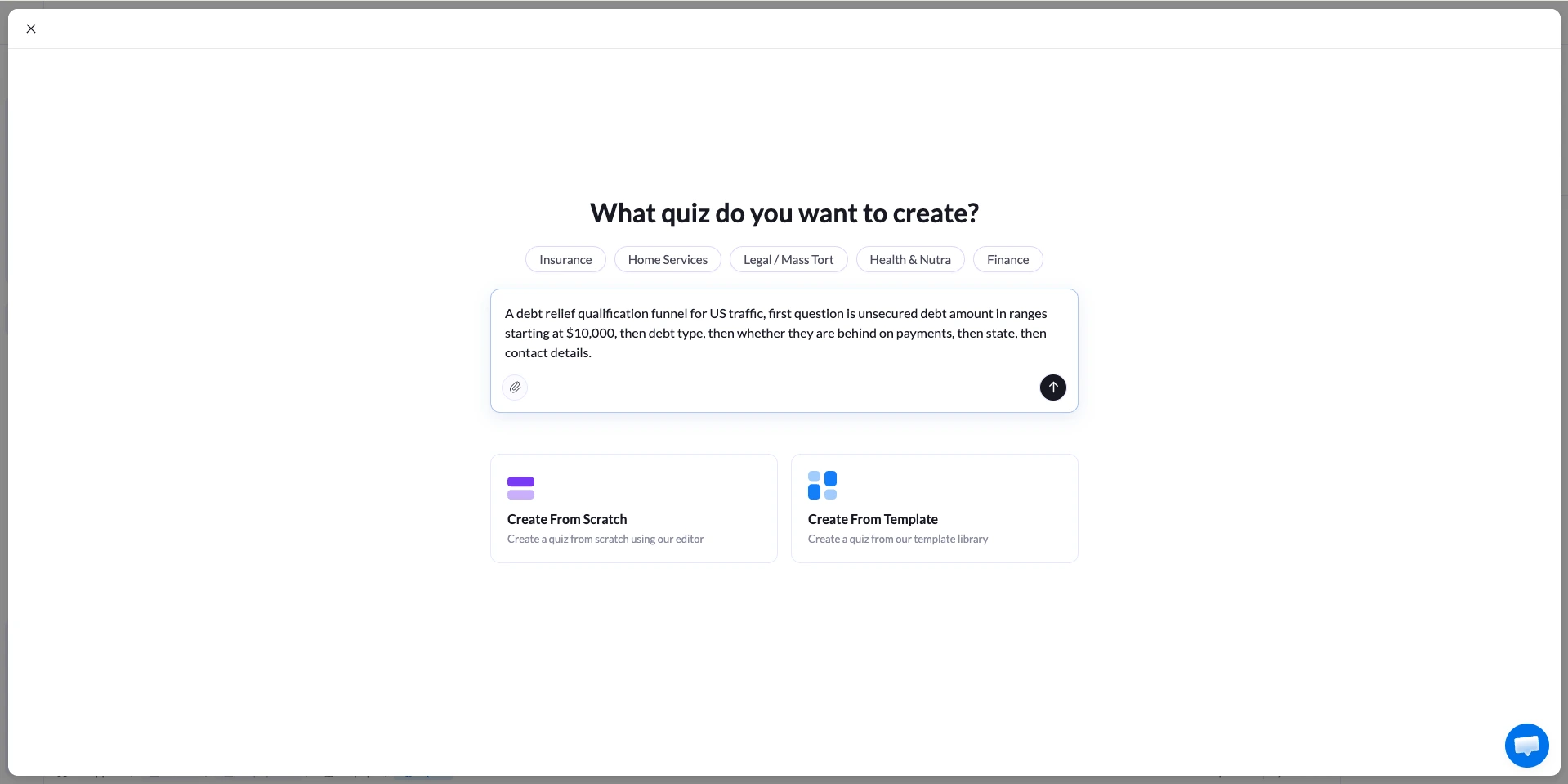
Rather than assembling questions one by one, you can describe the funnel and edit what comes back. Drag the Quiz element onto a page, and the prompt box asks what the quiz is for.
A prompt with real constraints beats a vague one. Something like: a debt relief qualification funnel for US traffic, first question is unsecured debt amount in ranges starting at $10,000, then debt type, then whether they are behind on payments, then state, then contact details.
The AI quiz builder returns the flow, the questions and the input fields, and drops you into the builder to change them.
2. Set one question per step
Over 70% of debt traffic is mobile in most media buys, so a step that needs scrolling is a step that loses people. One question, large tap targets, short labels.
Turn the progress bar on. A visitor who can see they are a third of the way through is more likely to finish than one who has no idea how long this takes.
3. Branch on the answers that matter
Two branches carry almost all the value in a debt funnel.
The first is debt amount. Below your floor, send people to a separate step with a different offer.
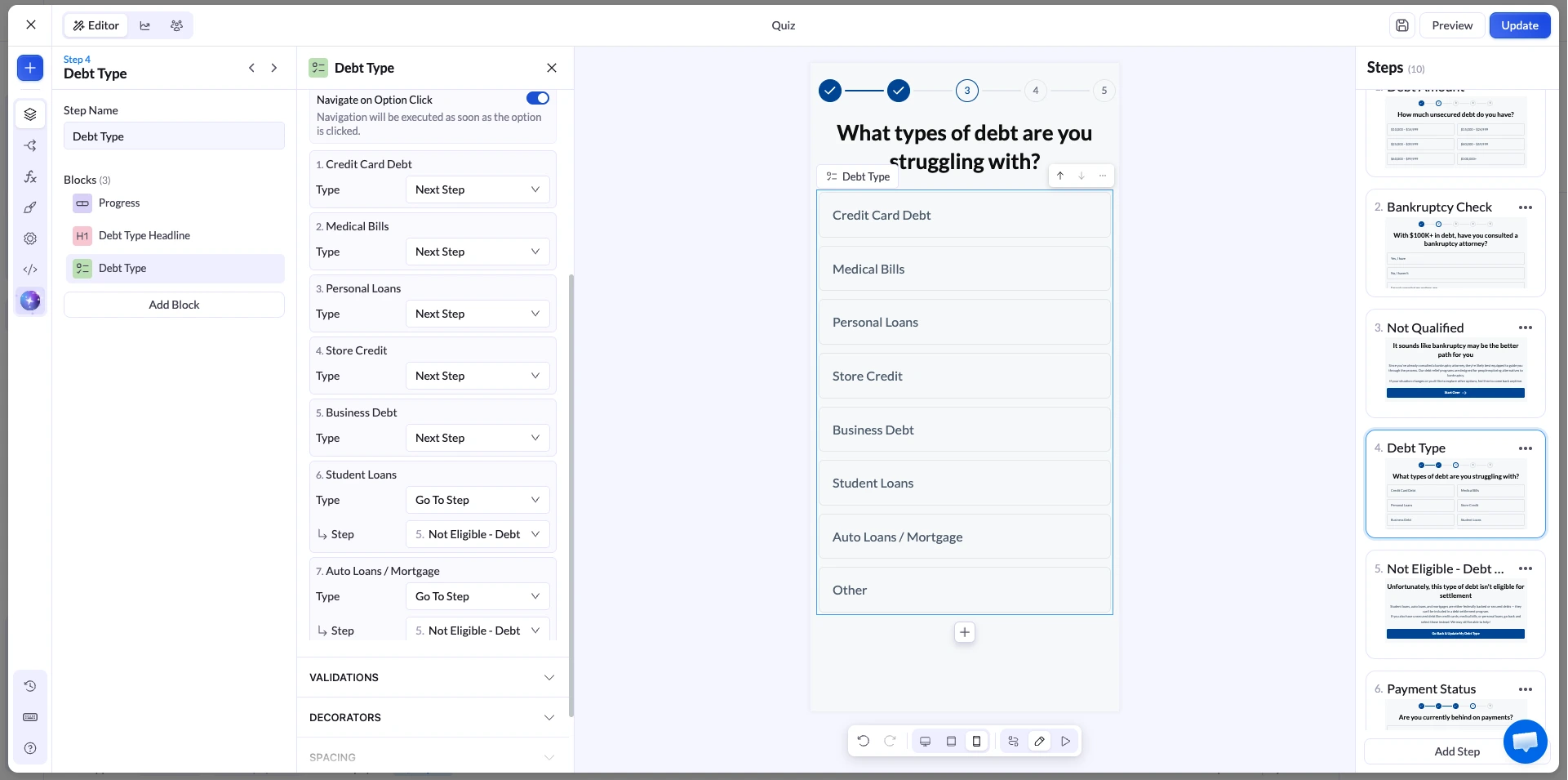
The second is debt type. Federal student loans, auto loans and mortgages are secured or excluded, so they belong on a different path, not in your settlement file.
In LanderLab this lives in the Navigation section of a Multiple Choice or Image Choice block. Switch it to Conditional Navigation and each answer gets its own step selector.
The conditional navigation settings also let you send an answer straight to an external URL, which is how you hand off disqualified traffic to another offer.
4. Add verification where it pays for itself
Every verification layer costs you some completion rate and buys you some lead quality. Add the ones your buyer actually pays more for, and skip the rest.
| Layer | What it catches | What it costs you |
|---|---|---|
| Email verification | Typos and dead inboxes | Almost nothing |
| Phone validation | Wrong format, invalid numbers | Almost nothing |
| Bot protection (Turnstile or reCAPTCHA) | Automated form spam | Almost nothing, if invisible |
| SMS one-time password | Fake and mistyped numbers, low intent | A real drop in completion, plus a per-check fee |
| TrustedForm or Jornaya certificate | Nothing, it records proof | Nothing visible to the visitor |
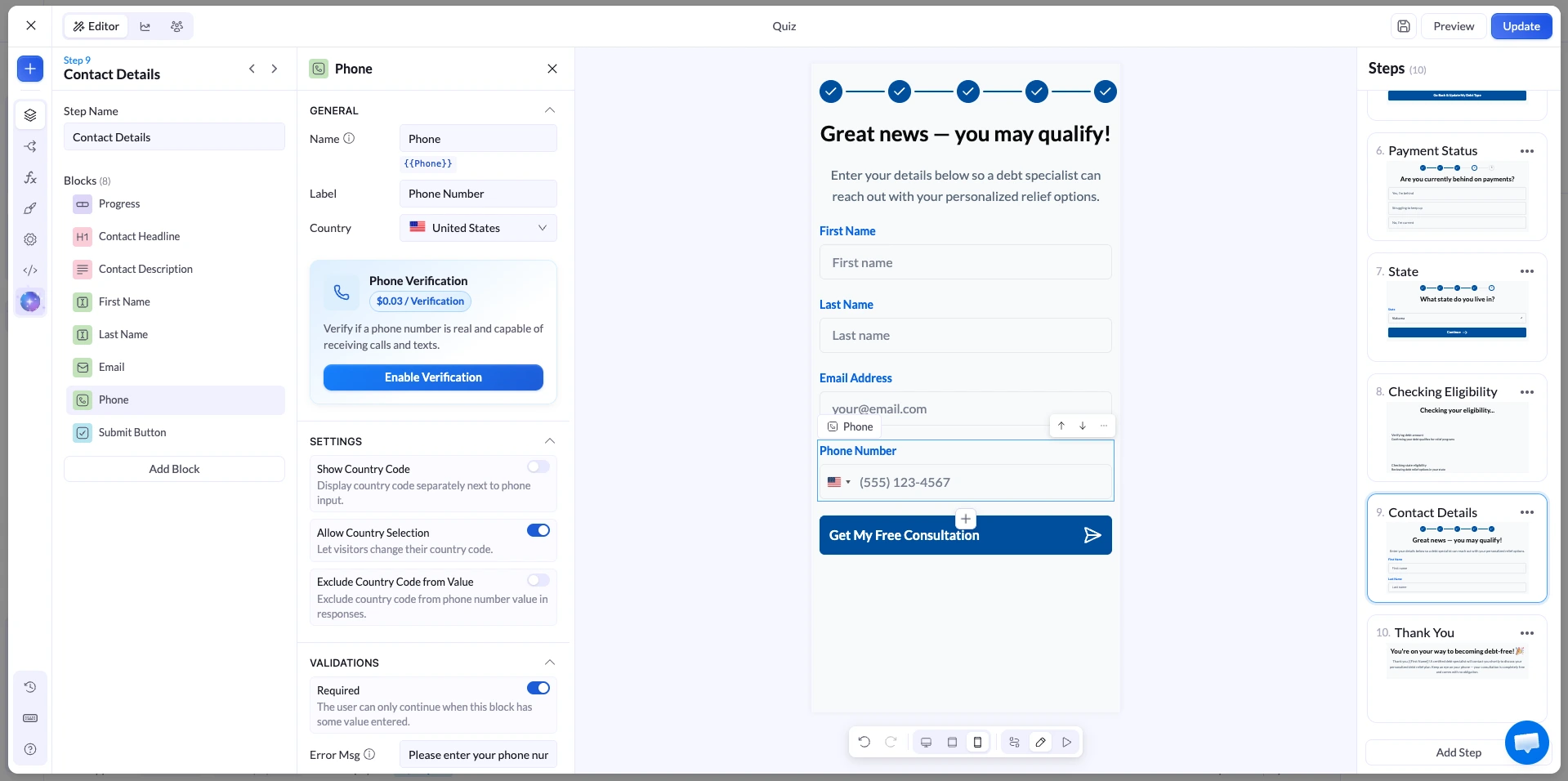
The SMS code is the one to think hard about. It confirms the number is live and tied to a real phone, which matters when the lead is going to a call center, and the extra effort filters out casual submissions.
It also costs $0.09 per verification in LanderLab and will shave points off your completion rate. Run it as a test against a variant without it and compare accepted leads, not form fills.
Certification is different. A TrustedForm certificate records the session and the consent language the visitor was shown, then attaches a certificate URL to the lead.
Buyers in finance and insurance frequently require it before they will accept a lead at all, so it is closer to a ticket of entry than an optimization.
Build the whole qualifying funnel from one prompt
Describe your debt offer and get a multi-step funnel with branching you can edit and publish.
Routing: get each lead to the right destination
A debt relief landing page rarely serves one buyer. A $60,000 credit card lead in a licensed state is worth a different amount than a $12,000 medical debt lead somewhere else, and they often go to different places.
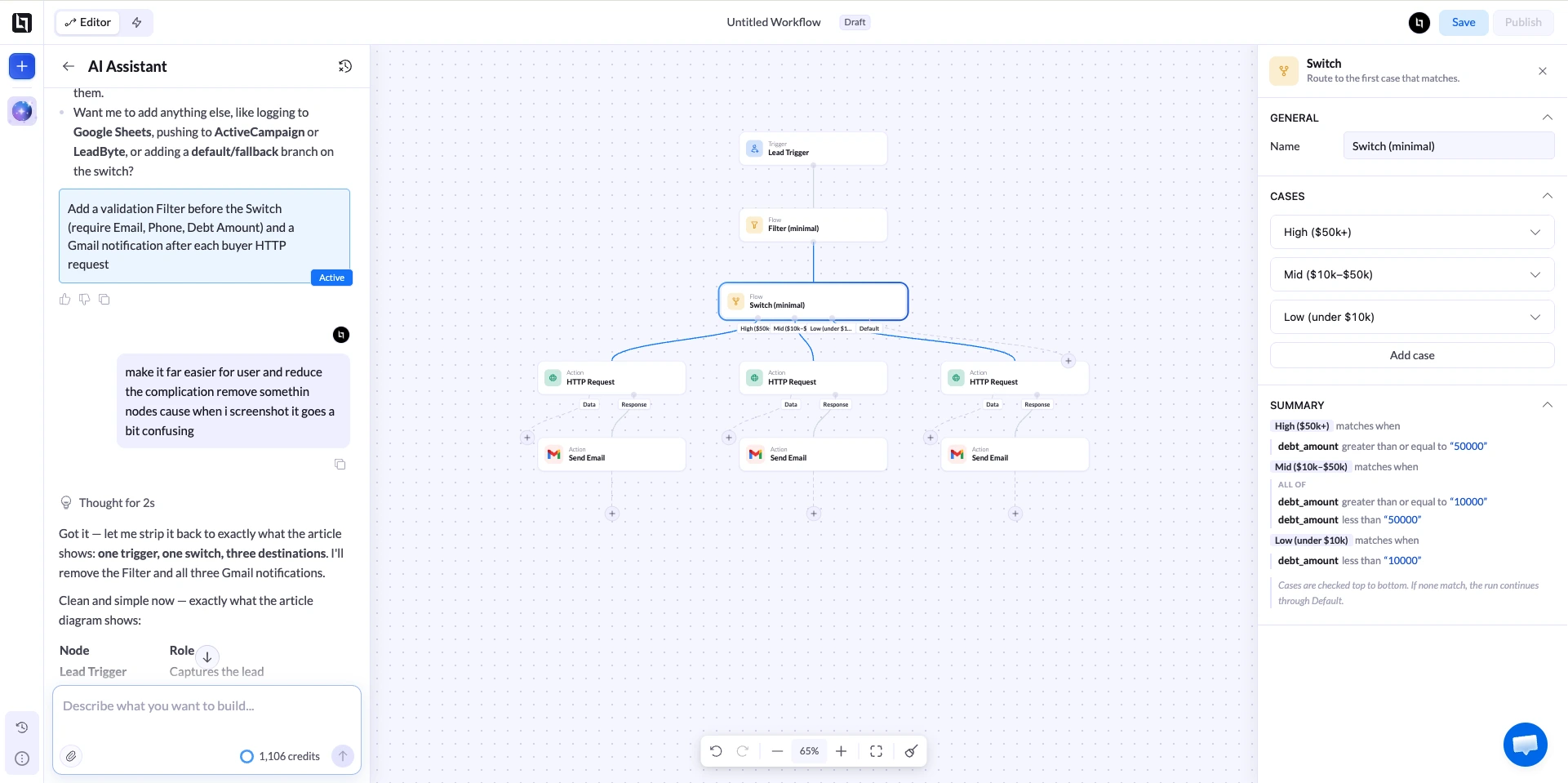
Two ways to handle it. You can attach a lead distribution integration directly to the page, or you can build the routing as a workflow that runs on every new lead.
The workflow route is the flexible one. A Lead trigger starts the run, then Filter, If and Switch nodes read the data on the lead and pick a path.
A Switch on debt amount can send the top band to one buyer and everything else to another. Each branch ends in an action: LeadsPedia, LeadProsper, Phonexa, a CRM, or a plain HTTP request to whatever endpoint your buyer gave you.
Three things people get wrong here:
- Ping-post versus direct post. Direct post sends the whole lead in one request. Ping-post sends partial data first so buyers can bid, then posts the full record if a bid wins. Pick the one your campaign is actually set up for, or every post fails.
- The certificate field. If you use TrustedForm, the
xxTrustedFormCertUrlfield has to be included in the payload you send. An unclaimed certificate expires after 90 days, and a buyer who cannot verify it will not pay for the lead. - Silent failures. Check the run log after you go live. A workflow that looks published and is quietly failing on a mis-mapped field looks identical to one that is working, right up until you reconcile invoices.
If your compliance team does not want lead data sitting on a third-party platform, there is a setting for that too. Lead Compliance Delivery passes leads straight to your integrations without storing them.
The trade-off is real: if the delivery fails, the lead is gone, because it was never saved anywhere.
Then optimize the step that is actually losing you money
Most funnel optimization is guesswork because nobody looks at the per-step numbers. In a multi-step funnel you do not have to guess.
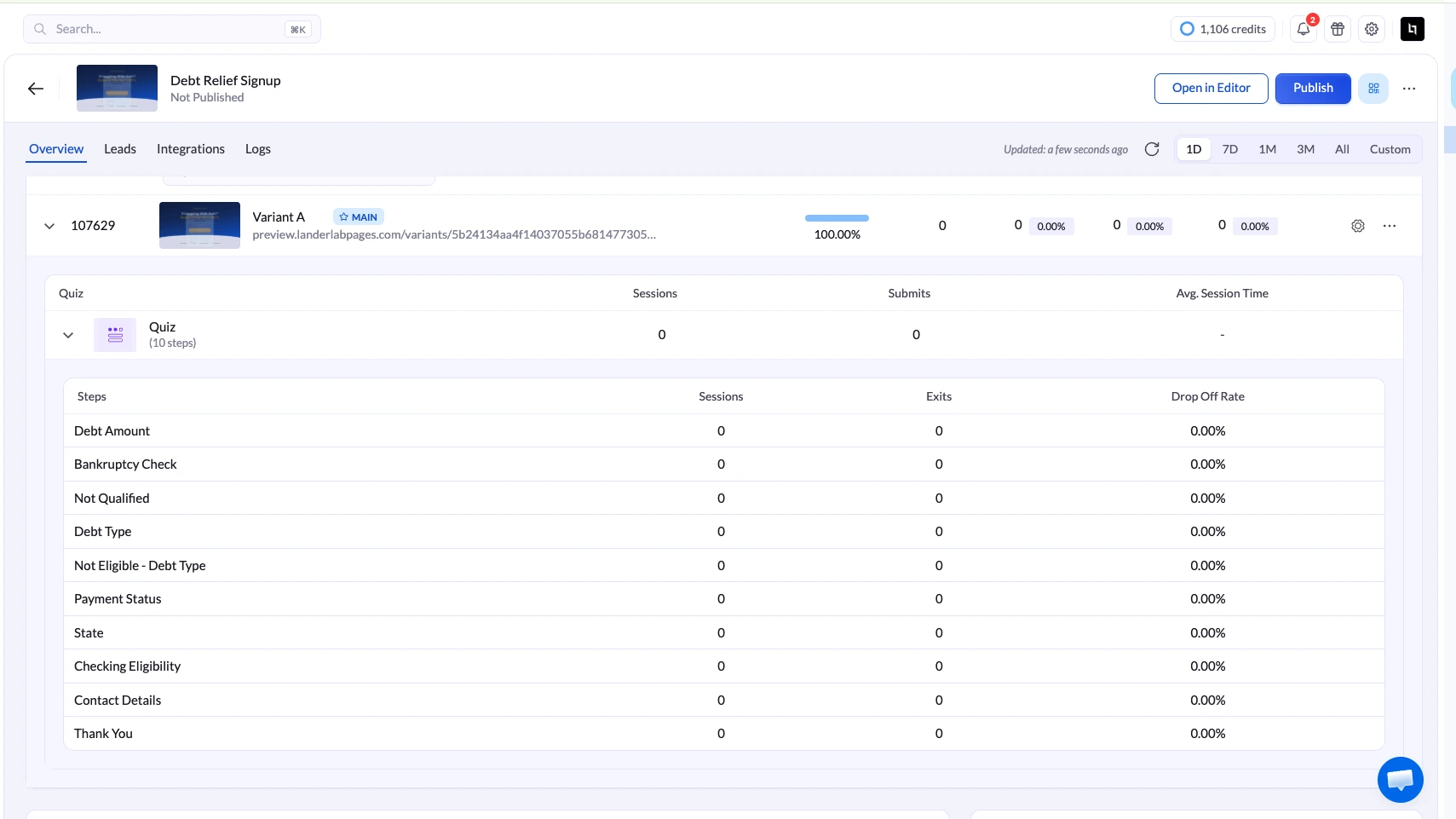
The drop-off breakdown gives you sessions, exits and a drop-off rate for every step in the order visitors see them. Read it top to bottom. The step with the worst rate is your entire to-do list.
Common findings, and what they usually mean:
- Heavy exit on step 1. The first question is too big an ask, or the page above it did not explain what happens next.
- Heavy exit on the phone step. Predictable and partly unavoidable. Check the consent language is readable and the number is not being asked for twice.
- Exits spread evenly across every step. Usually a mobile layout problem rather than a copy problem.
Two features soften the losses. Partial leads save whatever a visitor entered before they left, so a funnel that asks for the phone number early keeps something even when people drop.
Inactivity auto-submit sends that partial record to your integration after a set idle period. Set it to 90 seconds or more so you do not fire on someone who is still reading.
Then test, one change at a time. Duplicate the winning variant, change the first question or the step count or the button copy, split the traffic and let it run.
LanderLab’s A/B testing handles the split by weight, so you can start a new variant at 20% while you watch it rather than betting half your traffic on it.
Mistakes that show up on almost every debt relief landing page
- Phone number on the first screen. You will get fills. They will be worse.
- Debt amount as a free-text field. Slower, and the answers arrive in twelve different formats.
- Hard stops for disqualified traffic. Send them somewhere. You paid for the click either way.
- Savings claims on the page. “Cut your balance in half” is a claim you have to be able to substantiate.
- Consent text on a different step than the phone field. The record should show what was on screen when the number was given.
- Turning on every verification layer at once. You will not know which one cost you the drop.
- Testing four things in one variant. A win you cannot explain is a win you cannot repeat.
What the rules require on a debt relief landing page
This part is not optional in debt, and it shapes the page design.
The FTC’s Telemarketing Sales Rule has specific provisions for for-profit debt relief services. They cover the disclosures you have to make before someone signs up, a ban on misrepresenting the service, and a ban on collecting fees before a debt has actually been settled or renegotiated.
The FTC’s guide for business is the readable version. The rule reaches inbound calls made in response to advertising, which means it reaches the calls your landing page generates.
On consent, the picture changed.
The FCC’s one-to-one consent rule would have required consent naming a single seller. The Eleventh Circuit vacated it in January 2025 before it took effect, and the FCC formally removed it later that year. The federal standard went back to prior express written consent without the one-to-one constraint, as Womble Bond Dickinson set out when the repeal landed.
That is the federal position, not the whole position. State statutes have kept moving, buyers set their own consent requirements that are often stricter than the law, and a certificate showing what the visitor saw protects you either way.
Build the funnel as though single-seller consent still applied and you are covered whichever direction this moves next.
Have a lawyer approve your actual disclosure text. This article is not legal advice.
Frequently asked questions
How many steps should a debt relief funnel have?
Usually five to eight. Fewer than five and you are asking for too much per screen. More than eight and completion starts falling without adding qualification value.
Test the step count directly rather than copying a number from another vertical.
Should I ask for the phone number before or after the debt amount?
After. The debt amount is the question that decides whether the lead is worth anything, and it is one tap.
Asking for it first means the people who drop out are mostly people you would have paid to reject anyway.
Does SMS verification hurt conversion rate?
Yes, and that is partly the point. It removes fake and mistyped numbers and it filters out low-intent submissions.
Judge it on accepted leads and revenue per visitor, not on form fills. If your buyer pays a premium for verified numbers, it usually wins.
What does the FTC require on a debt relief landing page?
The Telemarketing Sales Rule requires clear disclosure of key facts before someone signs up, including cost, timelines and the possible negative consequences of the service.
It bans misrepresentations, including about success rates and nonprofit status, and it bans charging fees before a debt has been settled or renegotiated.
Is one-to-one consent still required in 2026?
Not as a federal rule. The Eleventh Circuit vacated it in January 2025 and the FCC removed it in September 2025, so prior express written consent is the federal standard again.
State laws and individual buyer requirements still apply, so many operators keep single-seller consent in place anyway.
Can I recover people who abandon halfway through?
Partly. A multi-step funnel saves partial leads, so whatever was entered before the visitor left is still there.
How usable that is depends on whether your consent language and your buyer’s rules cover contacting an incomplete submission.
Where to start
Take your current debt relief landing page and check one thing: what is the first question, and does it qualify or does it collect?
If it collects, reorder it so the debt amount comes first, publish it as a second variant, and split the traffic. That single change usually moves more than a month of copy edits.
Launch your next debt funnel this week
Landing pages, multi-step qualification, lead verification and routing to your buyers, in one platform.


