Leadpages vs Unbounce 2026: Best for Paid Traffic?
You have a campaign going live this week. You need a landing page, a pixel that fires, and a way to test two headlines against each other. Two tabs are open: Leadpages and Unbounce. Most Leadpages vs Unbounce comparisons will tell you Unbounce has the better editor and Leadpages is cheaper. That is

You have a campaign going live this week. You need a landing page, a pixel that fires, and a way to test two headlines against each other. Two tabs are open: Leadpages and Unbounce.
Most Leadpages vs Unbounce comparisons will tell you Unbounce has the better editor and Leadpages is cheaper. That is true, and it does not help you. What decides your bill is not the editor. It is what each platform meters, and what it locks behind the next tier up.
So this is a Leadpages vs Unbounce comparison written from the ad account side. Real plan limits, real caps, and the point where each tool starts charging you again.
The short answer
The Leadpages vs Unbounce decision comes down to four things.
- Unbounce charges you for visitors. 20,000 a month on the $99 plan, 30,000 on $149, 50,000 on $249. Good campaigns push you up a tier.
- Leadpages does not cap traffic on any plan. That is its strongest argument for paid media, and it is a real one.
- Both gate the things a media buyer needs on day one. Unbounce puts pixels on Build ($99) and A/B testing on Experiment ($149). Leadpages includes testing at $99 but limits you to 2 variants and gives you no team seat.
- Neither routes leads to a buyer, runs a quiz funnel, or imports a page from a spy tool. If you run lead gen or pay per call, that gap costs you more than the subscription.
If your traffic is small and your design standards are high, Unbounce. If you run volume on one or two offers, Leadpages. If you run many offers across many domains, keep reading past the table.
Leadpages vs Unbounce at a glance
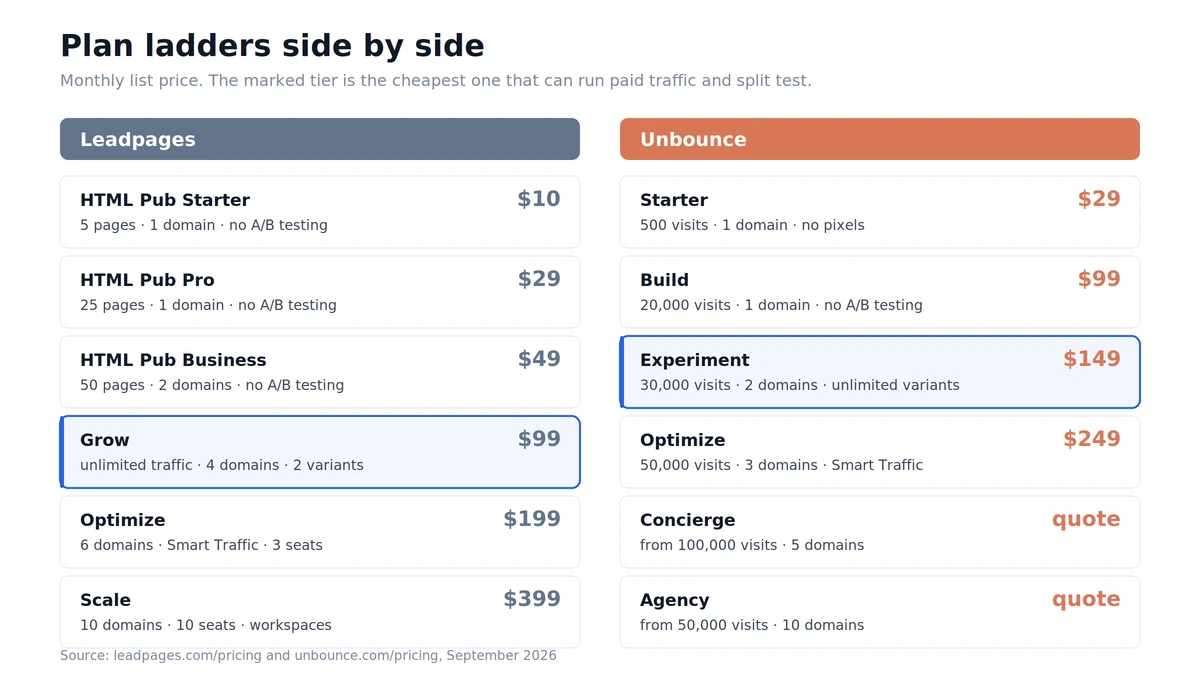
Here is the Leadpages vs Unbounce comparison at plan level, before we get into what each limit costs you.
| Leadpages | Unbounce |
|---|---|---|
Cheapest plan with landing pages | $10/mo (HTML Pub Starter, 5 pages) | $29/mo (Starter, 5 pages) |
Monthly visitor limit | None, on every Leadpages plan | 500 / 20,000 / 30,000 / 50,000 by tier |
Custom tracking pixels | All plans | Build ($99) and up |
A/B testing | Grow ($99), 2 variants per test | Experiment ($149), unlimited variants |
AI traffic routing | Optimize ($199), Smart Traffic | Optimize ($249), Smart Traffic |
Custom domains | 4 / 6 / 10 by tier | 1 / 1 / 2 / 3 by tier |
Team seats on the entry paid plan | None on Grow | None on Build |
Free plan | No, 7-day trial, card required | No, 14-day trial, no card |
Quiz funnels | No | No |
Lead distribution to buyers | No | No |
Prices above are monthly billing, checked on the vendors’ own pricing pages in September 2026. Leadpages takes 20% off for annual, Unbounce takes 25% off.
What Unbounce actually charges you for
Unbounce meters visitors. A visitor is one person who views your page at least once in a month, counted once no matter how often they come back.
The tiers go 500 on Starter, 20,000 on Build, 30,000 on Experiment, 50,000 on Optimize. Above that you are talking to sales.
Three things follow from that, and they all matter more than the builder.
The $29 plan cannot run ads
Starter has no custom scripts and pixels. Those start on Build at $99. So the real entry price for anyone running paid traffic is $99, not $29, and it comes with one root domain and 20,000 visitors.
A/B testing is a separate purchase
Build gives you pages and pixels. It does not give you split testing. That starts on Experiment at $149. When you get there the testing is genuinely good: unlimited variants, manual traffic allocation, confidence intervals. But you paid $50 more a month for the ability to run a test, which is the first thing any media buyer does.
Smart Traffic is a $249 line item
Smart Traffic is the feature Unbounce is known for. It sends each visitor to the variant most likely to convert them instead of splitting traffic evenly. It sits on the Optimize plan at $249 a month, two tiers above the entry plan.
The visitor cap is what stings, though. Unbounce says your pages keep running if you go over, and the overage is billed as a one-time charge based on your extra usage. It does not publish the rate on the pricing page. So a campaign that works gives you a bill you cannot forecast. Our full Unbounce pricing breakdown goes tier by tier if you want the detail.
What Leadpages actually charges you for
Leadpages rebuilt the product in 2026 and split it in two. HTML Pub is the publishing layer, from $10 to $49 a month. Leadpages is the conversion layer on top, from $99.
The headline is real: no traffic caps on any Leadpages plan. If you are pushing 200,000 visits at a single offer, that is a significant advantage over Unbounce and worth paying for.
Two limits are easy to miss.
Two variants per test on the $99 plan
Grow includes manual A/B testing, which reads well next to Unbounce’s $149. Look at the feature table and it is 2 variants per test. Optimize and Scale give you 4. If you test a control against three angles, which is normal on cold traffic, $99 does not cover it.
You are alone on Grow
Team seats are not included on Grow at all. They start on Optimize at $199 with 3 seats. If a designer and a buyer both need access, your floor is $199, not $99. The same trap exists at Unbounce, where Build is single user and seats start on Experiment.
Leadpages also throttles active integrations by tier: 5 on Grow, 10 on Optimize, 25 on Scale. Our Leadpages plan limits post covers the rest.
The four limits that bite media buyers
These are the ones that do not show up in a normal Leadpages vs Unbounce comparison, and they are the ones that cost you money.
1. Domains
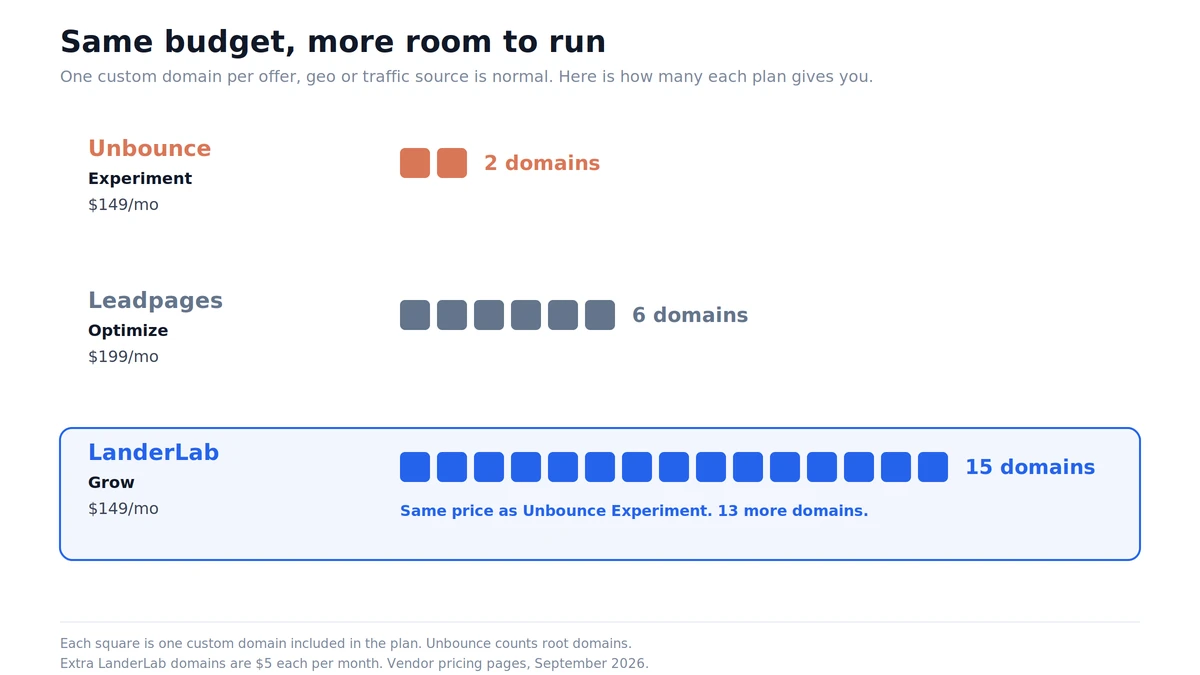
Unbounce gives you 1 root domain on Build, 2 on Experiment, 3 on Optimize. Leadpages gives you 4, 6 and 10.
If you run one brand, that is fine. If you run separate domains per offer, per geo, or per traffic source, which is standard practice for media buyers, you hit that wall in month one. Neither vendor sells extra domains as a cheap add-on. You upgrade the whole plan.
2. Visitor caps applied to your winners
Caps punish success. Your losing campaign never approaches 20,000 visitors. Your winner does, in week two, right when you want to scale spend. On Unbounce that means an overage charge or a forced upgrade, exactly when your cash is committed to media.
3. The testing gate
Testing is not a premium feature for paid traffic. It is the job. Unbounce charges $149 before you can run one. Leadpages charges $99 and caps you at 2 variants. Either way, the ability to test properly is not in the entry price.
4. Page supply
Both tools give you unlimited pages, which sounds generous until you count how you make them. Every page starts from a template or a blank canvas. Neither lets you pull a competitor’s page in from a spy tool and rebuild it. If your workflow starts in Adplexity or Anstrex, you are copying by hand.
Run more offers without the domain restriction
LanderLab Launch starts at $69 a month billed yearly, with room to scale a winner.
- 100,000 visits a month, not 20,000
- 5 custom domains on the entry plan
- Quiz funnels and lead routing included
Where both tools stop: after the click
The Leadpages vs Unbounce question assumes one of them finishes the job. Neither does. Both are landing page tools, and they are good at the part between the ad click and the form submit. They largely stop there.
Neither has quiz funnels. A multi-step qualifying flow beats a single form on most lead gen offers, because each small question raises the chance of the next one being answered. To build one, you leave the platform.
Neither routes a lead to a buyer. If you sell leads to LeadsPedia, LeadProsper, Phonexa or LeadByte, or you run pay-per-call campaigns through Ringba or Retreaver, you are adding Zapier, a webhook layer, or a developer.
Neither is a lead CRM. Leadpages adds enrichment on top of forms, which is useful for B2B. It is not lead management, and it is metered too: 1,000 enrichments a month on Grow.
So the honest version of the Leadpages vs Unbounce comparison is that you are picking between two good page builders, and then buying two or three more tools to finish the job.
The third option: LanderLab
Both sides of the Leadpages vs Unbounce comparison leave the same gap. LanderLab was built for the paid traffic case rather than adapted to it, which changes what is included and what is metered.
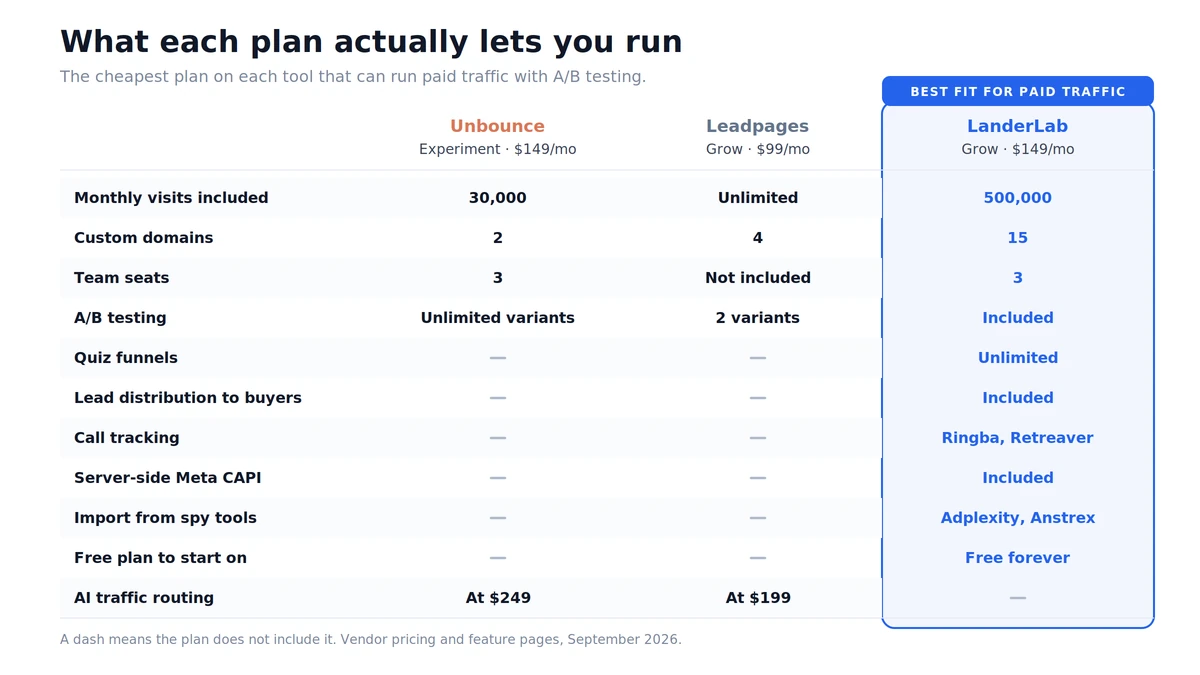
Traffic you can plan for. The Launch plan is $89 a month, or $69 billed yearly, and includes 100,000 visits. That is five times Unbounce Build for less money. If you do go over, the overage rate is published: $0.001 per extra visit on Launch, which works out to $10 per extra 10,000 visits. You can put that in a spreadsheet before you spend.
Domains at the entry tier. Launch includes 5 custom domains, against 1 on Unbounce Build and 4 on Leadpages Grow. Extra domains are $5 a month each rather than a plan upgrade. Grow at $149 gives you 15.
Quiz funnels, unlimited, on every paid plan. Build a multi-step quiz funnel with drop-off analytics per step, so you can see which question loses people instead of guessing.
Import instead of rebuild. The page importer pulls a page in from a URL, a ZIP file, or directly from Adplexity and Anstrex. For anyone who researches offers before building, that is hours back per campaign.
The lead actually goes somewhere. There are 28+ native integrations, including the Meta Pixel and the Meta Conversions API for server-side events, TikTok, Snapchat, Taboola and NewsBreak pixels, Voluum, RedTrack and ClickFlare for tracking, and direct lead distribution to LeadProsper, LeadsPedia, Phonexa and LeadByte. Ringba and Retreaver handle inbound calls. Google Ads offline conversions upload from your real leads, so the algorithm optimises on what you actually got paid for.
A free plan that publishes. 2,500 visits, 5 published pages, 1 custom domain, 1 quiz funnel and unlimited leads, forever, with no card. Unbounce gives you 14 days. Leadpages gives you 7 and takes your card first.
Where LanderLab does not win: it has no equivalent of Smart Traffic, no built-in heatmaps, and no visitor enrichment. If AI traffic routing is the reason you were considering Unbounce Optimize, that is a fair reason to pay for it.
So which one should you buy?
- Pick Unbounce if you are running one or two campaigns under 20,000 visitors a month, you want the most precise editor, and Smart Traffic at $249 fits your margin.
- Pick Leadpages if you push high volume at a small number of offers and traffic caps are the thing you want gone.
- Pick LanderLab if you run several offers across several domains, you qualify leads before you pass them on, and you want the funnel and the routing in the same tool.
The Leadpages vs Unbounce answer changes with your numbers, so put your own in before you decide. Take last month’s visits, your domain count, and how many variants you actually test. Then price all three. The tool that looks cheapest at the top of the page is often not the one you end up paying for. Our free ROAS calculator helps if you want to work backwards from margin.
FAQ
Is Leadpages cheaper than Unbounce?
At list price, yes. Leadpages entry CRO plan is $99 a month against Unbounce Build at $99, but Leadpages includes A/B testing at that price and Unbounce does not until $149. Leadpages also has no visitor cap, while Unbounce Build stops at 20,000. On the Leadpages vs Unbounce comparison that matters for paid traffic, Leadpages is the cheaper of the two.
Does Unbounce have a visitor limit?
Yes. 500 visitors on Starter, 20,000 on Build, 30,000 on Experiment and 50,000 on Optimize. Unbounce counts each person once per month regardless of repeat visits. Going over does not take your pages down, but it triggers a one-time overage charge based on your extra usage. The rate is not listed on the pricing page.
Can you A/B test on the cheapest Leadpages plan?
Not on the HTML Pub publishing plans, which run $10 to $49. A/B testing starts on the Grow plan at $99 a month and is limited to 2 variants per test there. Optimize at $199 and Scale at $399 allow 4.
Leadpages vs Unbounce: which is better for Facebook and Google ads?
Both work. Unbounce needs the $99 Build plan or higher before you can add custom tracking pixels, so its $29 Starter plan is not usable for paid campaigns. Leadpages supports pixels on all plans. Neither sends server-side conversion events natively, so if you want the Meta Conversions API you will need a third tool or a platform that includes it.
Do Leadpages or Unbounce have quiz funnels?
No. Both build single landing pages with forms. Unbounce has multi-step forms on Build and above, which is not the same thing as a branching quiz with per-step analytics. For multi-step lead qualification you need a funnel builder.
What is the best Leadpages and Unbounce alternative for lead generation?
For teams running paid traffic to lead gen offers, look for the things both tools leave out: quiz funnels, lead distribution to buyers, call tracking, and traffic allowances that survive a winning campaign. LanderLab covers those from $69 a month billed yearly, and has a free plan you can publish real pages on.
Before you pick
Write down three numbers: your monthly visits, your domain count, and the number of variants in your next test. Then price Leadpages, Unbounce and LanderLab against those three numbers only. Leadpages vs Unbounce stops being a close call once you use your own figures.
Build your next lander in minutes
Describe the offer, get a page, split test it, and send the leads where they need to go. All in one place.