You’re spending thousands each month on Google Ads. You’ve tried shared lead platforms. Maybe your website looks clean and your logo is sharp. But the phone still doesn’t ring the way it should.
Half the leads you pay for never answer. The ones who do are already quoting three of your competitors. Sound familiar?
Here’s the hard truth. 85% of contractors fail within their first five years, and broken lead generation is one of the biggest reasons. The problem isn’t that you aren’t spending enough.
The problem is that your leads are leaking out of a broken system before they ever convert.
This guide breaks down exactly why most contractor lead gen campaigns fail. More importantly, it shows you how to fix each one.
If you want to stop burning budget on leads that go nowhere, exclusive contractor leads are worth understanding before we dig in.
What You’ll Learn
- You’re Responding to Leads Too Slowly
- You’re Using the Wrong Channel for the Job
- You’re Not Tracking Which Leads Turn Into Jobs
- You’re Relying Too Heavily on Shared Lead Platforms
- You’re Missing Too Many Phone Calls
- Your Landing Pages Are Killing Conversions
- You’re Cutting Marketing Budget When Business Slows
- You’re Ignoring Your Reputation and Reviews
1. You’re Responding to Leads Too Slowly
Speed is the single biggest predictor of whether a lead turns into a job. And most contractors are losing before they even pick up the phone.
A lead that comes in at 2:14 PM and gets called back at 4:30 PM isn’t a warm lead anymore. It’s a cold one.
The homeowner has already moved on, filled out two more forms, and booked the guy who called them back in four minutes.
The Five-Minute Rule
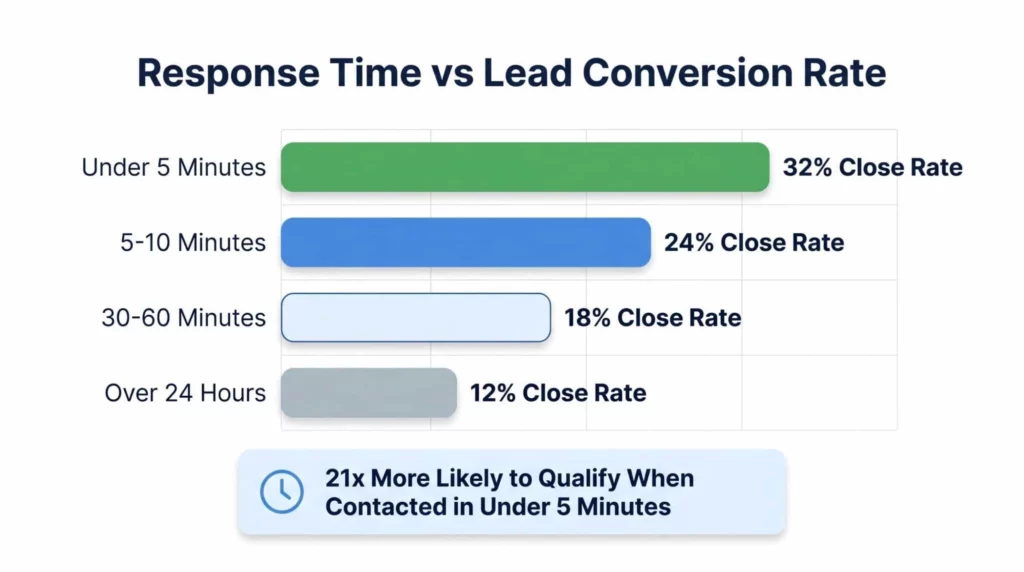
The research is not subtle on this point. A lead contacted within five minutes is 21 times more likely to qualify than one contacted after 30 minutes.
Meanwhile, the average response time across the home services industry sits at 47 hours. That’s almost two full days. By then, the roof is already being tarped by someone else.
Why it happens:
- Leads route to a personal email inbox that doesn’t get checked until evening
- Office staff juggle inbound calls, scheduling, and billing all at once
- Nobody owns the lead after hours or on weekends
- Manual lead assignment delays pickup by 35%
How to Fix It
- Set up instant SMS and email notifications for every form fill
- Use an auto-responder that acknowledges the lead within 30 seconds
- Route after-hours leads to an answering service or a pay-per-call partner
- Assign one person clear ownership of the first-touch response
- Audit your actual response time every week, not every quarter
AI-powered routing tools can increase response speed by up to 8 times compared to manual assignment. You don’t need enterprise software to cut your response time under five minutes. You need a system with a clear owner.
The Math on Response Time
Here’s what the data looks like when you compare response windows side by side:
| Response Time | Close Rate | Cost Per Job ($100 lead) |
|---|---|---|
| Under 1 minute | 35-40% | $250-286 |
| Under 5 minutes | 32% | $312 |
| After 30 minutes | 18% | $555 |
| After 24 hours | 12% | $833 |
Leads contacted in under one minute convert at roughly 35 to 40%.
Leads contacted within 5 minutes close at about 32%.
Leads contacted after 30 minutes drop to 18%. Leads contacted after 24 hours fall to just 12%.
Think about that in revenue terms. If you pay $100 per lead and close 32% at 5 minutes, your cost per job is $312. Wait 30 minutes and that cost jumps to $555.
Wait a day and you’re paying $833 per job for the same leads. The lead cost didn’t change. Your close rate did.
This is why speed is the highest-impact fix on this entire list. You can double your close rate without spending another dollar on marketing by answering faster.
2. You’re Using the Wrong Channel for the Job
Not every lead source fits every job. A burst pipe at 9 PM on a Tuesday is not a Facebook ad moment. A $40,000 bathroom remodel is not a yard sign moment.
When you match the wrong channel to the wrong intent, you pay more for leads that convert less. This is how contractors end up with a “full pipeline” that produces zero jobs.
The Urgency Gradient
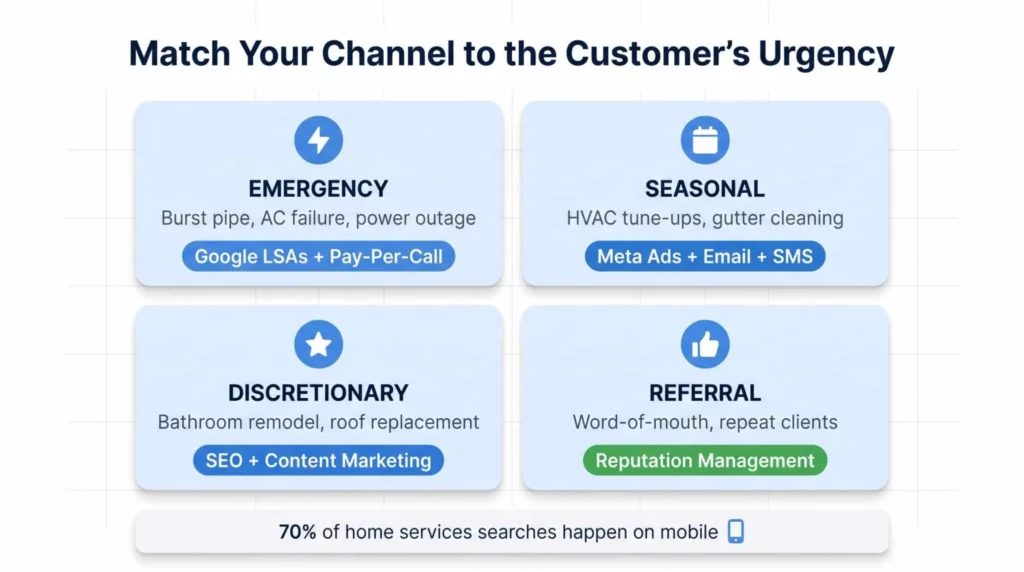
Different urgency states need different channels:
- Emergency repair: Google Local Services Ads, call-only ads, and pay-per-call. Homeowners want to dial, not type.
- Seasonal maintenance: Meta ads, email, and SMS reminders for predictable cycles like HVAC tune-ups.
- Discretionary remodels: SEO, content marketing, and long-form trust building through galleries and reviews.
- Referrals: Reputation management and social proof, which convert at 2 to 4 times the rate of cold leads.
A plumber running Meta ads for emergency drain cleaning is fighting physics. The user wasn’t searching for a plumber. They were scrolling through their feed when your ad interrupted them. That’s not intent. That’s a distraction.
How to Fix It
- Map each service you offer to the matching urgency state
- Put your emergency budget on Google LSAs and call tracking numbers
- Use Meta and direct mail only for pre-purchase or seasonal offers
- Build SEO content for the high-ticket, long-consideration jobs
Pay-per-call services align perfectly with emergency demand because you only pay when the phone actually rings with a qualified caller. No wasted clicks, no form-fill tire-kickers, no ghosted follow-ups.
3. You’re Not Tracking Which Leads Turn Into Jobs
This one is the silent killer. A contractor can run a “profitable” campaign for a full year while bleeding money, simply because they don’t know which leads actually closed.
If you can’t tell which keyword, which ad, or which channel produced your last $12,000 roofing job, you’re making decisions blind.
The Attribution Void
Most contractor campaigns get evaluated by the wrong metrics: click-through rate, cost per lead, total impressions. None of these tell you if the campaign made money.
The only metrics that matter are Cost Per Acquisition and Return on Ad Spend. And you can’t calculate either one without call tracking.
Consider this: a roofing lead that costs $250 sounds expensive. But if the average ticket is $12,000 and you close one in ten, your ROAS is 10 to 1. Without tracking, you might cut that “expensive” channel and kill your best-performing campaign.
How to Fix It
- Assign a unique call tracking number to every campaign and every landing page
- Record every inbound call so you can diagnose sales gaps
- Tag calls as jobs, quotes, spam, or price shoppers inside your CRM
- Review the data monthly to see which keywords actually produce revenue
A quick gut check: can you tell me right now, without pulling a report, which of your marketing channels produced the most revenue last month? If the answer is “I’d have to check,” you don’t have attribution. You have guesses with a spreadsheet.
Call recordings also reveal something most contractors miss. If 37% of phone leads close on the first call and your close rate is 10%, the issue isn’t the leads. It’s the conversation.
Your front desk is fumbling the handoff, and no amount of better marketing will fix a bad phone script.
4. You’re Relying Too Heavily on Shared Lead Platforms
Shared lead platforms feel cheap when you start. They’re easy to set up. They drop leads into your inbox while you finish a job. What’s not to love?
Then month three hits. Your close rate drops. Your techs start complaining about price shoppers.
Every lead becomes a bidding war against four other contractors who got the same inquiry.
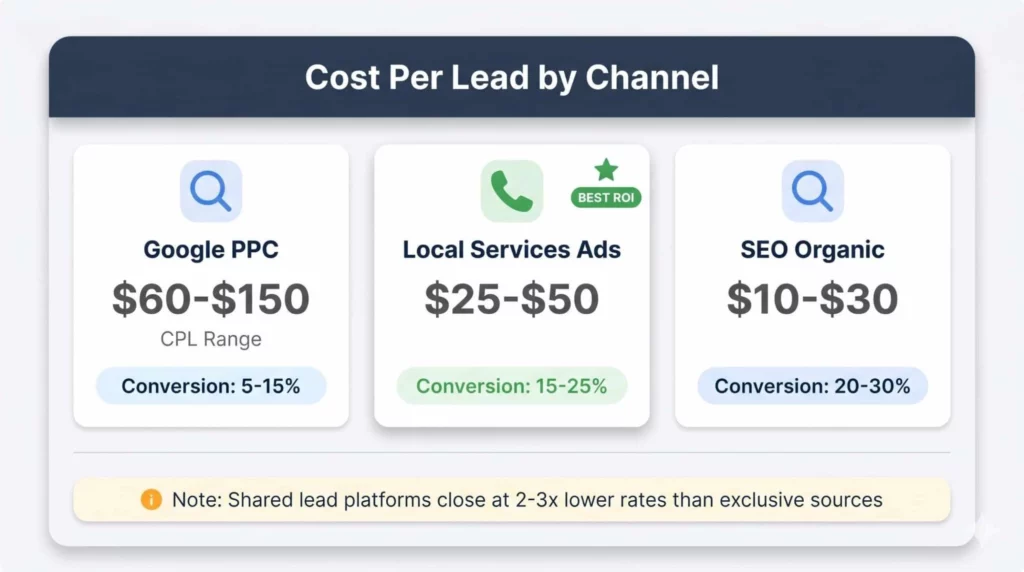
The Shared Lead Problem
Shared platforms sell each inquiry to 3 to 5 contractors at the same time. By the time the homeowner picks up, they’ve already been pitched by your competition. The conversation isn’t about quality. It’s about who’s cheapest.
This is why shared leads typically close at 2 to 3 times lower rates than exclusive leads.
Common complaints from contractors using shared platforms:
- Leads are often recycled, outdated, or show incorrect contact info
- Price wars strip margin out of every quote
- Even “won” jobs come in at 15 to 20% below target ticket size
- Credit disputes for bad leads eat up hours each week
How to Fix It
- Shift budget from shared platforms toward owned channels (SEO, PPC, LSAs)
- Invest in your Google Business Profile to capture free organic calls
- Use pay-per-call networks that deliver exclusive, single-buyer leads
- Track close rates by source so you know which platforms actually pay
Exclusive leads from your own marketing or a pay-per-call partner typically close at 10% or higher, sometimes much higher.
That’s double or triple what shared platforms produce. The math favors exclusivity in almost every scenario once you count close rates, not just cost per lead.
5. You’re Missing Too Many Phone Calls
You can run the best ads in your market. You can rank number one on Google. None of it matters if nobody answers the phone.
This is the cruelest failure point because it’s entirely self-inflicted. The marketing works. The homeowner calls. And then silence.
The Missed Call Tax
Top-performing contractors answer 90% or more of inbound calls. Everyone else leaves money on the table with every ring that goes to voicemail.
Why it’s so costly: 37% of phone leads close on the first call. Every missed call is not a lost lead. It’s a lost job with nearly even odds of conversion.
And here’s the part that stings. When a homeowner calls during an emergency and hits your voicemail, they don’t leave a message.
They dial the next number on Google. You paid for that click. Your competitor got the job.
How to Fix It
- Track your answer rate weekly as a core KPI
- Hire or contract a dedicated call handler during peak hours
- Use a 24/7 answering service for after-hours and overflow
- Set up a pay-per-call partner so missed calls route to a live agent
- Audit call recordings to find gaps between ringing and answering
Busy times are the worst offenders. Monday mornings, Friday afternoons, and any day after a storm. These are also the highest-intent call windows of the entire year.
Missing calls during these peaks is where contractors quietly lose six figures in annual revenue without realizing it.
If you’re spending $3,000 a month on Google Ads and answering 70% of calls, you’re setting $900 on fire every month before any other inefficiency factors in.
6. Your Landing Pages Are Killing Conversions
Your ad did its job. Someone clicked. They landed on your website at 9:47 PM on a Tuesday with water running through their ceiling. And then your page took six seconds to load on their phone.
They’re gone. They tapped back, clicked the next result, and called your competitor.
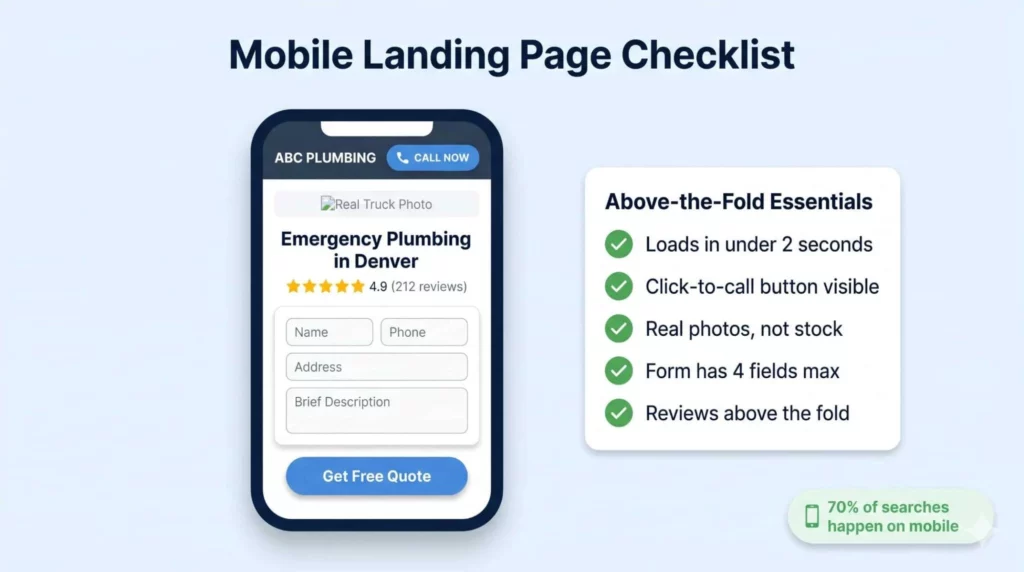
The Two-Second Rule
Over 70% of home services searches happen on mobile phones. If your landing page takes longer than two seconds to load on a phone, you’re losing emergency leads before they ever see your offer.
Speed is only part of the story. The bigger problem is what most contractor landing pages look like when they finally do load.
Common mistakes:
- Stock photos instead of real trucks, real crews, and real job sites
- Click-to-call buttons buried below the fold
- Lead forms with 8 or 10 fields when 4 would do
- Generic “services” pages that don’t speak to the specific job
- No social proof above the fold
How to Fix It
- Build a separate landing page for each service and each city you target
- Put a click-to-call button in the top banner and again after the first paragraph
- Use real photos of your team, your trucks, and your finished work
- Limit lead forms to 4 fields: name, phone, address, brief description
- Add 3 to 5 real customer reviews above the fold
Local relevance wins. A plumber in Denver who has a landing page for “Emergency Plumbing Aurora CO” will outperform a generic “Denver Plumber” page every time. Google rewards specificity and so do homeowners, who want to know you actually serve their neighborhood.
You can find high-intent contractor leads through paid partners, but you’ll still need strong landing pages for your own organic and PPC traffic. The two work together, not against each other.
Test Your Pages Monthly
Run your top landing pages through Google’s PageSpeed Insights. If your score is below 70 on mobile, that’s your highest-ROI fix this month. Compress images. Remove heavy scripts. Simplify the layout. Speed is the cheapest conversion lift you can buy.
The Trust Stack
Every element above the fold on your landing page should answer one question: “Can I trust this company enough to let them into my home?”
That means:
- A real photo of a uniformed tech or branded truck within the first 400 pixels
- A headline that names the specific service (not just “Plumbing Services”)
- A visible rating with a review count (4.9 stars, 212 reviews)
- A phone number in the top-right corner on desktop and top-banner on mobile
- Trust badges like BBB, licensing numbers, or manufacturer certifications
Contractors often skip the trust stack because it feels “basic.” That’s exactly why it works. Homeowners in a crisis state want boring, obvious signals that you’re legitimate. Fancy design is a distraction. Clear trust signals are a conversion lift.
7. You’re Cutting Marketing Budget When Business Slows
This one hurts because it feels like the responsible thing to do. Leads slow down. Revenue tightens. The first line item on the chopping block is the marketing budget.
It’s also the fastest way to guarantee a worse next quarter.
The Momentum Problem
Marketing in home services is not a faucet. You don’t turn it on when you need leads and off when you’re busy. It’s a flywheel.
It takes 6 to 12 months to build organic momentum through SEO, and you can lose that momentum in 30 days of silence.
Research shows that 28% of contractor failures come directly from insufficient marketing and lead generation.
Most of those failures trace back to contractors who pulled spending during a slow season and couldn’t recover when demand returned.
The Seasonal Trap
Home services have predictable seasonal dips. Late winter for roofers. Spring shoulder season for HVAC. Summer slowdowns for plumbing in certain markets. These dips feel like emergencies in the moment. They aren’t.
What they actually are: the best time to invest in marketing. Ad costs are lower, competition is softer, and the leads you capture now become jobs in 6 to 12 weeks.
How to Fix It
- Set a marketing budget as a percentage of revenue (typically 8 to 12% for home services)
- Treat the budget as non-negotiable, like insurance or payroll
- Shift spend between channels during slow seasons, don’t eliminate it
- Build a cash reserve that covers 90 days of marketing during downturns
- Track your 12-month rolling lead pipeline, not your week-to-week
A contractor who cuts Google Ads in March will pay double the CPC when they try to come back in May. Meanwhile, the contractor who held steady through the slow season now ranks higher, has more reviews, and has a full pipeline heading into peak demand.
Home service demand has shown steady stabilization into 2026 after a turbulent few years. Contractors who stayed consistent through the turbulence are the ones now capturing the recovery.
8. You’re Ignoring Your Reputation and Reviews
Your Google Business Profile isn’t a vanity metric. It’s the most important single asset in your lead generation stack, and most contractors treat it like a side project.
If your GBP has 14 reviews and a 4.1 average, your ads will cost more. Your organic traffic will shrink. Your LSA calls will dry up. It’s not fair. It’s just how Google ranks local businesses in 2026.
Why Reviews Compound
Google evaluates local businesses on three factors: relevance, distance, and prominence. Reviews drive prominence.
Prominence drives Map Pack rankings. Map Pack rankings drive roughly 70% of local call volume in home services.
A contractor with 150 five-star reviews can run LSAs at half the CPL of a competitor with 30 reviews. That’s not a small advantage. That’s the entire margin.
How to Fix It
- Ask every happy customer for a review before leaving the job
- Use automated SMS or email review requests 24 hours after completion
- Respond to every review within 48 hours, positive or negative
- Feature reviews prominently on your website and landing pages
- Report fake or spam reviews through Google’s flag system
The Review Request Script
Most contractors fumble the ask. Here’s what works:
“Before I pack up, I want to ask a quick favor. If you were happy with today’s work, a quick Google review would mean a lot to our team. I’ll send you a text with the link right now so it’s easy.”
That’s it. Asking at the end of a successful job, in person, with a text follow-up within 30 seconds produces review rates of 40 to 60%. Compare that to email-only asks, which typically hover around 2 to 5%.
Warning on review velocity: Google’s algorithm penalizes review spikes. If you go from 2 reviews a month to 40 in a week, expect a flag. Steady, organic review flow is better than bursts.
Conclusion
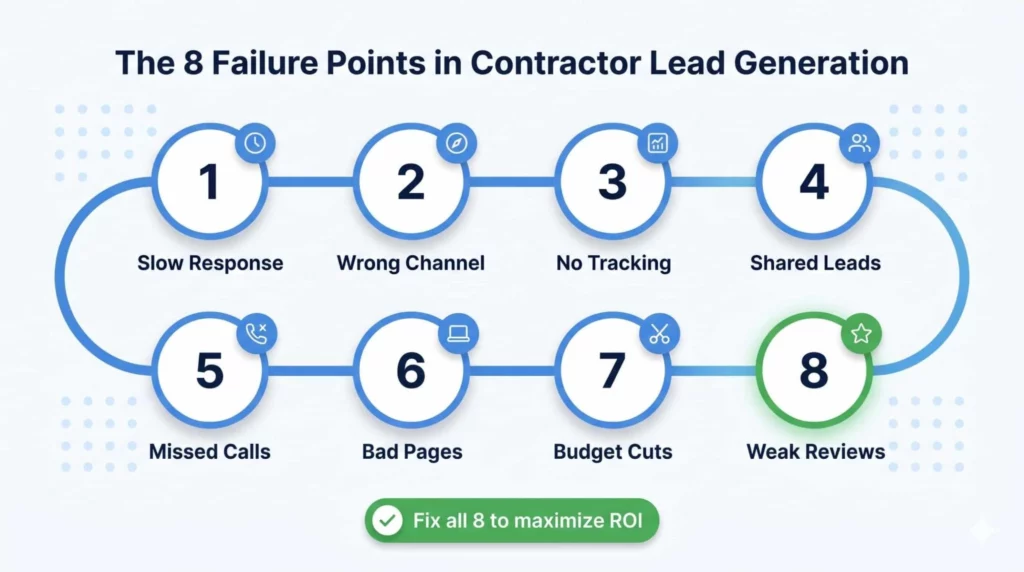
Broken lead generation in 2026 is almost never one problem. It’s a stack of small leaks that drain revenue at every stage of the funnel. You fix one, and the next one becomes visible.
The good news is that none of these fixes requires a bigger budget. Most of them require better systems and tighter attention to the metrics that actually predict revenue.
The contractors who will win the next five years aren’t the ones spending the most. They’re the ones measuring the right things and closing gaps faster than their competition.
Here’s the quick recap of what to fix:
- Respond to every lead in under 5 minutes with automated routing and alerts
- Match your channel to the urgency of the service you’re advertising
- Track every call and tie every lead back to revenue with call attribution
- Move budget away from shared lead platforms toward exclusive sources
- Answer 90% or more of inbound calls with live agents or call partners
- Build fast, mobile-first landing pages with click-to-call above the fold
- Keep marketing spend consistent through slow seasons to hold momentum
- Build review volume steadily and respond to every single one
Frequently Asked Questions
Why do so many contractor lead generation campaigns fail in the first year?
Most campaigns fail because of operational gaps, not marketing problems. The ads work. The leads come in. Then the contractor takes 47 hours to respond, misses 30% of phone calls, and loses every lead to a competitor who answered first. The five-minute response rule is the single biggest driver. A lead contacted within five minutes is 21 times more likely to qualify than one contacted after 30 minutes. Most contractors also cut their budgets during slow seasons, which destroys the momentum they built during busy months. Consistency over 12 months beats intensity over 3 months in every home services vertical.
How much should I spend on contractor lead generation each month?
A healthy marketing budget for home services sits between 8% and 12% of gross revenue. A contractor doing $1 million a year should spend $80,000 to $120,000 annually on marketing, which works out to roughly $7,000 to $10,000 per month. The split matters more than the total. Target 40% on paid channels like Google Ads and LSAs, 30% on SEO and content, 20% on reputation management, and 10% on testing new channels. New contractors should expect higher spend in months 1 through 12 because you’re building reviews, rankings, and trust signals from scratch. After the 12-month mark, costs typically drop 20 to 30% as organic and referral channels take over.
What’s the difference between pay-per-click, pay-per-lead, and pay-per-call?
Pay-per-click (Google Ads) charges you every time someone clicks your ad, whether they call or not. You have the most control but take on the risk of wasted clicks. Pay-per-lead (Angi, HomeAdvisor) charges you per form fill, often shared across 3 to 5 contractors, which drives close rates down. Pay-per-call charges only when a qualified caller actually reaches you. For most home service trades, pay-per-call produces the best ROI because you skip the non-converting clicks and the price wars of shared lead platforms. Google Local Services Ads are a form of pay-per-call and often produce leads at $25 to $50 per call. The right mix depends on your trade, ticket size, and close rate.
How do I know if my leads are actually worth what I’m paying?
You need two numbers: your cost per acquisition (CPA) and your average ticket. If your CPA is under 15% of your average ticket, you’re profitable. If it’s above 25%, you’re in trouble. Get there by tagging every lead with its source, tracking which leads close, and calculating revenue by channel every month. A $250 roofing lead that closes 1 in 10 on a $12,000 job is excellent. A $40 HVAC lead that closes 1 in 50 on a $400 repair is a disaster. The cost per lead number alone tells you nothing. Call tracking makes this calculation possible. Without it, you’re running your business on guesses.
Why do my leads go cold so fast?
Lead intent decays exponentially, not linearly. The homeowner who filled out your form 10 minutes ago is already filling out the next competitor’s form. By 30 minutes, most of them have scheduled with someone else. Most home service searches happen during moments of stress: a broken water heater, a leaking roof, a dead AC unit. Homeowners don’t wait. They call three contractors in ten minutes and book the first one that answers. The fix is infrastructure: auto-responders that acknowledge the lead in 30 seconds, SMS alerts to your phone the moment a form fills, and routing rules that send after-hours leads to a live answering service. Every minute saved in response time directly increases your close rate.