Top 5 Free Webflow Alternatives for Paid Ads in 2026
Most free website builders are free until you launch. Here are the top 5 free Webflow alternatives, tested against 5 checks that matter for paid ads.
Most "free" website builders are free until you try to launch. Then you need a paid plan for your own domain, your tracking pixel or more than a few form leads.
If you run paid ads, that matters. A page on someone else's subdomain, with no pixel and a cap of 50 leads, is not a page you can send traffic to.
So this list sorts free Webflow alternatives by one question. Can you run a real paid campaign on the free plan, without paying for anything except the domain?
The short answer:
- Truly free for paid ads: LanderLab. Its free plan includes your own domain, unlimited leads and 2,500 visits a month.
- Free to design, paid to launch: Framer, Webstudio and Carrd.
- Free with ads on your page, or free software you host yourself: WordPress.
What "truly free" means when you run paid ads
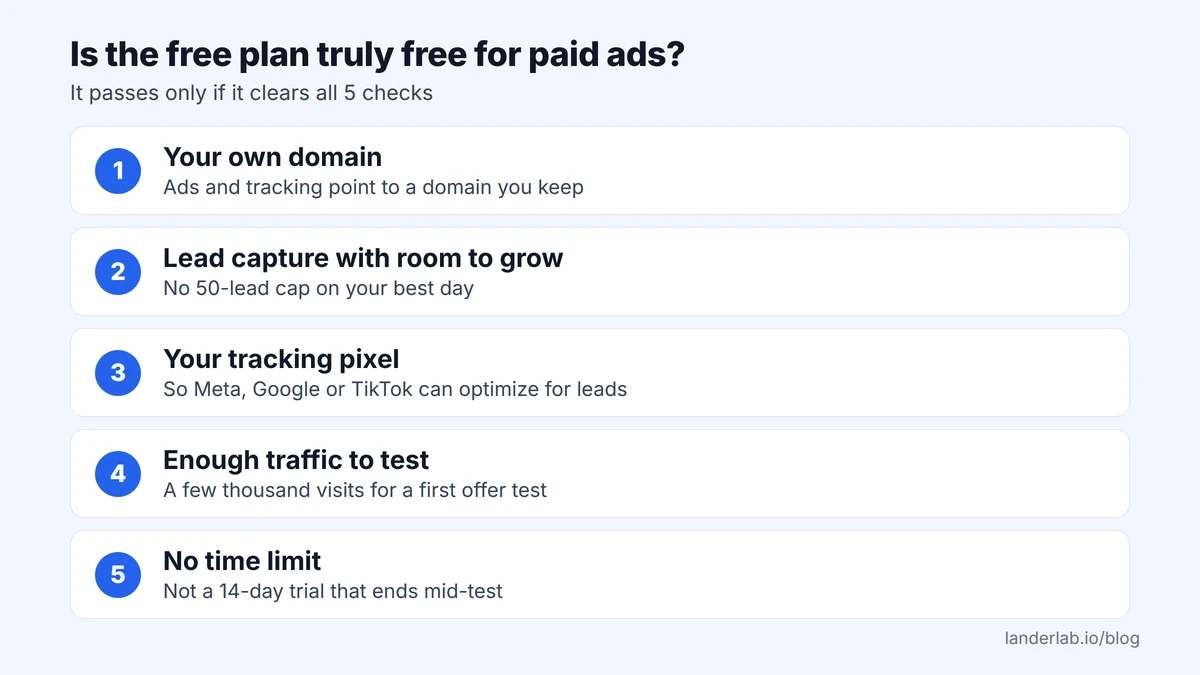
A free plan is truly free for paid traffic when it passes 5 checks.
- Your own domain. Your ads and tracking should point to a domain you keep.
- Lead capture with room to grow. A cap of 50 form leads can fill up fast once ads are live.
- Your tracking pixel. Without it, Meta, Google or TikTok cannot optimize for leads.
- Enough traffic to test. A first offer test often needs a few thousand visits.
- No time limit. A 14-day trial can end before your test does.
How Webflow's free plan does on the test
Webflow's Starter plan is free with no time limit, so it passes check 5. It fails the domain, lead and pixel checks. According to Webflow's pricing page, Starter gives you:
- a webflow.io address, with no custom domain
- 50 form submissions per site
- no custom code on the free plan, so no pixel
- 2 static pages and 1 GB of bandwidth a month
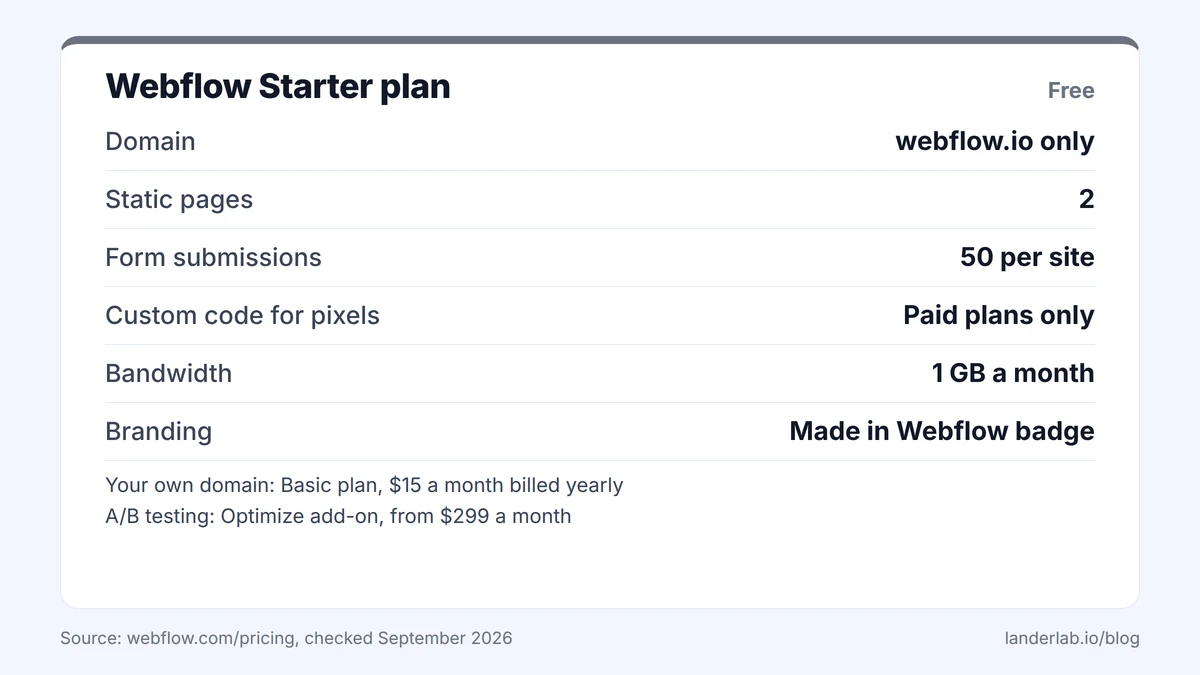
Your own domain starts at $15 a month billed yearly on the Basic plan. A/B testing (showing 2 versions of a page to see which converts better) is an add-on called Optimize, from $299 a month. The full Webflow pricing breakdown covers every tier.
1. LanderLab: truly free for paid campaigns
LanderLab is an AI landing page and quiz funnel builder made for paid traffic and lead generation. Of the top 5 free Webflow alternatives here, it is the only one that passes all 5 checks on its free plan.
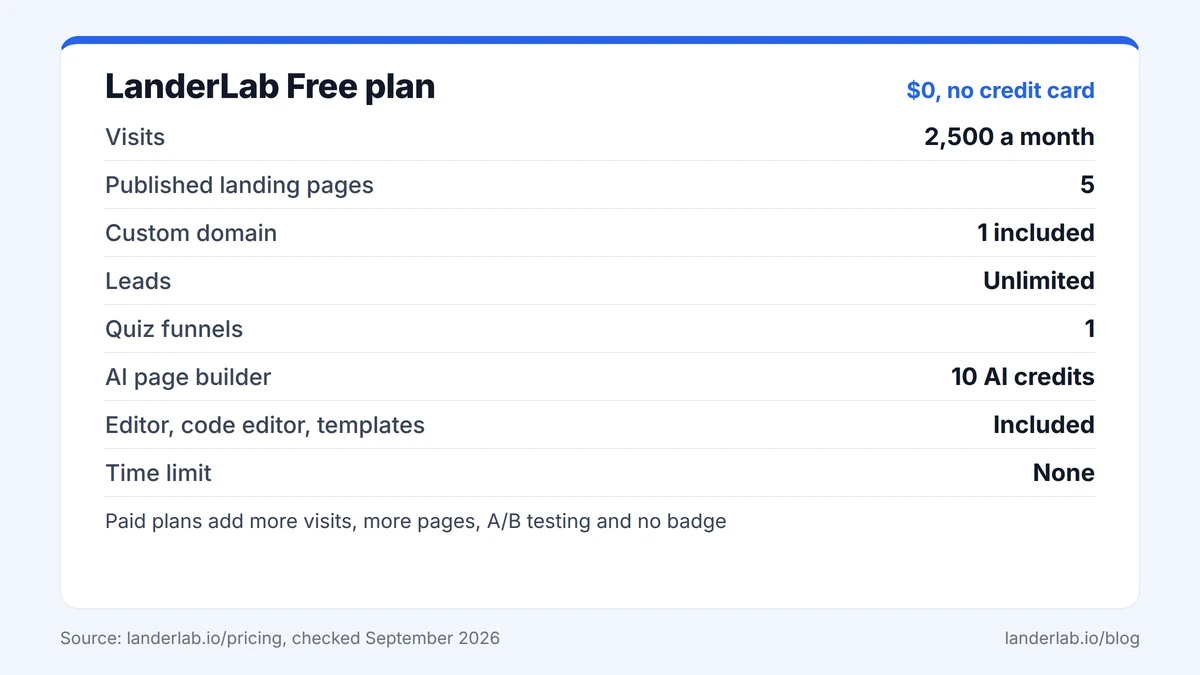
What you get for $0
- 2,500 visits a month
- 5 published landing pages
- 1 custom domain
- Unlimited leads, plus 1 lead integration to send them to your CRM or a webhook
- 1 quiz funnel (a multi-step form that qualifies leads before they submit)
- The AI page builder, with 10 AI credits, enough for about 5 AI-built pages
- The drag-and-drop editor, the code editor for your pixels and scripts, and the template library
- No credit card and no time limit
Templates built for the offers you run
The templates cover the formats affiliates and lead gen teams use every day. You get advertorials, listicles, lead gen pages and quiz funnels for offers like debt relief, auto insurance, solar, Medicare, sweepstakes and nutra.
LanderLab describes its landing page templates as built on proven layouts and conversion-focused copy. You can also import a page you already run, by URL or ZIP file, and edit it with AI.
How 2,500 free visits compare
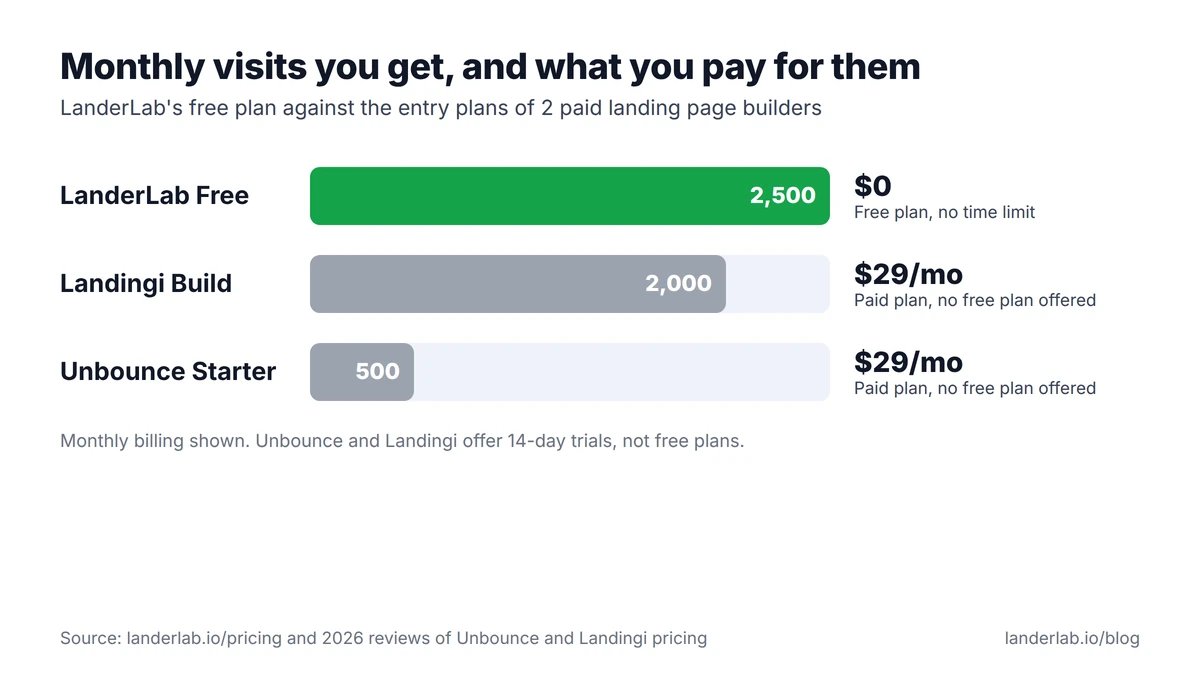
For a free plan, 2,500 visits a month is a lot. It is more traffic than some paid landing page builders include on their entry plans.
- Unbounce Starter: $29 a month for 500 visitors
- Landingi Build: $29 a month for 2,000 visits
Neither Unbounce nor Landingi has a free plan. Both offer a 14-day trial instead.
When you start paying
LanderLab charges you to grow, not to build. You upgrade when you need more traffic, more live pages, A/B testing or pages without the "Made with LanderLab" badge. For most media buyers, that is the month a campaign starts working.
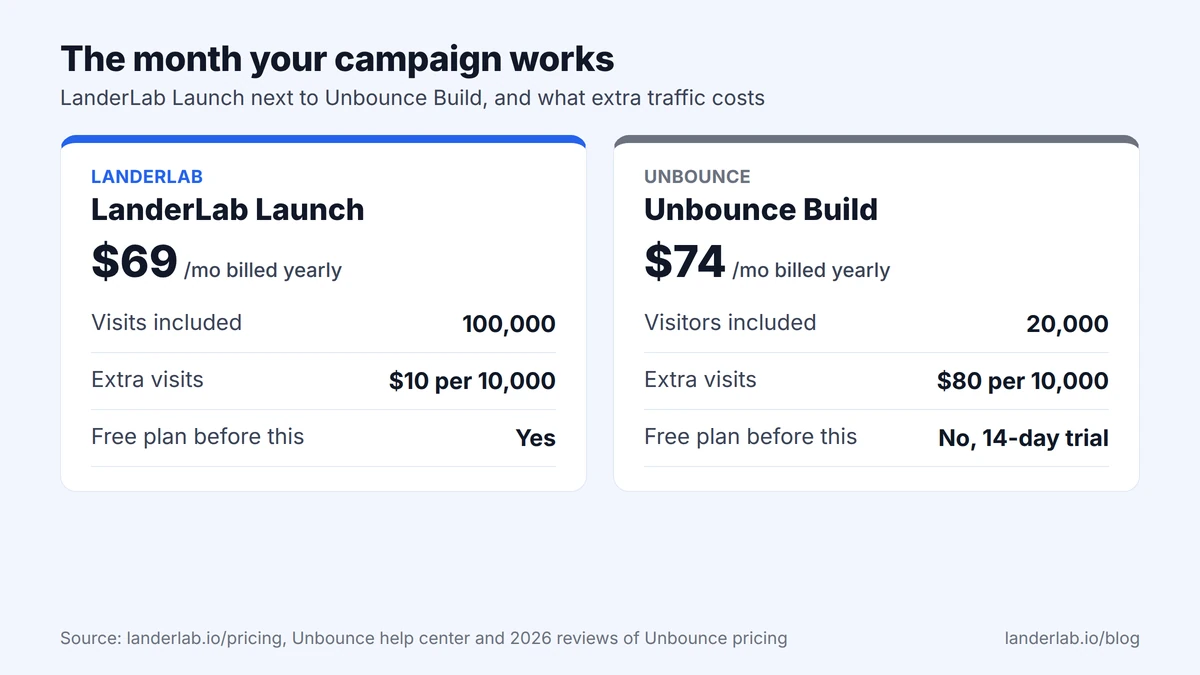
The first paid plan, Launch, costs $69 a month billed yearly and includes 100,000 visits. Unbounce's Build plan costs $74 a month billed yearly for 20,000 visitors.
Going over your limit costs less too. LanderLab charges $0.001 per extra visit on Launch, which is $10 per 10,000. Unbounce charges $80 per 10,000 extra visits, according to Unbounce's help center. See what each LanderLab plan includes.
The catch
- Free pages show a "Made with LanderLab" badge.
- 5 pages and 1 domain is a setup for testing, not for an agency.
- It is built for landing pages and funnels, not a large content site with a blog.
Truly free for paid ads? Yes.
2. Framer: free to design, paid to launch
Framer is the tool most Webflow users try first, and the design feel is close.
What you get free
Framer's pricing page lists:
- a Framer subdomain
- up to 1,000 pages and 10 CMS collections
- 1 GB of bandwidth a month
The catch
- Your own domain needs a paid plan, from $10 a month.
- Framer calls its free plan ideal for non-commercial use.
- Free sites show a "Made in Framer" badge.
Truly free for paid ads? No. You pay before your own domain works. The Framer pricing guide shows the costs once ad traffic arrives.
Launch your campaign free, on your own domain
2,500 visits, unlimited leads, the AI builder and your own domain. No credit card.
- Templates for affiliate and lead gen offers
- Code editor for your pixels
- Leads sent to your CRM or a webhook
3. Webstudio: free to build, open source
Webstudio is an open-source visual builder that styles pages with real CSS, much like Webflow.
What you get free
- unlimited projects and pages on a wstd.io subdomain
- 250 MB of asset storage and project export
- the option to self-host the builder for free
The catch
- Your own domain needs the Pro plan, at $15 a month billed yearly.
- Self-hosting means you run the servers and the updates.
- There is no one-click Webflow importer, so moving means a rebuild.
Truly free for paid ads? No, unless you self-host and handle the servers yourself.
4. WordPress: free with ads, or free software you host
WordPress gives you 2 free routes, and neither is free for a paid campaign.
WordPress.com free plan
Per the WordPress.com pricing page, you get a wordpress.com subdomain, 1 GB of storage and unlimited pages and posts. Visitors also see WordPress.com ads, you cannot use your own domain, and you cannot install plugins.
Self-hosted WordPress with Elementor
WordPress and the free Elementor plugin cost nothing to download, and you can use any domain. You pay for hosting and run updates yourself. Forms need Elementor Pro, which starts at $59 a year for one site.
Truly free for paid ads? No. One route puts ads on your page, and the other needs paid hosting.
5. Carrd: the cheapest upgrade
Carrd builds simple one-page sites.
What you get free
- up to 3 sites on carrd.co
- a small "Made with Carrd" badge on each one
The catch
- No forms and no custom domain on the free plan.
- Forms, widgets and custom domains start at Pro Standard, $19 a year, per Carrd's plan docs.
Truly free for paid ads? No, but $19 a year is the cheapest fix on this list.
Free Webflow alternatives side by side
Here is how the 5 free Webflow alternatives compare, with Webflow as a reference.
Tool | Own domain on the free plan | Main free-plan limit | Truly free for paid ads | Cheapest plan with your own domain |
|---|---|---|---|---|
Webflow (reference) | No | 2 pages, 50 form submissions | No | Basic, $15 a month billed yearly |
LanderLab | Yes, 1 domain | 2,500 visits, 5 pages | Yes | Free plan |
Framer | No | 1 GB bandwidth, badge | No | Basic, from $10 a month |
Webstudio | No | 250 MB asset storage | No | Pro, $15 a month billed yearly |
WordPress.com | No | WordPress.com ads on your pages | No | From $2.75 a month on 3-year billing |
WordPress + Elementor | Yes | You pay for hosting | No | Your hosting plan |
Carrd | No | No forms | No | Pro Standard, $19 a year |
Mistakes to avoid when you run ads on a free plan
Sending ads to a subdomain "just for the test"
If the test works, every ad and every link points at an address you will throw away. Start on the domain you plan to keep.
Launching without your pixel
Webflow's free plan has no custom code. On Carrd's free plan, widgets and embeds are paid. Check that your pixel fires before you spend a dollar, and see how to track quiz funnels with Google Tag Manager.
Forgetting the form cap
On Webflow's free plan, forms stop at 50 submissions per site. Before launch, submit a test lead and follow it all the way to your CRM or buyer. This guide to the lead generation form covers what to ask.
Judging price by the entry plan only
The bill that matters is the one in the month your campaign works. That is when overage fees show up. The Unbounce pricing breakdown shows how fast they add up.
Example of a $0 offer test
Here is how a media buyer might test a new offer for free. This is an example, not a case study.
- Pick the auto insurance quiz template in LanderLab, or generate a page from a short brief.
- Connect a spare domain and add your Meta pixel in the code editor.
- Send 1,500 clicks from a small ad test. That fits inside the 2,500 free visits.
- Send the leads to your buyer through your free lead integration.
If the offer works, you upgrade and start split testing. If it does not, you spent the ad budget and nothing on software.
FAQ
Is there a truly free Webflow alternative?
Of the free Webflow alternatives in this guide, only LanderLab passes every check on its free plan. You get your own domain, unlimited leads and 2,500 visits a month, with no time limit. The others need a paid plan, paid hosting or ads on your page before you can run a real campaign.
Does Webflow have a free plan?
Yes. The Starter plan is free with no time limit, but it has no custom domain, 2 static pages and 50 form submissions per site. Your own domain starts at $15 a month billed yearly on the Basic plan.
Can I add a Meta or TikTok pixel on a free plan?
On LanderLab's free plan, yes, through the code editor. Webflow's free plan does not include custom code. On Carrd's free plan, widgets and embeds need Pro Standard.
How many visits does LanderLab's free plan include?
2,500 a month. That is more than Unbounce's $29 Starter plan (500 visitors) and Landingi's $29 Build plan (2,000 visits).
What happens when my campaign outgrows the free plan?
You move to a paid plan. LanderLab's Launch plan costs $69 a month billed yearly for 100,000 visits, and extra visits cost $0.001 each.
What to do next
If you run paid ads, judge free Webflow alternatives by what they let you launch. Open a free LanderLab account, connect your domain, add your pixel and send your first clicks.
For paid tools as well, see the guide to the best landing page builders.
Start free, pay when your traffic grows
Free forever with 2,500 visits a month. Launch adds 100,000 visits when you need them.