Webflow vs Framer for Paid Ads: Which Fits, and What to Use Instead
Webflow and Framer are strong website builders, but paid traffic runs on pages, domains and tests. Here is what each one really costs a media buyer in 2026, and what to use instead.
The Webflow vs Framer question comes up in every media buying group sooner or later. Both tools make good-looking pages, both now build pages from a prompt, and both start under $20 a month.
For a brand website, either one is a solid pick. Paid traffic is a different job. You aren't building one site. You're building many pages, often on several domains, and changing them every week.
That difference decides the bill, the workload and who helps you when a pixel stops firing. This guide compares both tools on the things a media buyer actually pays for.
The short version
- Pick Webflow for a content-heavy website with a deep CMS (content management system), if you or a developer have time to learn it.
- Pick Framer for a polished marketing site built by a designer who already works in Figma.
- Pick neither for campaign pages. Both bill per site, sell A/B testing as an add-on, meter AI with credits and leave tracking code outside their support scope.
For ad traffic, a landing page builder priced on visits, like LanderLab, is usually the cheaper and faster fit.
Webflow vs Framer at a glance
Webflow | Framer | LanderLab | |
|---|---|---|---|
Built for | Content-rich websites with a CMS | Design-led marketing sites | Landing pages and quiz funnels for paid traffic |
Learning curve | Steep: classes, breakpoints, CMS setup | Easier, especially for Figma users | Prompt, template or import, then edit |
Entry paid plan | $15 a month per site (Basic) | $10 a month per site (Basic) | $69 a month per account (Launch) |
Priced by | Site, seat, bandwidth and add-ons | Site, editor, bandwidth and add-ons | Monthly visits across the account |
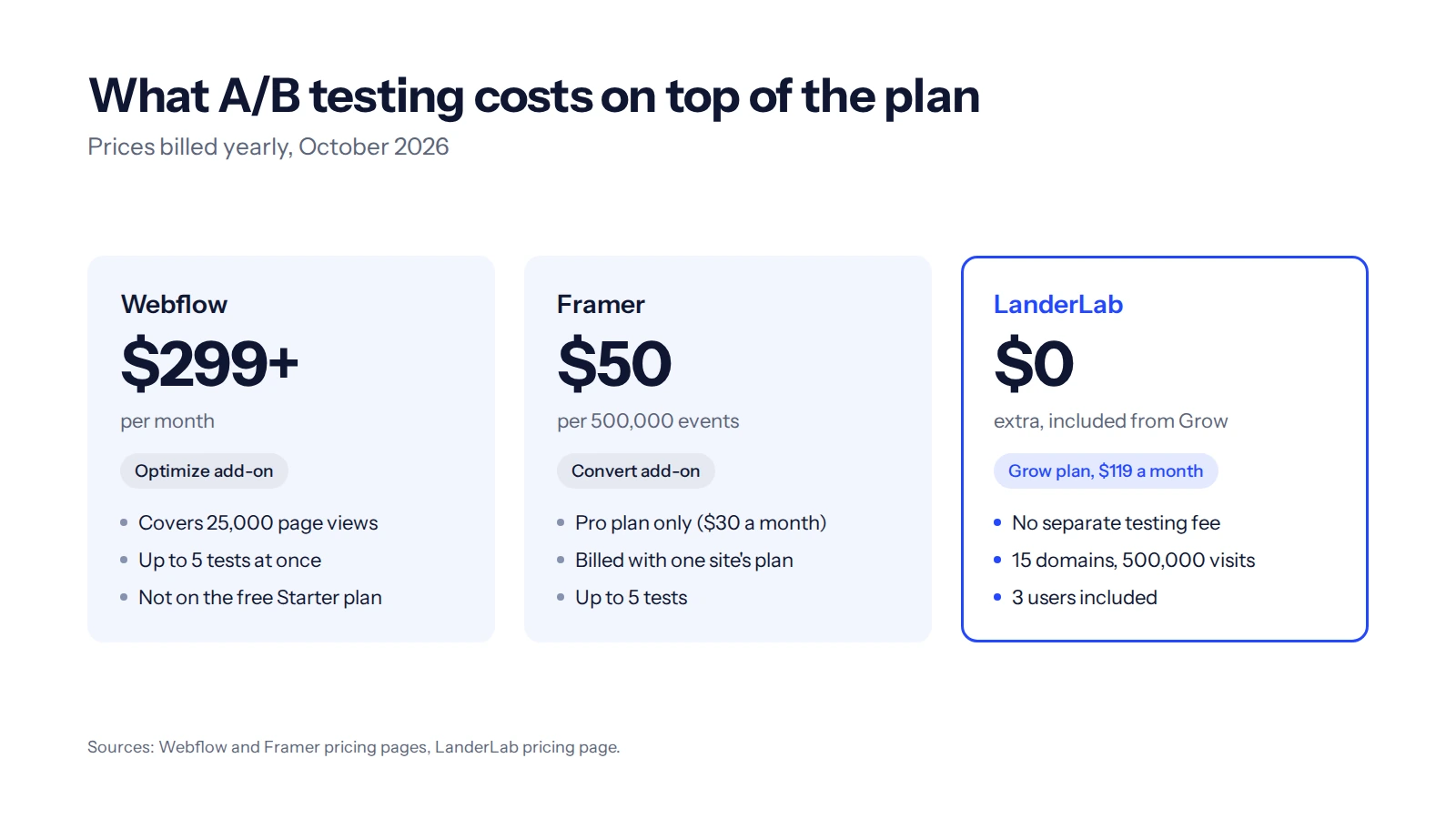
A/B testing | Optimize add-on, from $299 a month | Convert add-on on Pro, $50 per 500,000 events | Included from Grow ($119 a month) |
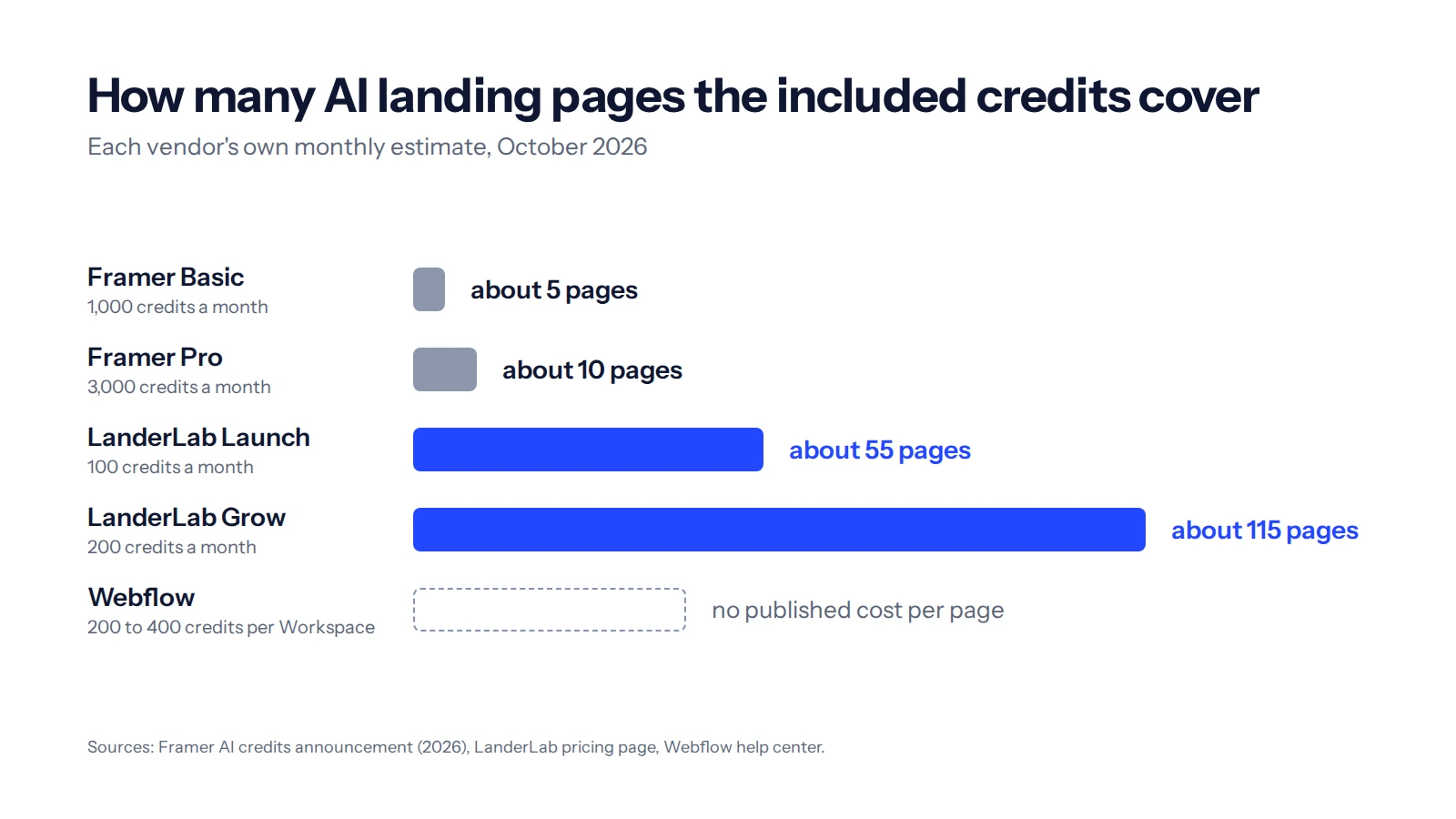
AI included | 200 to 400 credits a month per Workspace | 1,000 credits a month on Basic (about 5 AI pages) | 100 credits a month on Launch (about 55 AI pages) |
First support reply | Email, aims for 48 hours | Up to 72 hours (24 in the app) | Email on Launch, chat from Grow |
Help with tracking code | Outside support scope | Outside support scope | Native pixel, CAPI and tracker integrations |
Import an existing page | No | Figma paste or AI from a screenshot | URL, ZIP, Adplexity, Anstrex |
Prices are billed yearly and come from Webflow's pricing page, Framer's pricing page and LanderLab's own, all checked in October 2026. Monthly billing costs more on all three.
What Webflow and Framer are built for
Read the plan names and the answer is already there. Webflow describes Basic as a plan for simple sites without a CMS, and Premium as a plan for content-rich sites. Framer pitches Basic at personal sites and Pro at growing professional sites. The unit both companies sell is a website.
Paid traffic runs on a smaller unit, the page. One offer can need an advertorial, a quiz, 2 landers and a thank-you page. Many affiliates also keep each offer on its own domain, so one flagged domain doesn't take the others down.
The difference shows up in small details. On Webflow's Basic and Premium plans, publishing a static page republishes the whole site. Publishing one page on its own is a Team plan feature, and Team costs $2,500 a month on an annual contract. On Framer, a staging environment for checking changes before they go live starts on Pro.
Both are excellent at what they were designed for, which is a website with a brand, a CMS and a team behind it. Our guide to landing pages versus websites explains where the line sits for paid traffic.
Learning curve: Webflow is hard, Framer is easier for designers
Ease of use is where Webflow vs Framer opinions split the most, and the split follows one thing: whether you design for a living.
Webflow asks you to think like a front-end developer
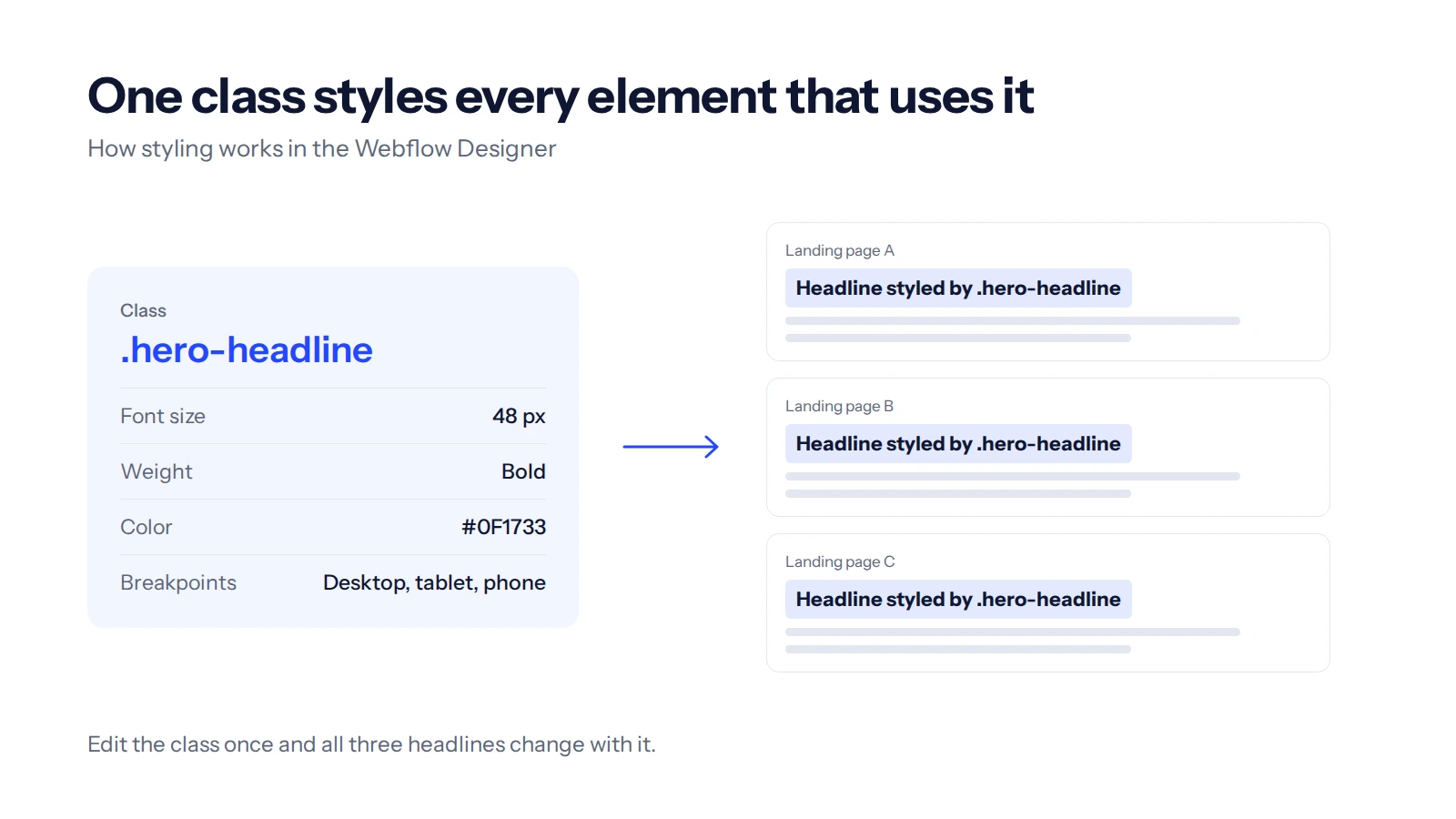
Webflow's Designer is built on real web concepts. You style with classes (reusable style rules), work with the box model (how margins and padding stack) and adjust layouts per breakpoint. That's why its output is clean. It's also why beginners struggle.
On G2, more than 100 Webflow reviews list the learning curve as a downside. Webflow runs a full course library, Webflow University, and sells a $100 certification exam for its own tool. That's great for a web designer. For someone whose real job is reading campaign data, it's a lot of homework.
Framer is easier if you already know Figma
Framer feels like a design tool because it is one. Framer pitches itself as Figma for live websites, and its Figma plugin lets you paste designs straight onto the canvas. Layouts use stacks, which work like auto layout in Figma.
If you design in Figma every day, you'll be quick. If you've never opened Figma, you're learning a design tool before you can ship a page. Framer is easier than Webflow, but it still rewards design skill.
LanderLab starts from a different place: a prompt, a template or a page you import. You then edit in a drag-and-drop editor, with a built-in code editor for the parts you want to change by hand.
The AI is metered, and heavy use costs extra
Both tools now build pages from a prompt. The catch is how many prompts you get before you pay again.
Webflow pools AI credits across a Workspace. The free Starter Workspace gets 200 a month, Core gets 300 and Growth gets 400. Extra credits cost $20 a month for 2,000, billed yearly.
Its help center says credit use is dynamic, with no fixed rate per action and no published rate card. You find out what a page cost after you've built it.
Framer is more open about it. Its AI credits announcement puts a landing page at about 300 credits on the default model. Basic includes 1,000 credits a month, which Framer itself equates to about 5 landing pages. Pro includes 3,000, or about 10. A heavier model costs 1.8 times as much per task.
To be fair, Framer refunds credits when you mark a result as bad. On paid traffic, though, 10 AI pages a month goes quickly. Every new angle is a page, and every variant is another one.
LanderLab charges 1.5 to 2 credits for a full AI page. Launch includes 100 credits a month, about 55 AI pages by LanderLab's count, and Grow includes 200, about 115. AI images are included, and AI edits work on imported pages too.
Extra LanderLab credits start at $49 for 150 a month, so heavy users still pay more. The included allowance just goes much further.
Webflow vs Framer on price: cheap on the page, expensive in practice
Framer's $10 and Webflow's $15 are real prices. They are only the first line of the bill.
The headline price assumes a yearly plan
Both pricing pages lead with yearly billing. Month to month, Webflow Basic is $25 and Premium is $39. Framer Basic is about $15 and Pro about $45. Webflow also states that if you cancel, you still pay the rest of the term. A test campaign that dies in 3 weeks can leave you paying for a year.
Every domain is a new plan
Both tools charge per site, so 5 offers on 5 domains means 5 site plans. Webflow also meters bandwidth per site. Basic includes 10 GB, which is roughly 6,600 views of a 1.5 MB page, and 2 months in a row over the limit triggers an automatic plan upgrade.
Framer lets you go over for 1 month, then asks you to upgrade. Its Basic plan also serves pages from 20 hosting locations, against 300 or more on Pro, which can matter for speed when your traffic comes from several countries.
Testing is a separate product
Webflow sells A/B testing inside Optimize, which starts at $299 a month for 25,000 page views and up to 5 tests at once.
Framer sells it as the Convert add-on, at $50 per 500,000 events. A page view, a tracked click or a tracked form submission each counts as 1 event. Convert needs the Pro plan and is billed with one site's plan.
LanderLab includes A/B testing on Grow, Scale and Enterprise, with no separate testing fee.
Seats add up
A teammate who builds pages costs $39 a month on Webflow (a full seat) and $20 a month on Framer (an editor seat). Content-only seats are cheaper, $15 on Webflow and $10 on Framer. LanderLab Grow includes 3 users.
What a real setup costs
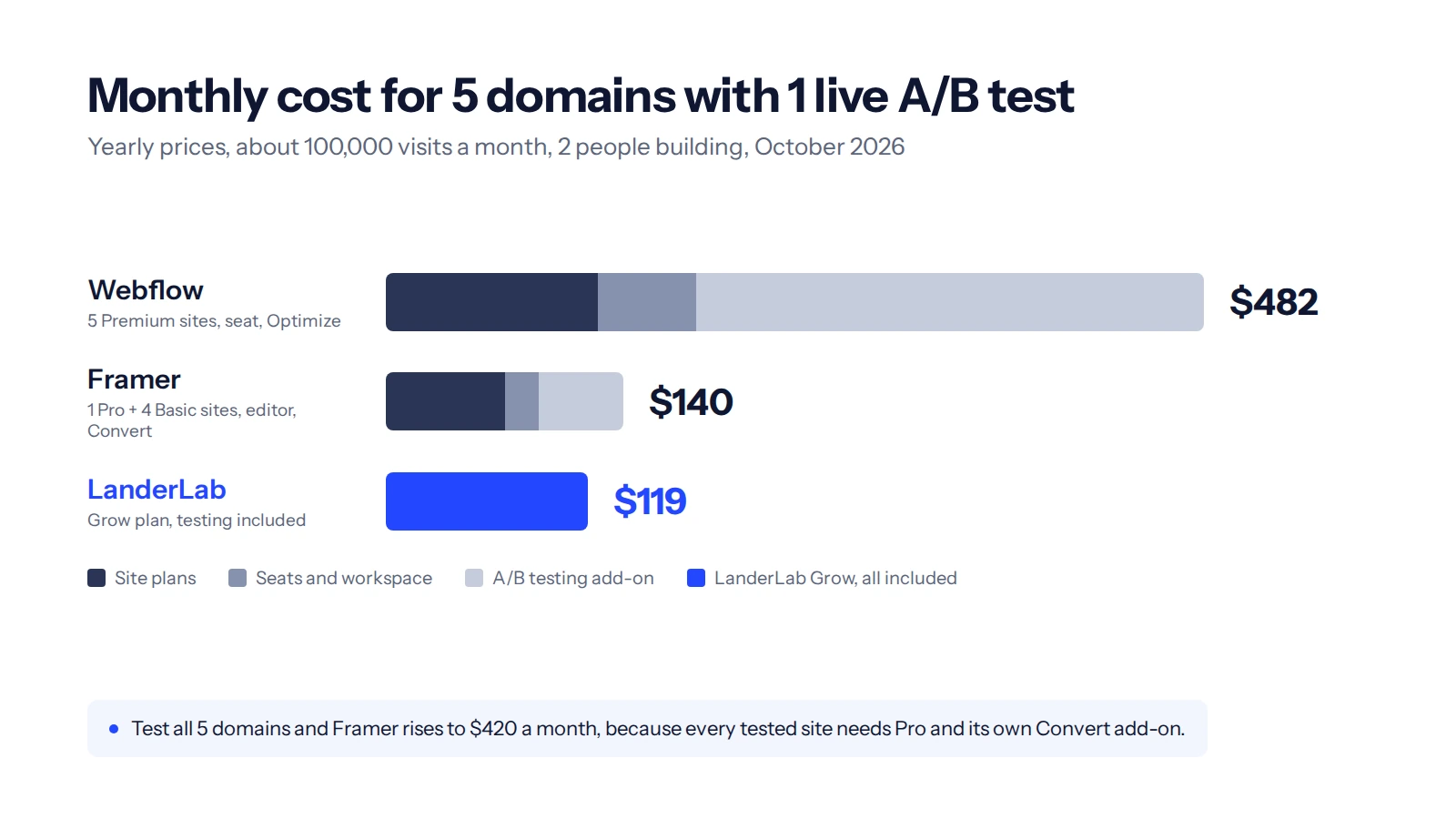
Take a common setup. You run 5 offers on 5 domains with about 100,000 visits a month in total. You have 2 people building pages and 1 A/B test on the offer you're scaling. The math below uses yearly prices and a 1.5 MB page.
- Webflow, about $482 a month. The 5 Premium plans cost $125, because 20,000 views per domain is about 30 GB, well over Basic's 10 GB. Add a Core Workspace ($19), 1 extra full seat ($39) and Optimize on the tested site ($299).
- Framer, about $140 a month. You need 1 Pro site for the test ($30), 4 Basic sites ($40), 1 extra editor ($20) and Convert ($50).
- LanderLab Grow, $119 a month. It covers 15 custom domains, 500,000 visits, 3 users and A/B testing.
Framer comes close in this setup, and that's worth saying plainly. The gap opens when you test on every domain. Each site then needs Pro and its own Convert add-on, which takes Framer to $420 a month.
Our Webflow pricing breakdown walks through every line of the Webflow bill.
The Framer pricing guide does the same for Framer, including the Scale plan Framer retired in 2026.
Test every domain on one plan
LanderLab Grow covers 15 custom domains, 500,000 visits and A/B testing for $119 a month, billed yearly.
- Pages and quiz funnels from one prompt
- Import pages by URL, ZIP or spy tool
- Leads sent straight to your buyer or CRM
Support: help desks vs help that knows your tracker
Support belongs in any Webflow vs Framer decision, because it's the cost you only see when something breaks. On paid traffic, that's rarely the design. It's a pixel that stopped firing, a postback (the server-to-server message that reports a conversion to your tracker) that never arrived, or a script that slows the page.
Both tools put that work outside their support scope. Webflow's support policy makes custom code, DNS and third-party integrations your responsibility. Its email support aims to reply within 48 hours, and priority support starts with the $2,500 Team plan.
Framer's help center gives up to 72 hours for a first reply on product questions, or up to 24 hours in the app. Its team doesn't help with code-related issues or third-party tools.
That's a fair policy for a website company. For a media buyer, though, the tracking code is the campaign.
LanderLab's support channel grows with the plan: email on Free and Launch, chat on Grow, Telegram on Scale, and Slack plus video calls on Enterprise. More of the tracking is built in as well. The Meta Pixel and Meta Conversions API (server-side tracking) connect natively, along with TikTok, Snapchat, Taboola and NewsBreak pixels.
Trackers like ClickFlare, RedTrack and Voluum, plus lead platforms like LeadProsper, LeadsPedia and Phonexa, connect through native integrations. LanderLab is also a sister product of TheOptimizer and ClickFlare, two tools built for media buyers.
Speed of change: where campaign work happens
Media buying is mostly editing. You copy what works, change the angle, launch a variant and kill the loser.
Webflow can't import an existing page. Its own FAQ says sites can only be built inside Webflow, and exported code can't be imported back.
Framer's import options center on Figma and on its AI agent, which can build a page from a screenshot. Webflow also retired Logic, its built-in automation tool, in June 2025, and points users to Zapier or Make instead.
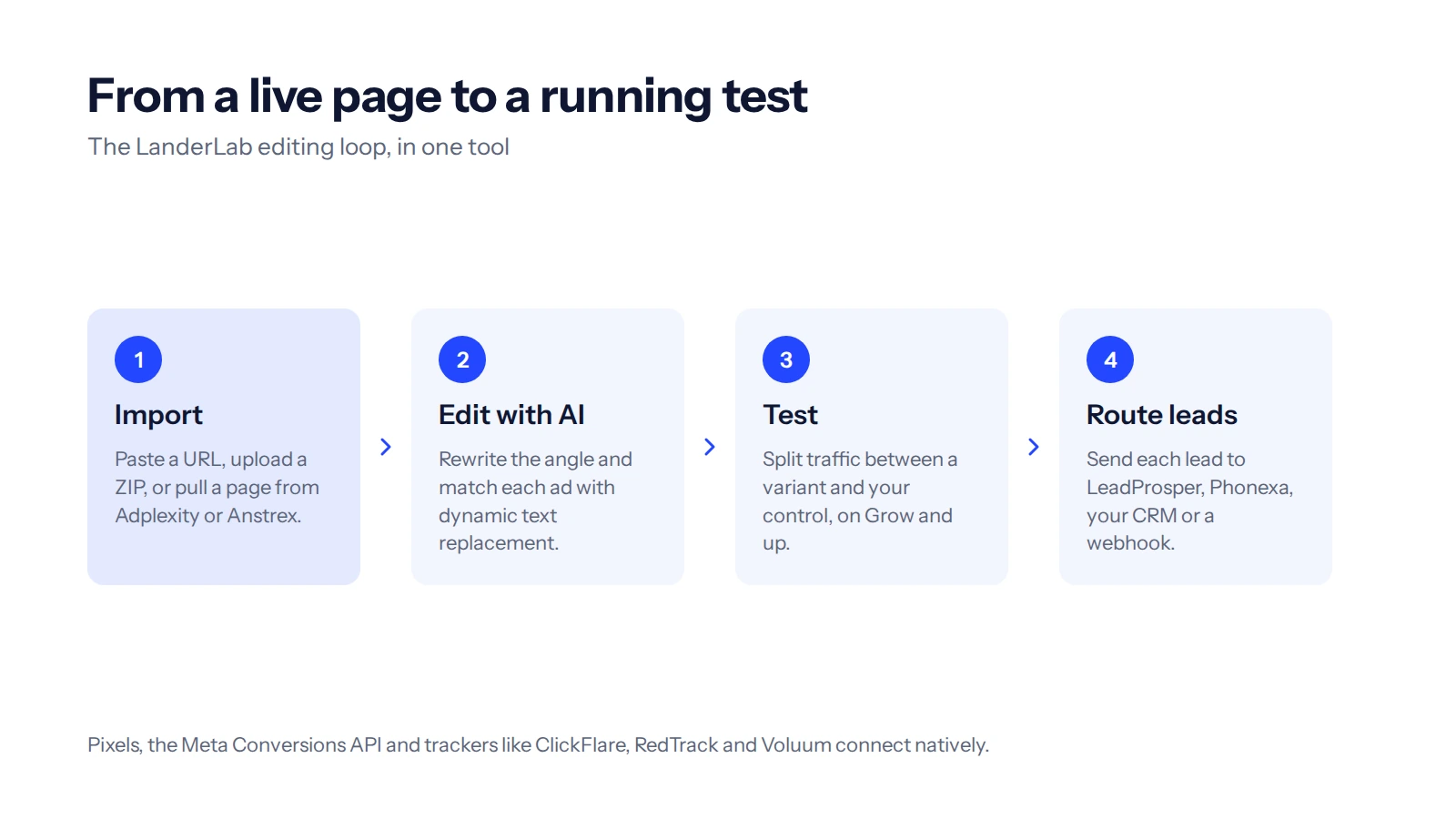
LanderLab is built around the editing loop:
- Import a page by URL or ZIP, or straight from spy tools like Adplexity and Anstrex, with the page importer.
- Edit with AI on imported pages, the same way as on pages built from scratch.
- Match the ad with dynamic text replacement, which swaps headline words to match the keyword or ad that sent the click.
- Test variants against your control on Grow and above.
- Route leads to your buyer, CRM or tracker as soon as the form is submitted, through a native integration or a webhook.
When Webflow or Framer is still the right call
A fair comparison needs this part, so here is where each tool wins.
- Webflow fits the website behind your campaigns, such as a blog, a resource library or a large content site. Premium includes a CMS with 20,000 items, and SEO control is one of Webflow's strongest areas.
- Framer fits when design quality and motion matter most and a designer owns the site. For a single offer on a single domain with no testing, Framer Basic at $10 a month is hard to beat.
- LanderLab fits campaign pages. It doesn't replace your company website, and it isn't a CMS. You can run both, a website builder for the brand and a landing page builder for the ads.
FAQ
Is Webflow or Framer better for landing pages?
For a single landing page on a single domain, Framer is quicker to learn and cheaper to start, at $10 a month billed yearly. Webflow suits landing pages that sit inside a bigger website with a CMS. For paid traffic across several domains with regular tests, a builder priced on visits usually costs less than either.
Is Framer easier to learn than Webflow?
For most people, yes. Framer works much like Figma, so designers feel at home quickly. Webflow uses web concepts like classes and breakpoints, and more than 100 G2 reviews mention its learning curve. Neither is built for someone with no design experience.
Do Webflow and Framer include A/B testing?
Not in their base plans. Webflow sells testing in its Optimize add-on, from $299 a month. Framer sells it in the Convert add-on, at $50 per 500,000 events, and only on the Pro plan.
Webflow vs Framer: which AI costs less?
Framer publishes its costs: about 300 credits per landing page, with 1,000 credits a month on Basic and 3,000 on Pro. Webflow includes 200 to 400 credits a month per Workspace and sells 2,000 more for $20 a month, but it doesn't publish a cost per action.
Can I run affiliate offers on several domains with Webflow or Framer?
Yes, but each domain needs its own site plan, so 5 domains means 5 plans. On Framer, every domain you want to test also needs Pro and its own Convert add-on.
What is a good alternative to Webflow and Framer for paid ads?
A landing page builder priced on traffic instead of sites. LanderLab Grow covers 15 domains, 500,000 visits and A/B testing for $119 a month billed yearly. The free plan includes 2,500 visits a month, 5 published pages and 1 custom domain.
The bottom line
The Webflow vs Framer choice matters for your brand site. For the pages your ads point to, count your domains, your tests and the people who edit pages, then price each tool against that number. If campaigns are the work, start on LanderLab's free plan and move one live offer over to compare.
Price your pages on visits, not sites
Start on the free plan and move one live offer over when the numbers make sense.