5 Best Quiz Makers for Lead Generation [2026 Review]
Quiz funnels have become one of the most effective tools for lead generation in a modern marketer’s toolkit. Choosing the best quiz funnel software can make a big difference in how effectively you capture and qualify leads online. Instead of sending visitors to a single-step form, you guide them thr

Quiz funnels have become one of the most effective tools for lead generation in a modern marketer’s toolkit.
Choosing the best quiz funnel software can make a big difference in how effectively you capture and qualify leads online.
Instead of sending visitors to a single-step form, you guide them through a brief interactive scenario. A few questions, a personalized result, and lead information captured.
Engagement goes up and, hopefully, leads and quality, too. Sales teams spend less time sifting through unqualified prospects.
But actually building these funnels? It has traditionally been pretty time-consuming.
Designing the pages, writing the questions, configuring conditional logic for different answers, and connecting everything to your CRM used to be time-consuming.
That is changing pretty fast, though. AI-powered quiz funnel builders can now handle much of this automatically, but, of course, not all these tools are created equally.
Some are specifically built for lead generation funnels, while others are primarily form builders that just happen to also offer quiz functionality.
To cut through the noise, we built the same quiz funnel on five popular platforms and evaluated each based on the quality of AI generation, the conditional logic, and lead capture.
TL;DR – Best Quiz Funnel Software Compared
| Tool | Best For | Key Strength | AI Builder | Starting Price |
|---|---|---|---|---|
| ⭐LanderLab Best Overall |
AI landing pages & quiz funnels | Generate funnels from a single prompt | Yes | $89/mo |
| Typeform | Conversational forms | Excellent user experience | Yes | $79/mo |
| Jotform | Flexible forms | Huge template library | Yes | Free / $39+ |
| Heyflow | Lead funnels | Visual funnel builder | No | €59/mo |
| Perspective | Mobile-first funnels | Conversational funnel design | Limited | €59/mo |
Our Testing Methodology
To make the comparison fair, every platform was tested with the same funnel: a simulated auto insurance quote flow.
The funnel included:
- Step 1 – Start screen: A headline inviting users to check how much they could save on car insurance
- Step 2 – Qualification question: Users select their car brand (Mercedes, Volvo, BMW, or Honda)
- Step 3 – Conditional logic: BMW selections route to a disqualification message; all others continue
- Step 4 – Follow-up question: Users enter the year their car was manufactured
- Step 5 – Lead capture: Users provide their email to receive a quote
This lets us evaluate AI generation quality, conditional branching, multi-step funnel building, UI design, and overall flexibility.
The 5 Best Quiz Funnel Builders for Lead Generation
1) LanderLab – Best Overall for Lead Generation Funnels
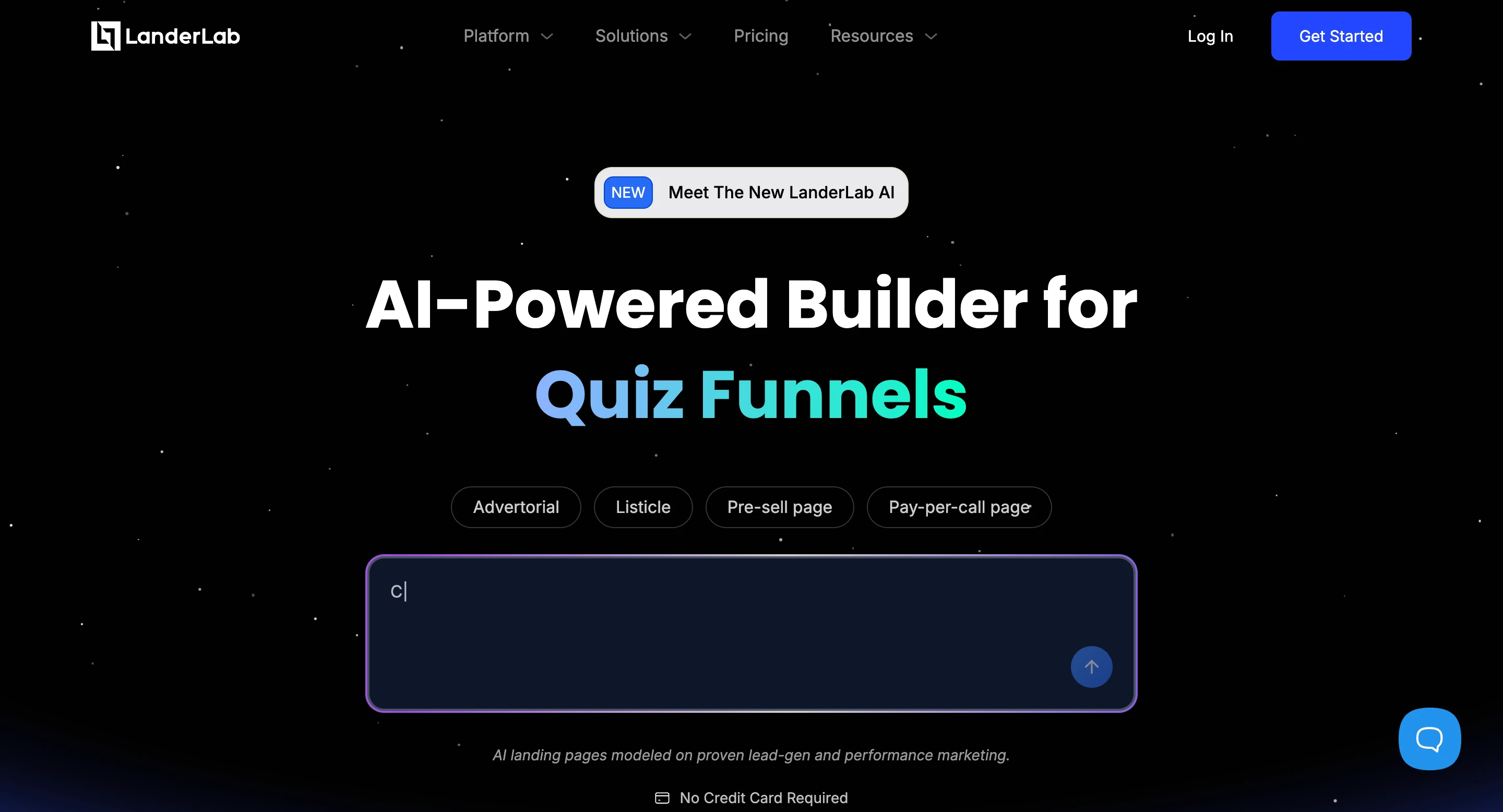
LanderLab takes a different approach compared to most quiz builders in this category.
Instead of asking users to manually assemble questions, logic, and pages, it can generate an entire quiz funnel from a single prompt.
To test this, we asked the AI assistant to create an auto insurance savings quiz funnel.
The prompt described a simple lead-generation flow: ask visitors about their vehicle and apply conditional logic to disqualify them if BMW is selected.
Within seconds, the platform generated a complete funnel.
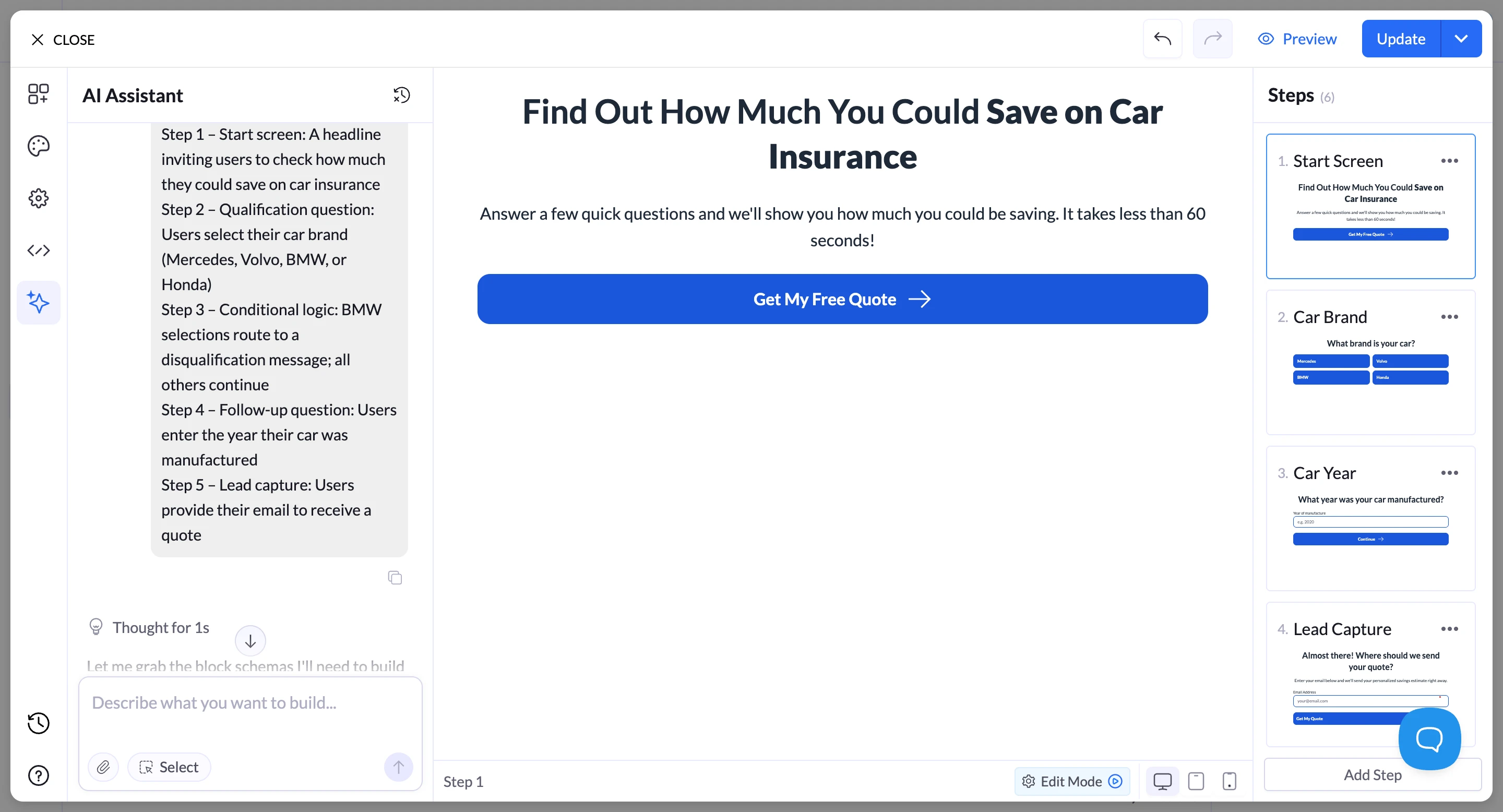
The AI automatically created:
- a quiz start screen inviting users to check how much they could save on car insurance
- a qualification step asking for the vehicle brand
- follow-up questions, such as the vehicle year
- a lead capture step requesting the user’s email
The entire funnel was structured as a multi-step quiz, a common approach in lead generation campaigns because it keeps users engaged while gradually qualifying them.
Conditional Logic
When users select BMW as their car brand, the funnel automatically routes them to a disqualification message explaining that quotes for BMW vehicles are not available.
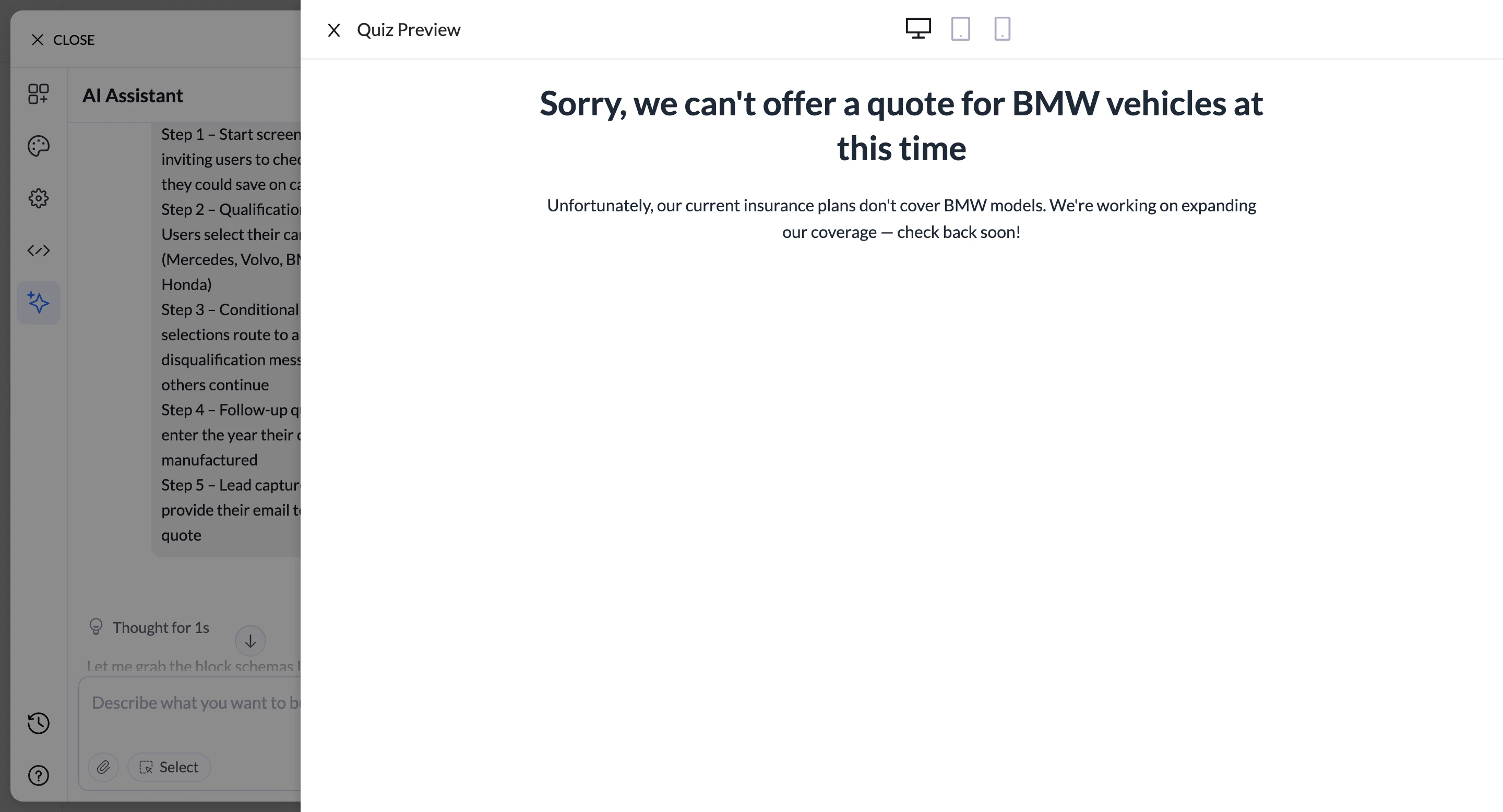
All other vehicle brands continued to the next step of the funnel.
This type of conditional routing is commonly used in lead generation campaigns to filter traffic before it reaches sales teams.
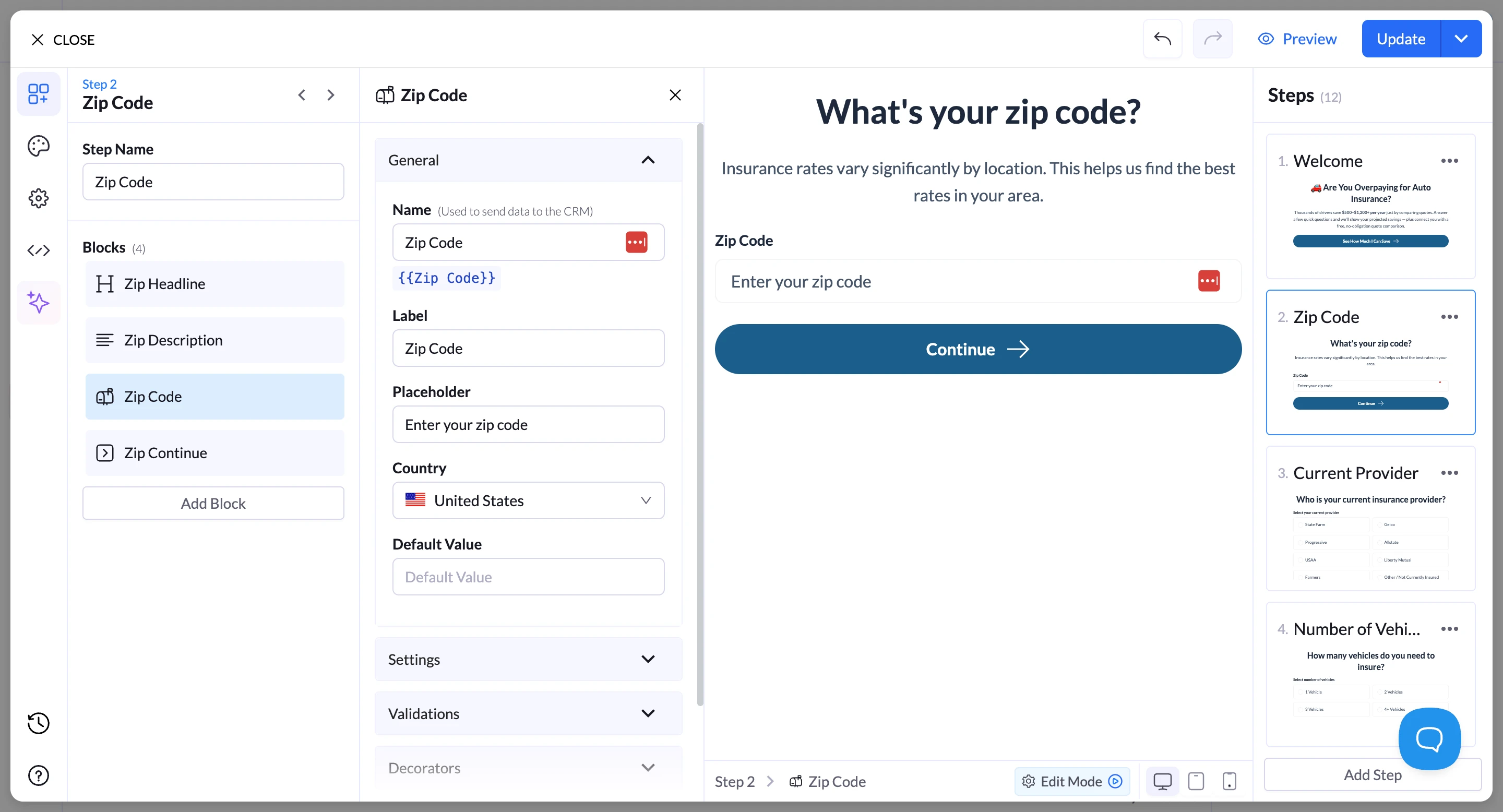
Editing the Funnel
After the funnel was generated, the visual editor allowed quick adjustments.
Questions could be modified, steps could be reordered, and the copy could be refined directly inside the builder. Instead of starting from scratch, the AI provided a working framework that could be customized.
Why This Matters
For teams running lead generation campaigns, the biggest advantage is speed.
Instead of spending hours assembling forms, pages, and logic rules, marketers can generate a working funnel, adjust the details, and launch campaigns much faster.
That makes LanderLab particularly useful for industries where new campaigns need to be tested frequently, such as insurance, finance, solar, or home services.
Lead Management, Insights, and Integrations
Once a visitor completes the quiz, the captured data is automatically stored in the leads section inside LanderLab.
Instead of collecting only contact details, the platform records every response throughout the quiz funnel. This allows marketers to see exactly how each lead answered qualification questions and what type of customer they represent.
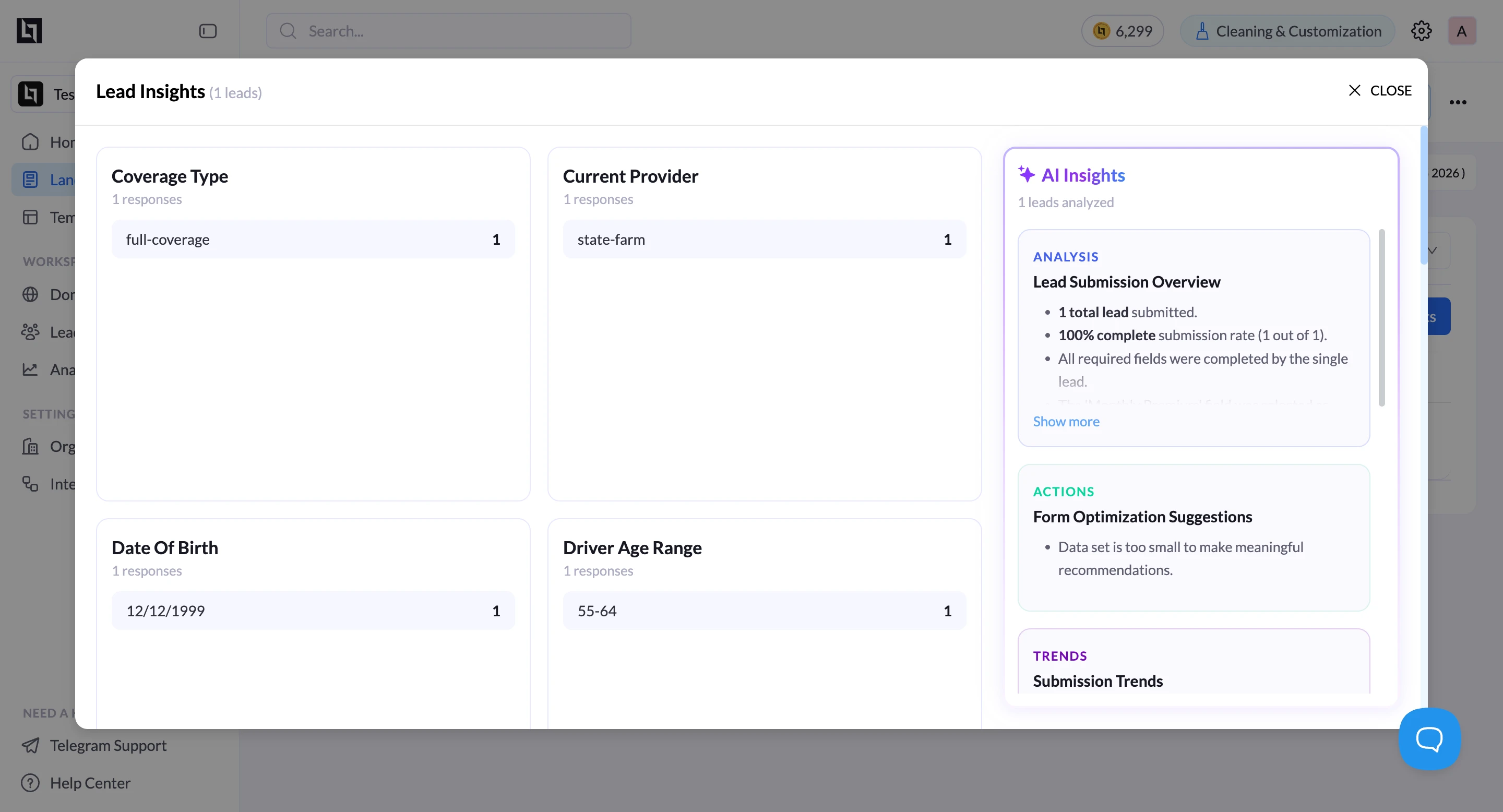
For example, in the insurance funnel test we created, the system tracked responses such as:
- coverage type selected
- current insurance provider
- driver age range
- date of birth
- Other qualification answers submitted during the quiz
All of this data appears inside the Lead Insights dashboard, where responses are automatically grouped and summarized.
This view makes it easier to understand how users are interacting with the funnel. Marketers can quickly identify patterns such as the most common coverage types selected, the insurance providers’ leads currently used, or the demographic segments submitting the most responses.
LanderLab also provides AI-generated insights based on the collected lead data. The system can summarize submission trends, highlight completion rates, and surface early observations about how users are filling out the funnel.
Beyond internal analysis, captured leads can also be connected to external tools through integrations.
This allows responses to flow directly into CRM platforms, email marketing tools, or automation workflows for follow-up campaigns and lead management, such as LeadsPedia, Phonexa, LeadsProsper, etc.
Because quiz answers, lead details, and insights are stored together in one dashboard, teams can quickly move from lead capture to analysis and follow-up without needing additional software.
When creating a new funnel in LanderLab, users can start in several ways.
How Funnels Are Created in LanderLab
Funnels can be generated directly with the AI assistant by describing the campaign in a prompt, or they can be started from scratch or using a template, depending on the workflow.
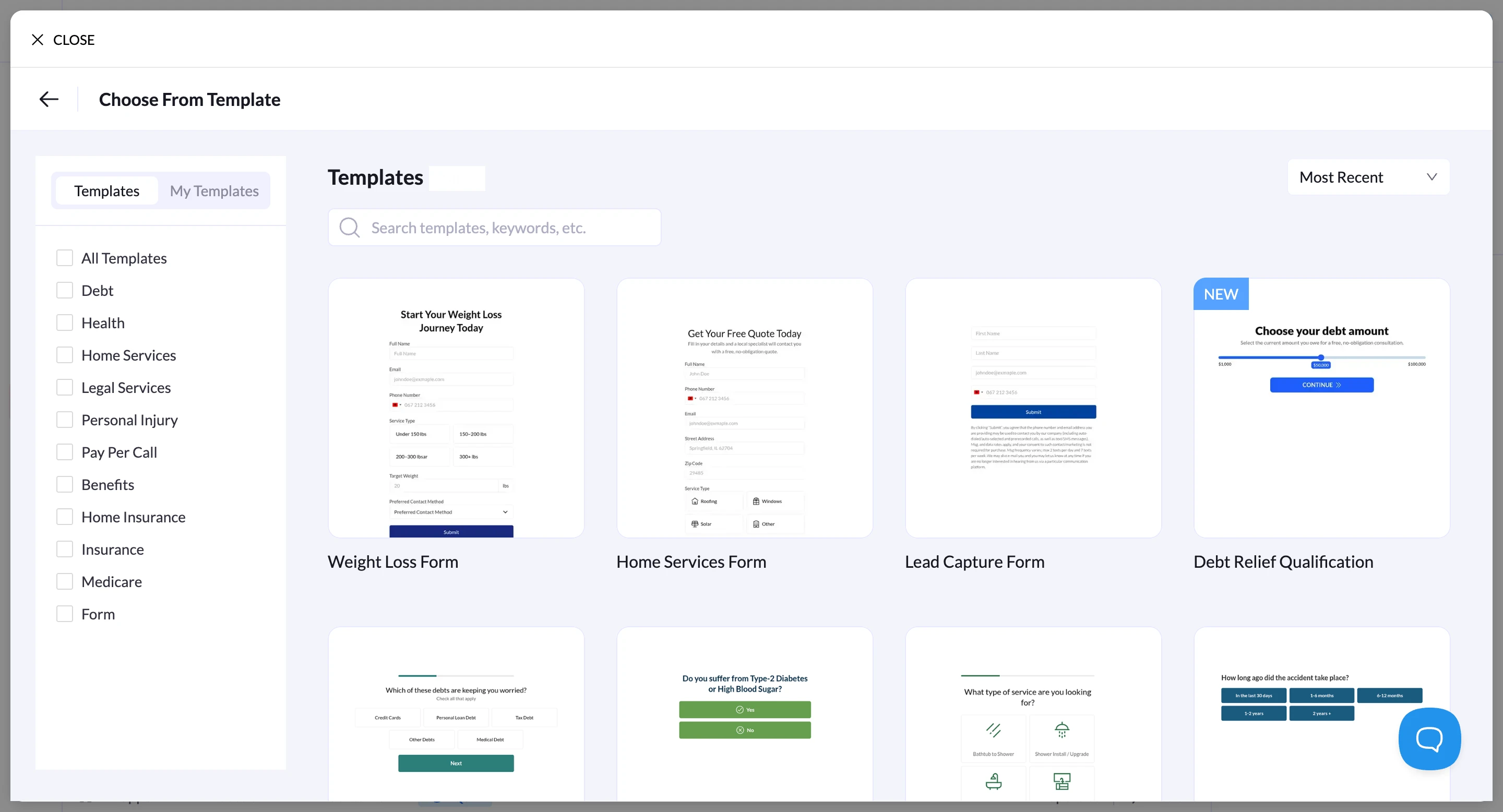
Templates are organized by common lead-generation use cases, such as insurance, pay-per-call, home services, and financial offers.
This makes it easy to start with a pre-built funnel structure and adjust the questions, design, and qualification logic as needed.
For teams that prefer more control, the builder also lets you create funnels from scratch.
Pages and quiz steps can be added one by one, with full control over the layout, question types, and conditional routing between steps.
This flexibility means campaigns can either be generated quickly with AI or built manually when more customization is required.
The “Apple” of page builders – Outstanding support team
“The latest update made LanderLab one of the most competitive tools I’ve used. Whether you’re running direct response campaigns or building a simple website to showcase your B2B services, the platform is packed with templates, AI features, and tools that save a significant amount of time.
What impressed me the most is the team and the support. Being able to reach them on Telegram is extremely convenient, and they are responsive and dedicated to helping users succeed. They even helped import all of my funnels from my previous tool.”
• Verified User Review – Trustpilot
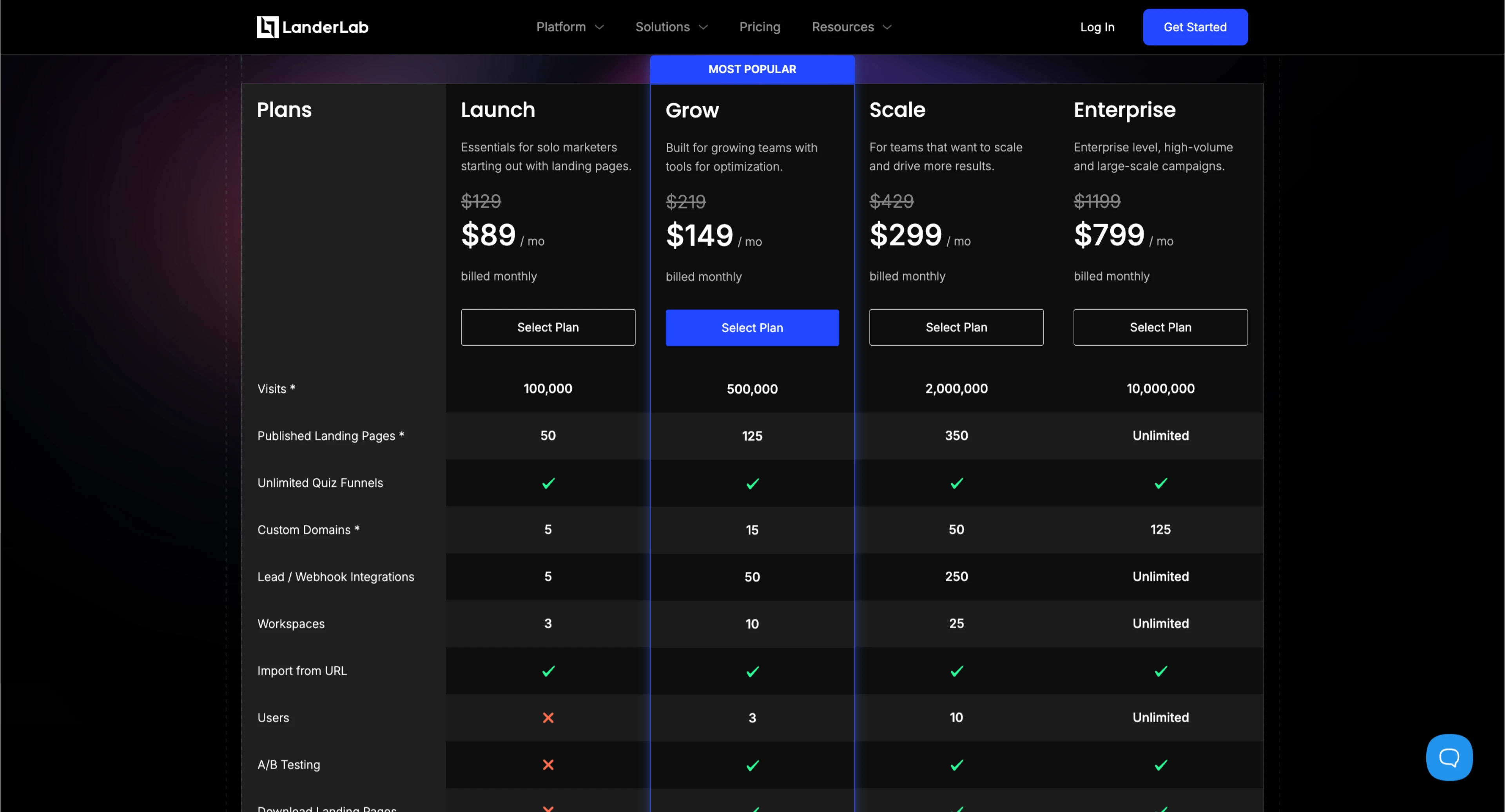
LanderLab Pricing
Pros
- AI can generate complete quiz funnels and landing pages from a single prompt
- Conditional logic and funnel structure are created automatically, saving setup time
- Built specifically for lead generation and performance marketing funnels
- Built-in A/B testing, lead tracking, and analytics
- Built-in CRM for managing leads
- Custom domain hosting included
- AI image generation and Unsplash integration are available directly in the builder
- Fast workflow for launching campaigns quickly
Cons
- May feel more performance-marketing focused compared to general-purpose form builders
- Teams looking only for simple forms may not need the full funnel functionality
2) Heyflow
Heyflow is a no-code builder designed to create multi-step forms and interactive lead funnels.
When creating a new flow, users can either start from scratch or choose a template.
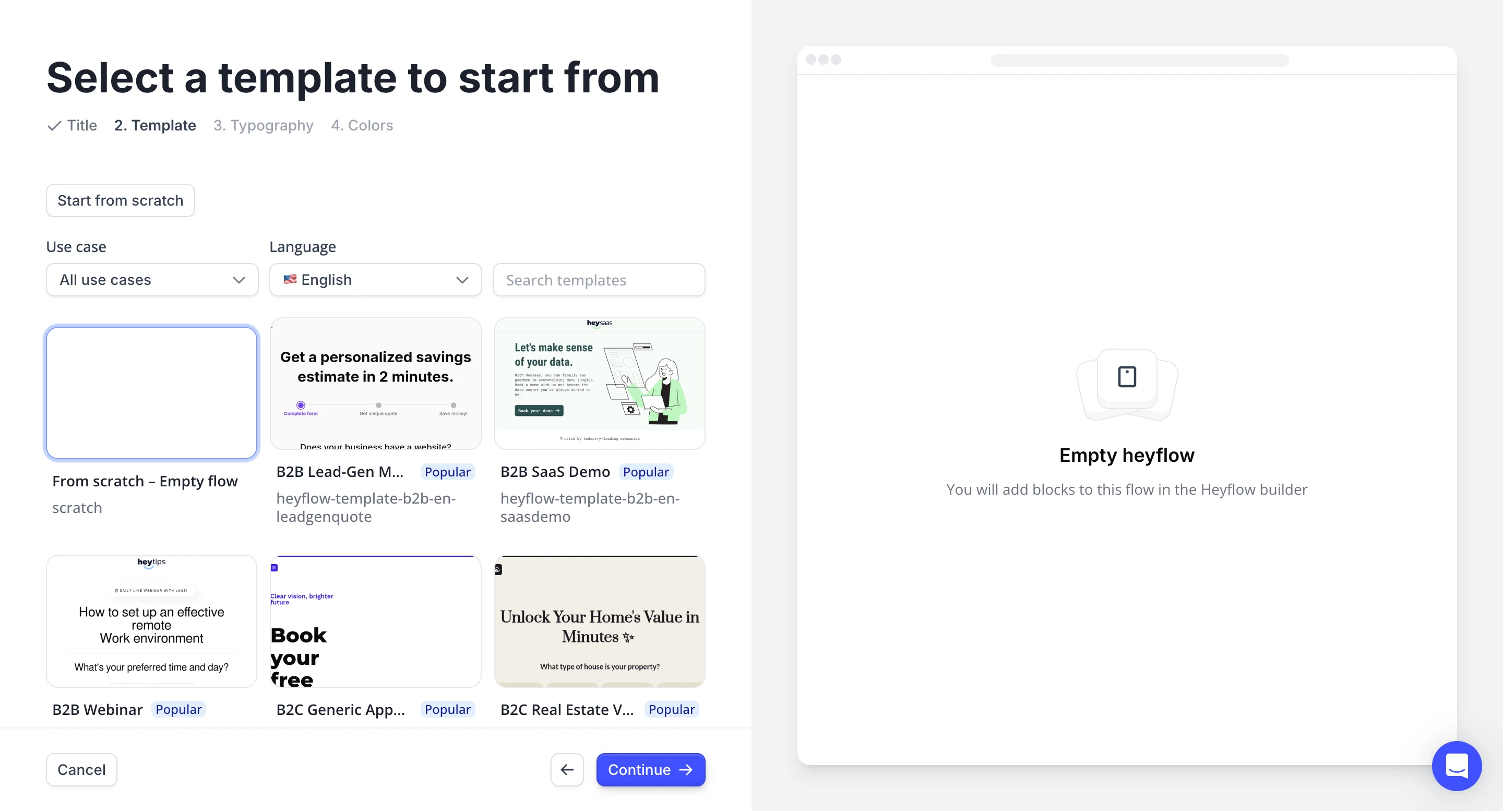
The templates are based on different use cases such as B2B lead generation, SaaS demos, or webinar registrations.
The setup process allows for basic customization, too, things like selecting typography and brand colors before entering the editor.
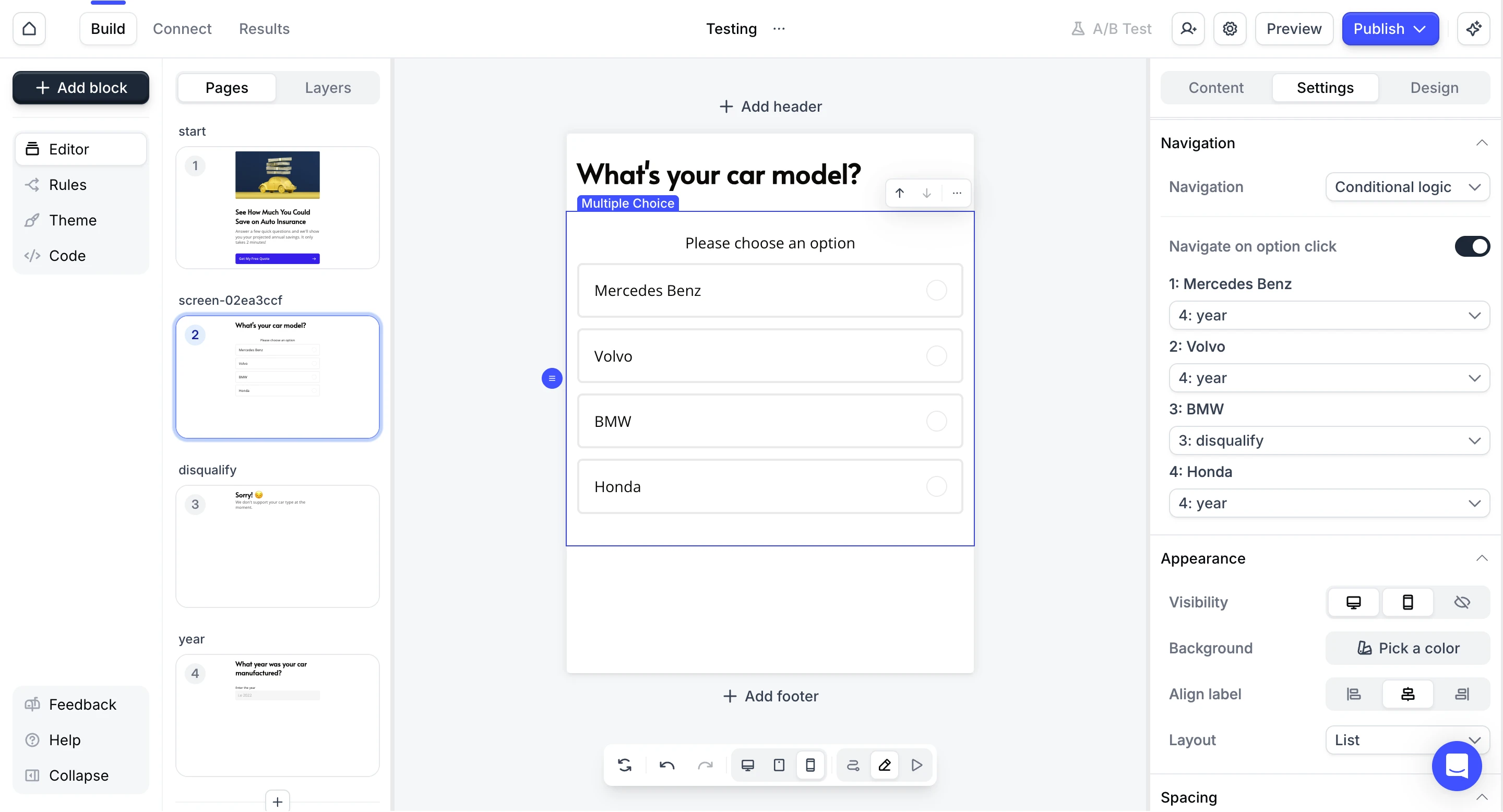
Inside the builder funnels, these are structured as individual screens that represent each step of the user journey.
In our test, we created a simple lead qualification flow that included a start screen with a call-to-action, a question asking for the car brand, a disqualification screen for unsupported options, and a follow-up question asking for the vehicle year.

Heyflow supports conditional logic, and that allows different answers to route users to different screens.
For example, when BMW was selected in our test, users were redirected to a disqualification message, while the other options proceeded to the next step of the funnel.
One thing we noticed during testing is that the entire flow must be built manually.
Unlike other Heyflow alternatives that can generate quizzes with AI, they require users to create each step, question, and routing rule individually, which makes the setup process slower, especially when building more complex funnels.
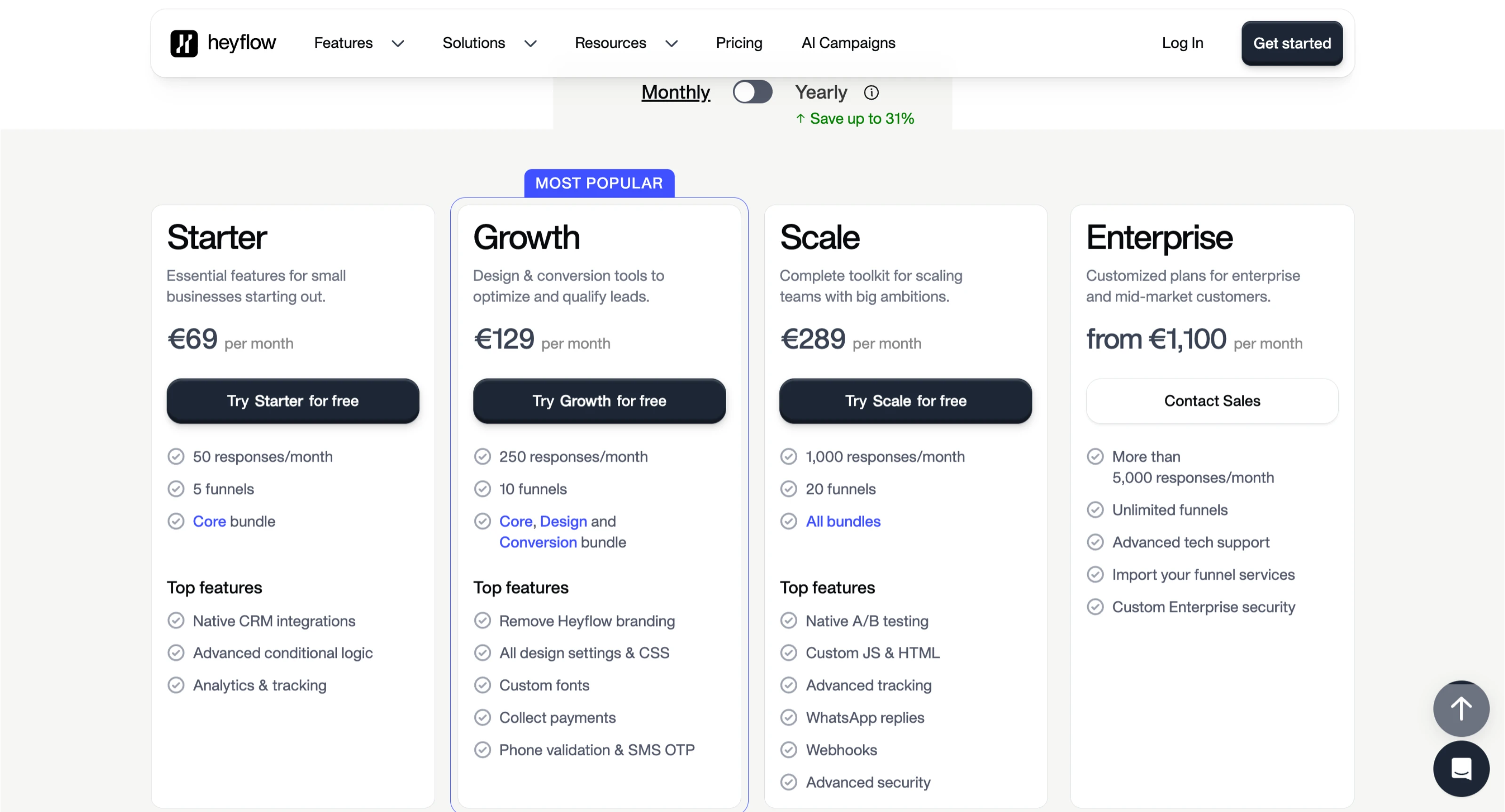
Heyflow Pricing
Another downside is pricing: while the builder itself is flexible, costs can increase quickly as projects scale, particularly for teams running multiple funnels or higher-traffic campaigns. It is something to think about.
“We started using Heyflow for lead generation funnels, but the pricing model became a problem very quickly. Since plans are tied to visitor volume, our costs climbed to over $500/month sooner than expected. On top of that, support availability felt limited when we needed help. For teams running paid traffic, this kind of pricing structure can make scaling campaigns much more expensive than anticipated.”
• Verified User Review • Trustpilot
Looking for a better Heyflow alternative?
Try LanderLab to build AI-generated landing pages and quiz funnels, launch campaigns faster, and run A/B tests without paying crazy overages.
Pros
- Clean and modern visual builder
- Easy to create multi-step forms and interactive funnels
- Flexible conditional logic routing between steps
- Good template selection for common lead generation use cases
- Intuitive drag-and-drop interface
Cons
- No AI generation for funnels or quiz structures
- Funnels must be built step by step manually.
- Pricing can increase quickly as usage scales
3) Perspective
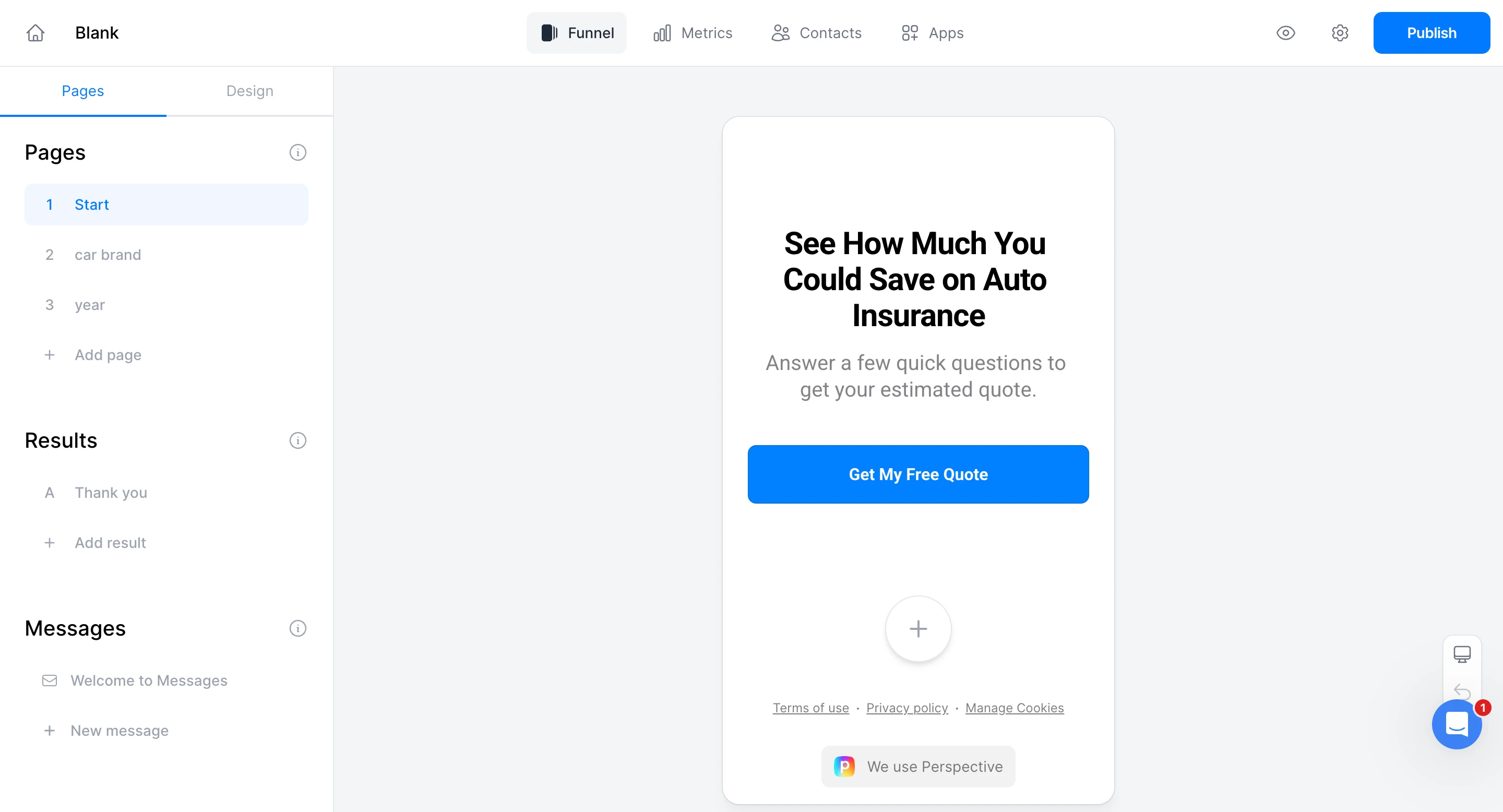
Perspective is positioning itself as a pretty modern tool for building interactive quiz funnels and conversational lead forms, too.
From the start, the platform walks users through a fairly structured onboarding process before you even begin building your funnel, which makes the experience feel guided and polished, though it also means that getting started can take longer than with builders that let you jump directly into the editor.
Perspective also provides a large library of templates, which makes it easier for users to get started quickly without building every step of the funnel from scratch.
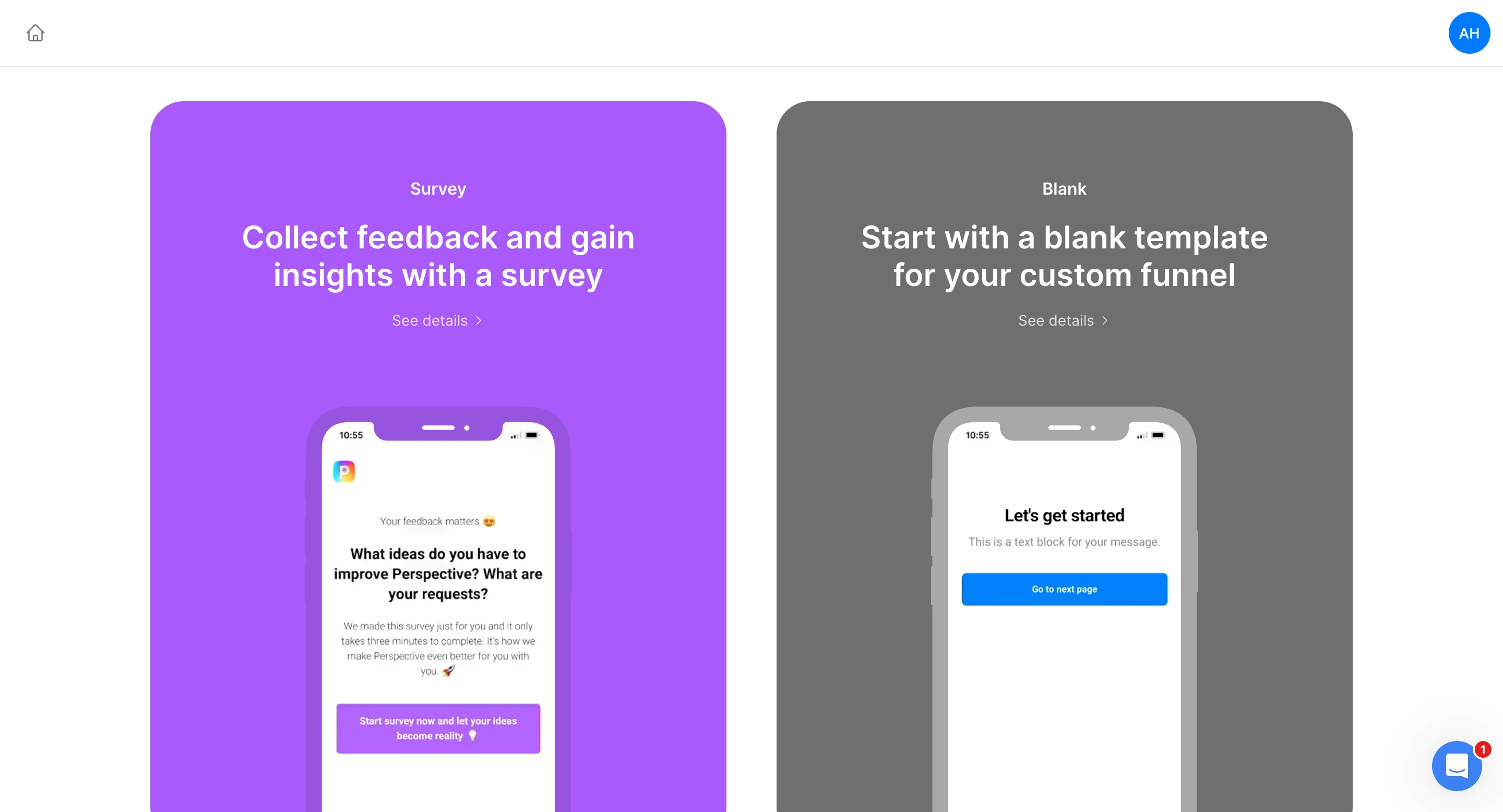
Once inside the builder, the interface is clean and kind of intuitive.
Perspective focuses heavily on conversational-style flows, where users move through a sequence of questions, and are designed to feel more like a dialogue than a traditional form.
This approach works especially well for personality-style quizzes, product recommendation flows, and lightweight lead qualification funnels. It is a solid approach.
The overall product feels refined and thoughtfully designed, though maybe a little too “clean” and limited for some.
For teams creating interactive experiences or marketing quizzes, Perspective provides a smooth and visually appealing way to build those flows; it is hard to argue against that.
Perspective Pricing
When it comes to scaling campaigns, pricing can become a consideration.
Perspective’s plans are structured around the number of live funnels and feature tiers, meaning teams running multiple campaigns may need to move to higher plans relatively quickly.
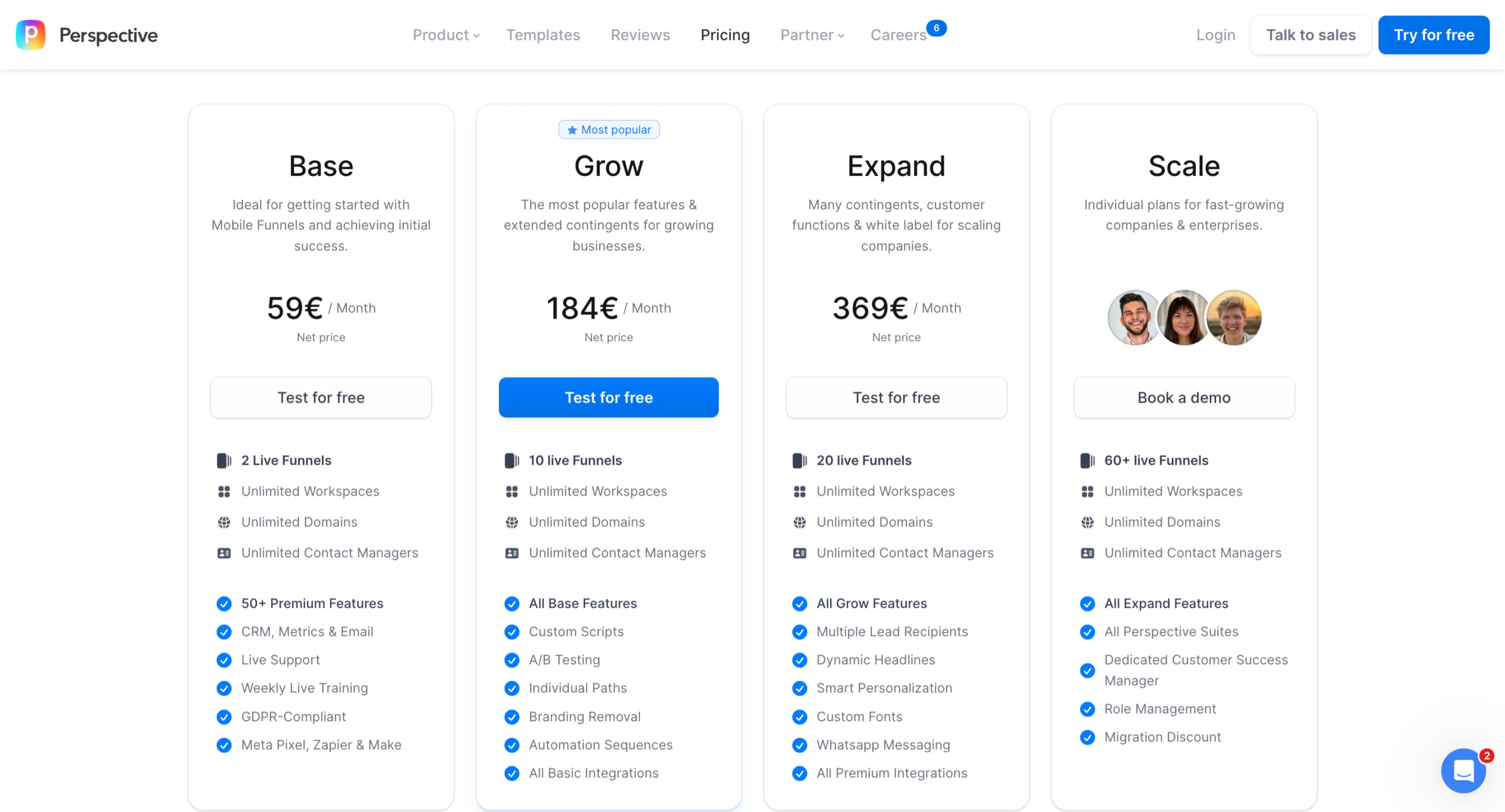
For marketers running paid acquisition campaigns or higher-volume funnels, this pricing structure can make scaling more expensive over time, so it’s important to review the plan limits carefully.
Conditional Logic
During testing, setting up conditional logic took some trial and error at first.
While the interface itself is clean, understanding how the routing rules connect between steps requires some manual configuration before the flow behaves exactly as expected.
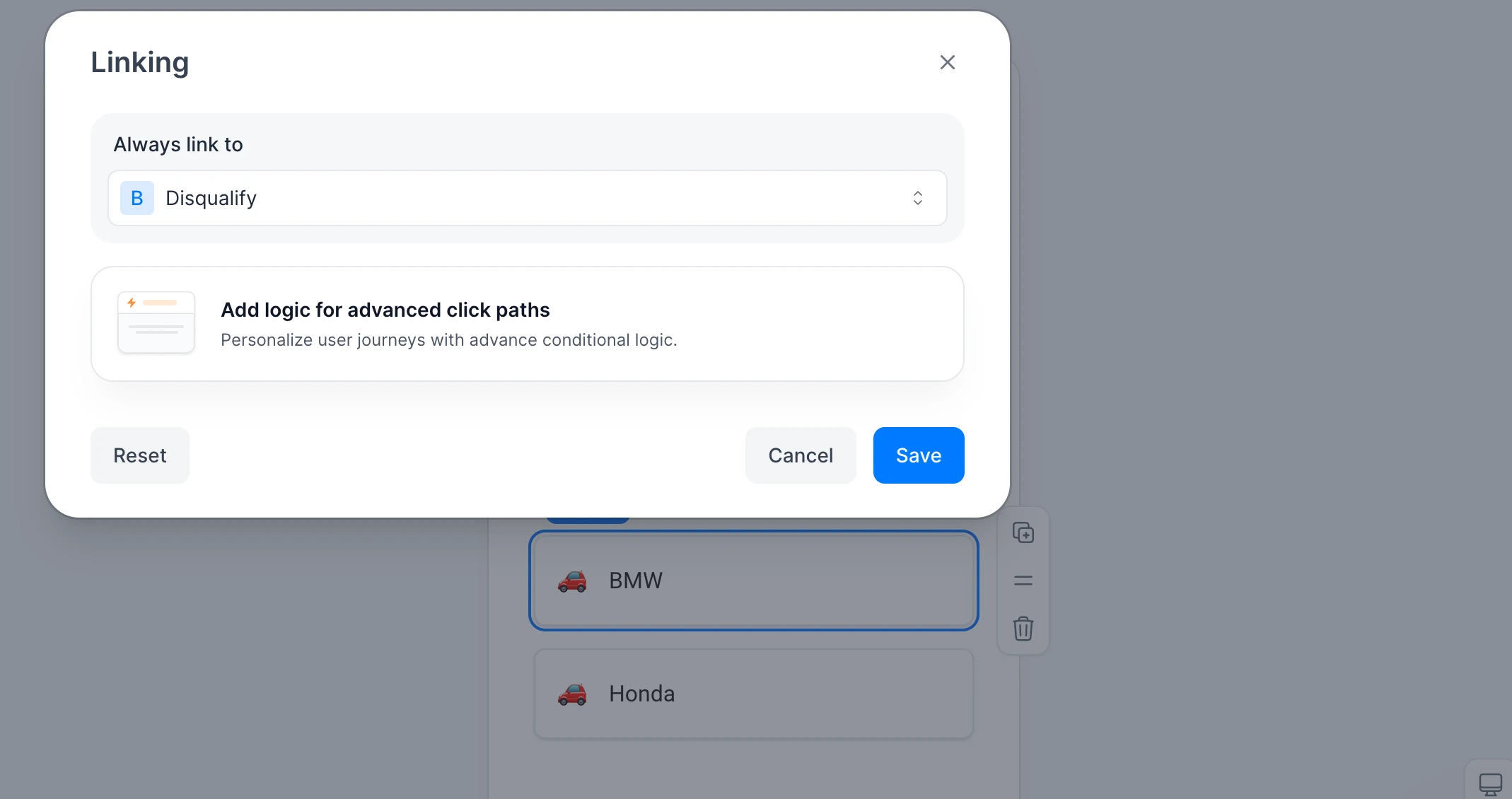
Another limitation we noticed is that some advanced linking and logic options are not fully accessible during the trial period. This makes it harder to properly test more complex funnel behavior before committing to a paid plan.
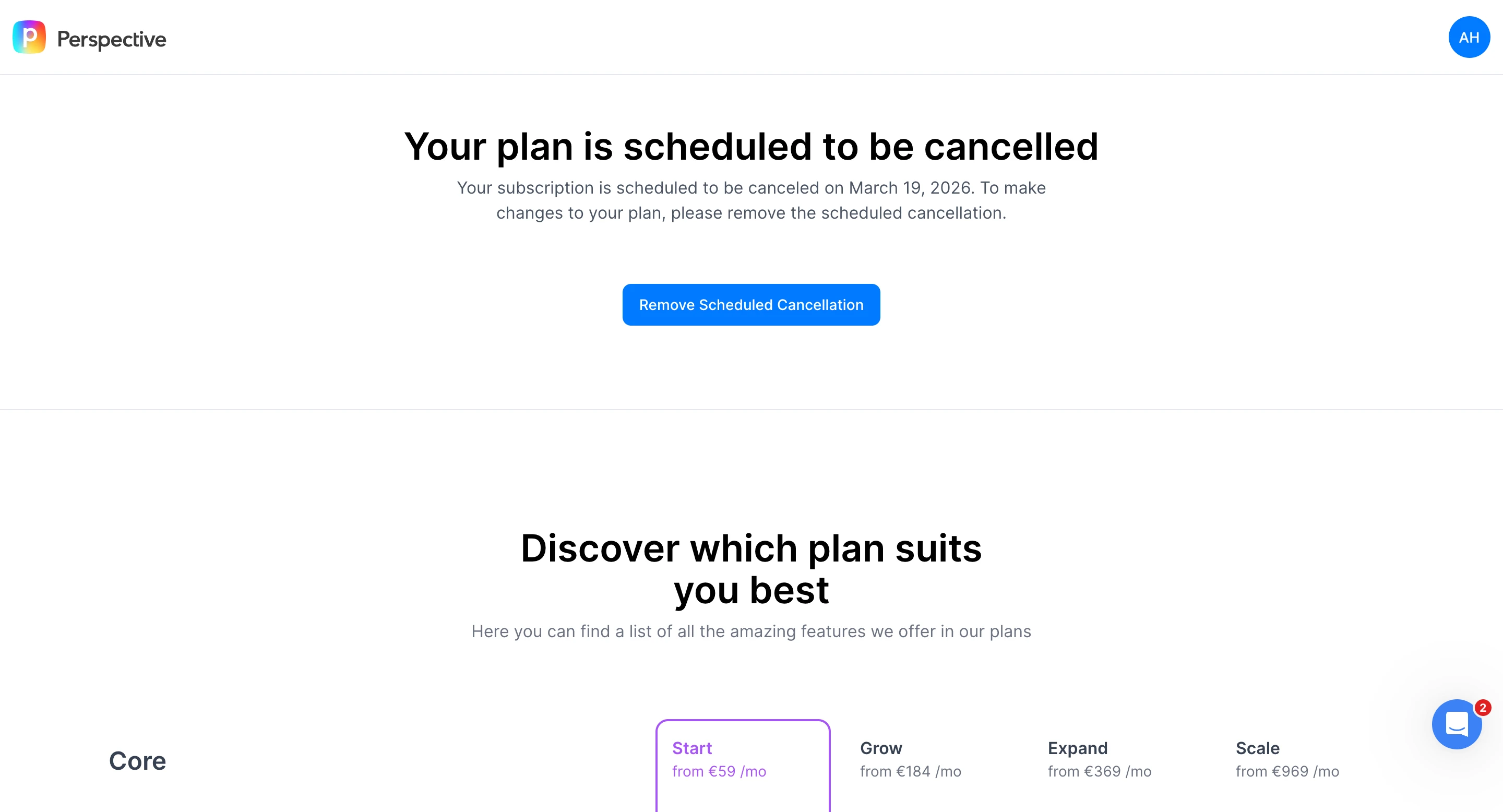
For teams building simple conversational quizzes, this may not be a major issue, but marketers running lead-generation funnels with multiple qualification paths will likely want to spend some time experimenting with the logic settings to ensure everything works correctly.
User feedback on pricing limitations
Some users report frustration with the platform’s pricing tiers and feature limits, noting that capabilities such as API access, higher lead limits, and exporting contacts often require upgrading to higher plans. For teams running more advanced funnels or integrations, these additional upgrades can increase costs relatively quickly.
• User feedback from Trustpilot reviews
Pros
- The interface is clean, which makes building those conversational funnels actually kind of straightforward. So that is a plus.
- There is a large template library too, helping users to get started pretty quickly, which is nice, and can save a lot of time
- The design flexibility seems good for creating visually engaging funnels.
- Structured onboarding also helps new users understand the builder, which is helpful, of course.
Cons
- Setting up conditional logic sometimes requires trial and error. Especially when configuring routing between the steps.
- Some of the more advanced linking and funnel logic features cannot be fully tested during the trial period before you have to pay. Cannot really get a full sense of it before committing.
- Pricing scales quickly as campaigns grow, and the more features are needed, the costs go up accordingly.
- Certain capabilities, such as API access, higher lead limits, and exports, require upgrading to higher-priced plans.
- Likely better suited to lighter quiz-type funnels than to high-volume lead-generation campaigns; it is not really built for heavy-duty stuff.
4) Typeform
Typeform is definitely a well-known name when it comes to creating forms and quizzes that feel more like a conversation. Their thing is showing one question at a time, which makes it feel more engaging compared to just filling out a regular old form.
If you’re exploring different options, you can also check our guide on the best Typeform alternatives.
Getting Started
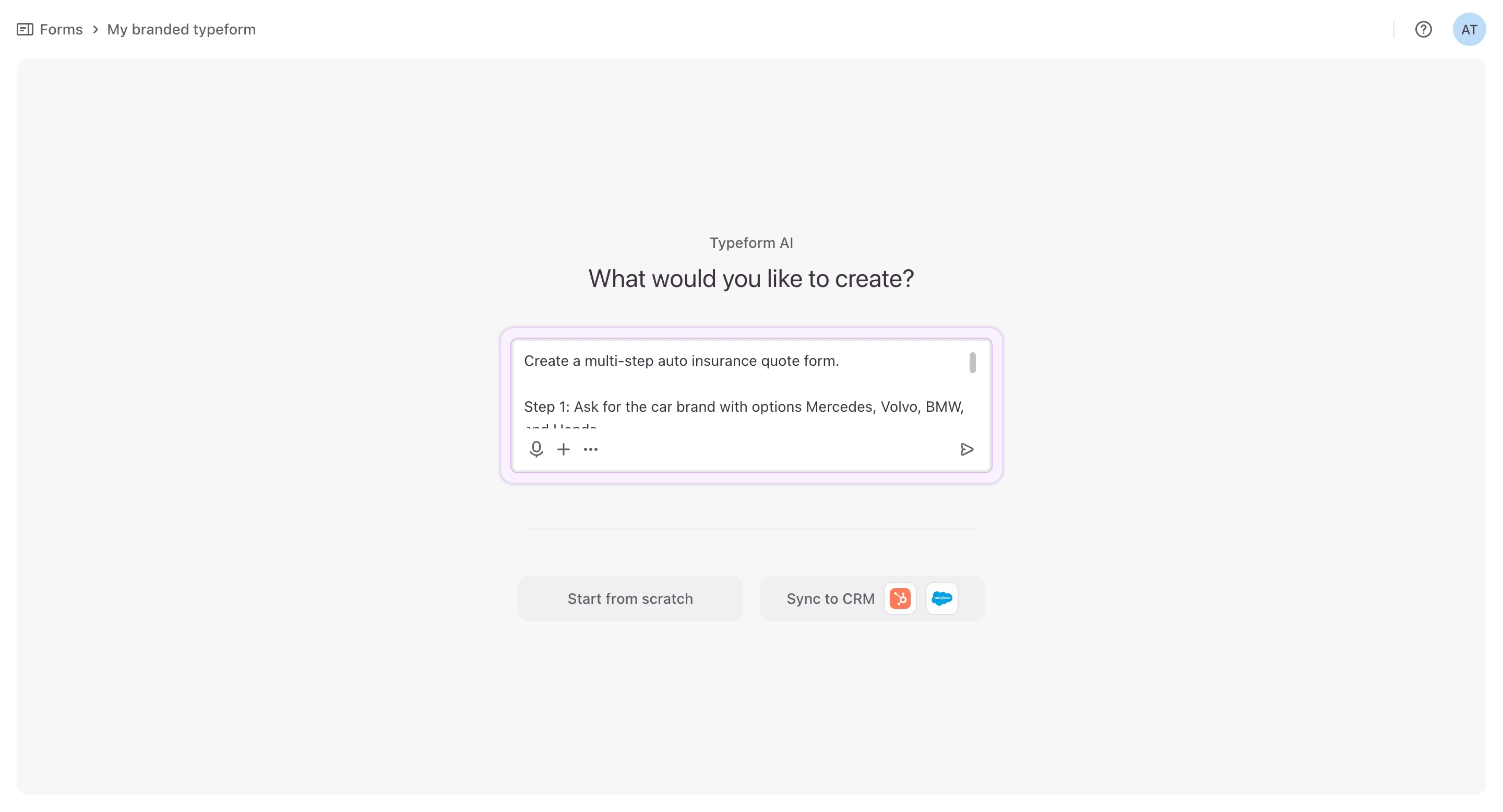
When you go to start a new project, you have a few choices. You can start with a blank slate, pick something from their template collection, or have their AI build a form for you.
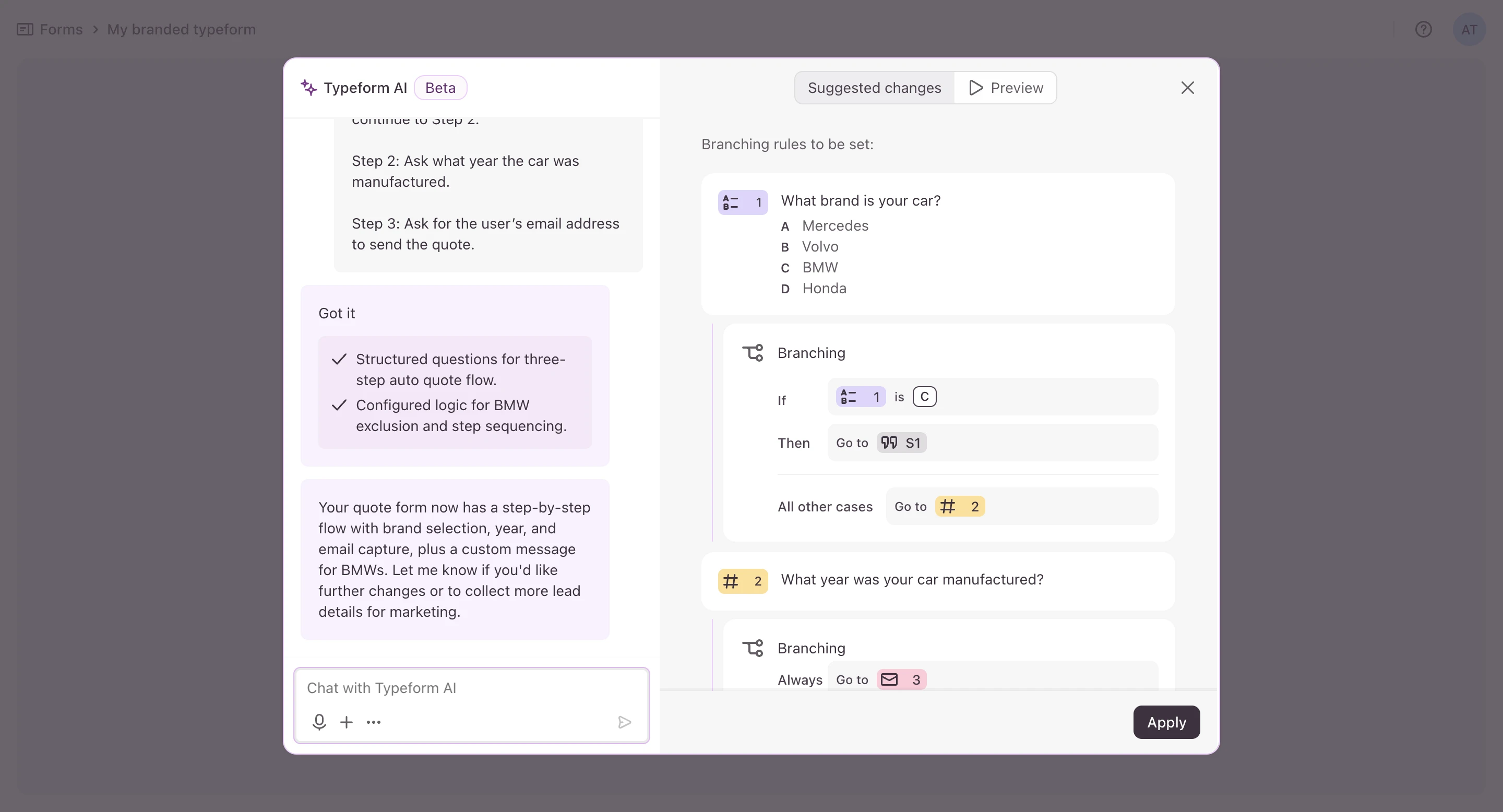
During testing, I created the quiz using the AI option. The AI produced a decent starting structure with several questions already added, which made it faster to shape the flow. From there, questions and answer options can be edited easily inside the builder.
Builder Experience
The editor itself is nice and clean, pretty easy to figure out. You can add all sorts of stuff, like fields for contact info, multiple-choice questions, ratings, file uploads, and it even integrates with tools like HubSpot and Salesforce.
The forms, when you are done, look really professional without you having to spend a lot of time on design.
Conditional Logic
Typeform has conditional logic, so depending on how people answer, you can send them to different questions or outcomes.
This is good if you have simple qualification flows or surveys, but it is really meant for just moving people through the form, not for building out super complex funnel paths.
Typeform Pricing
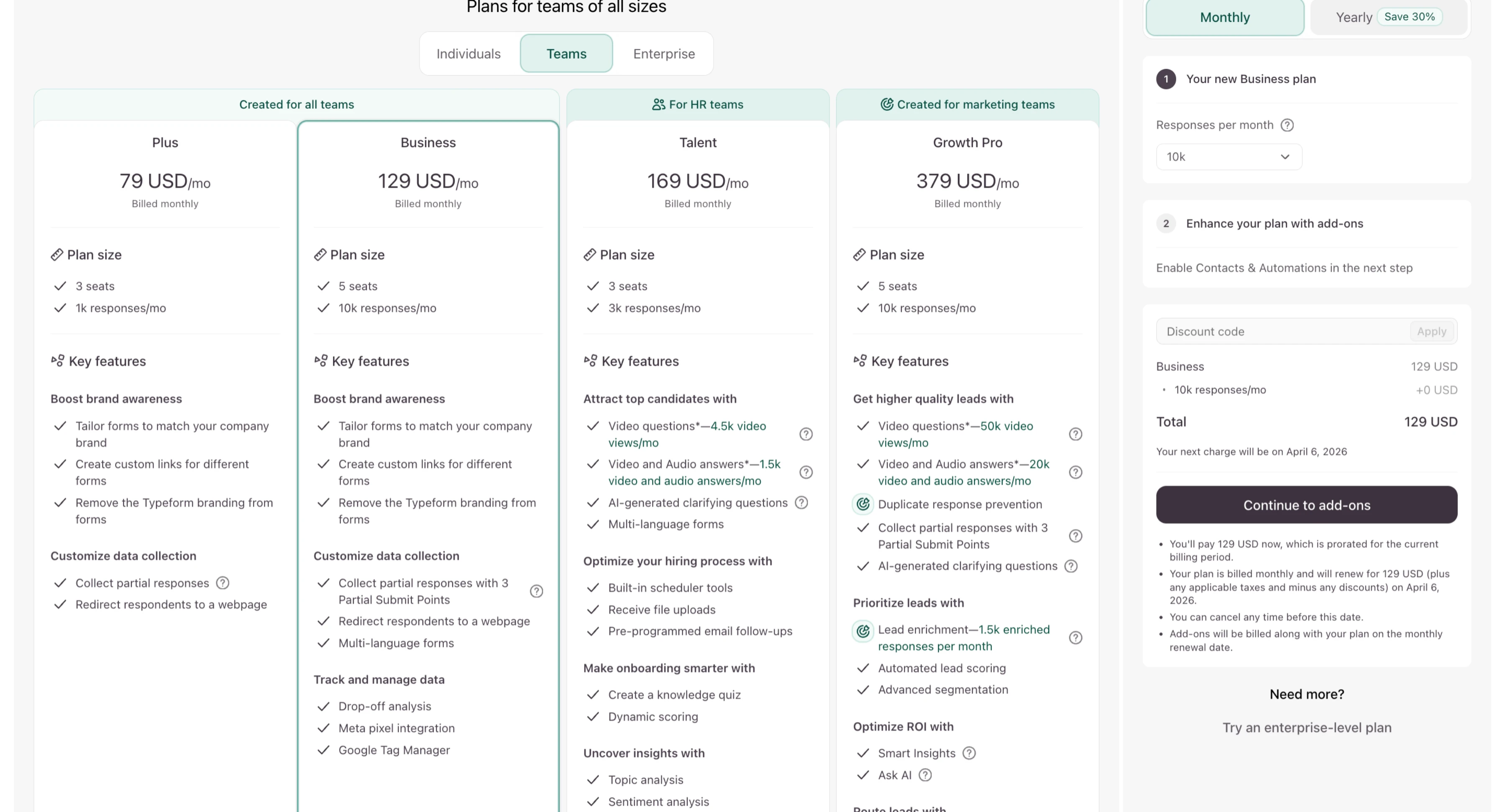
Typeform’s pricing starts around $79/month, but plans are tied to response limits and feature access. For marketers running high-volume campaigns, this can mean upgrading plans sooner than expected as lead volume grows.
Overall Experience
Overall, Typeform is a solid pick for creating interactive forms and quizzes that deliver a good user experience. It is especially useful for surveys, getting feedback, and setting up simple lead capture flows.
Pros
- The interface is very polished and easy to use
- AI builder and template gallery to get things set up fast
- Good experience for conversational forms
- Lots of different form elements and integrations
- Conditional logic for basic routing
Cons
- More of a form builder, not a full-blown funnel platform
- Price goes up as you get more responses
- More complex lead-generation setups may require third-party tools
5) Jotform
Jotform is a pretty flexible form builder; it has a good-sized template library and a whole bunch of integrations. It seems like it is made more for general-purpose forms and not so much for full lead generation funnels, still, it does have AI features which, in theory, can speed up the setup.
Getting Started
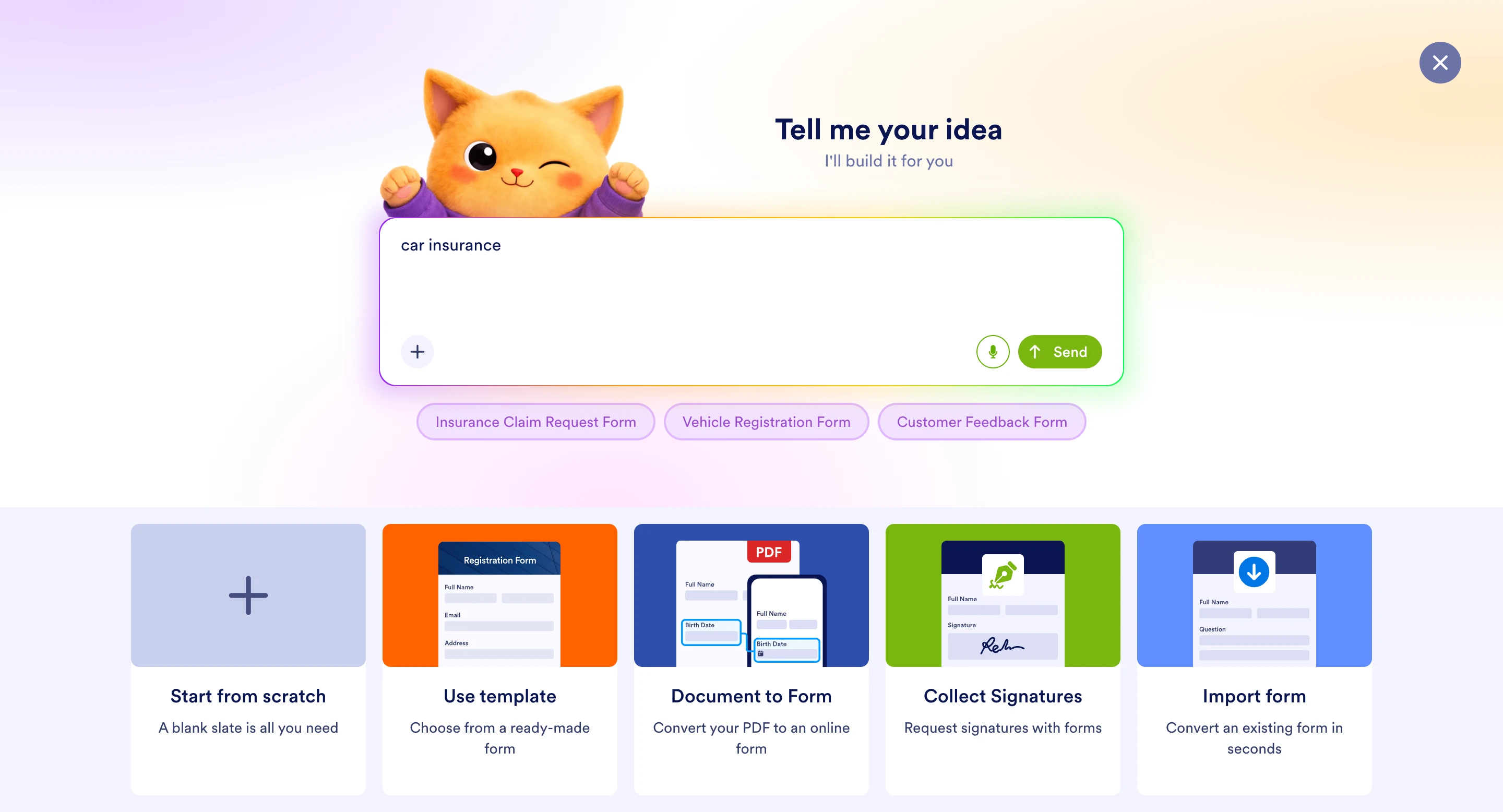
When you go to create a new form, Jotform gives you a handful of ways to get started. You have the option to begin from scratch, pick from their templates, or make use of the AI builder, which generates a form from whatever prompt you give it.
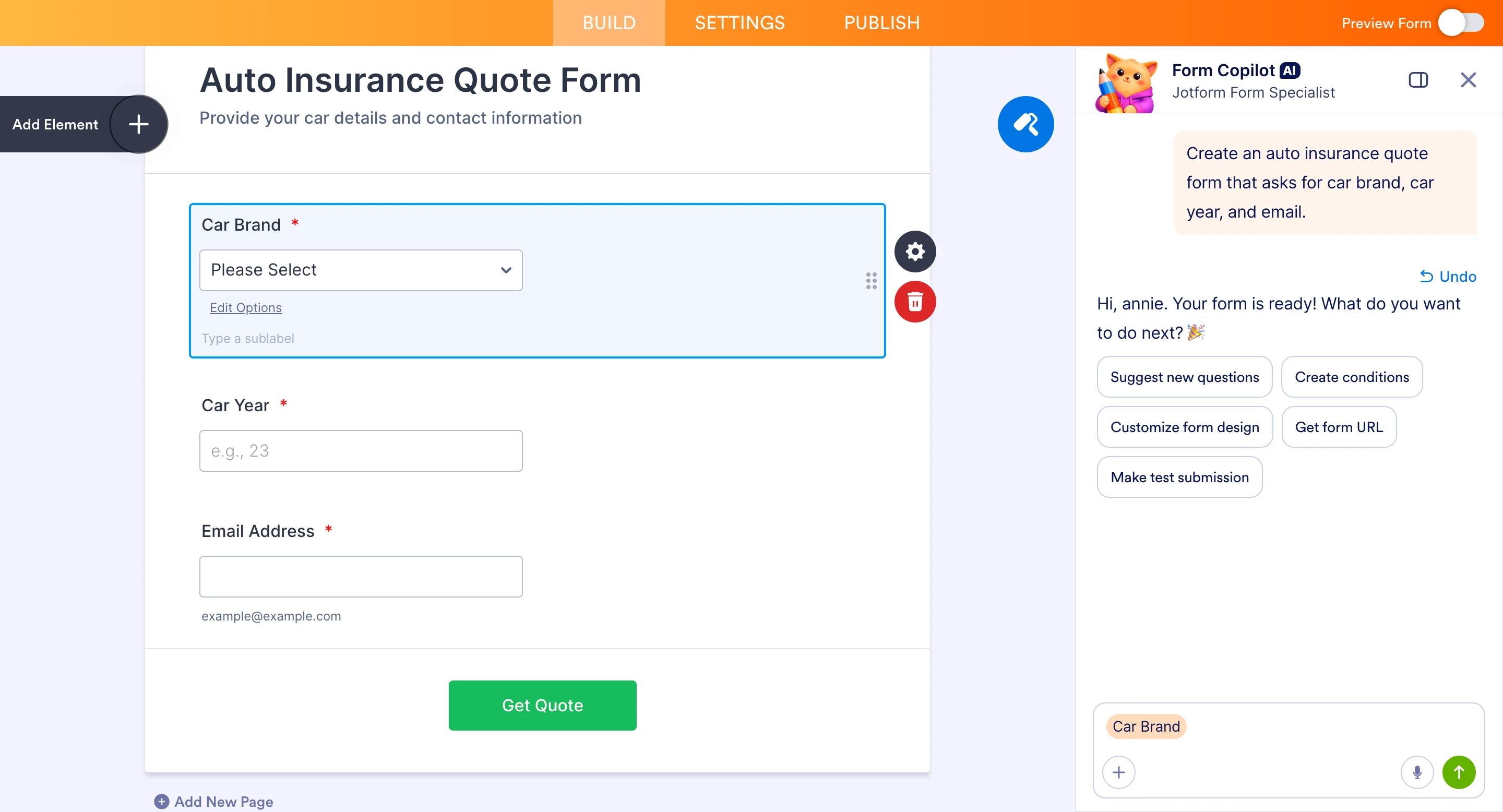
When I tested it myself, I went with the AI option and gave it the same prompt I used with the other tools for a fair comparison.
The AI actually did generate a usable structure to start with for the quiz. So it made it quicker to get going than to build everything yourself manually.
Builder Experience
Once you are in the editor, Jotform offers a wide range of form elements, including the standard contact fields, multiple-choice questions, uploads, payments, signatures, and more.
The builder is pretty flexible, and as I said, the template library is one of the best things about it if you need to move fast.
That said, it still feels more like a form builder than, say, a proper quiz funnel platform. It handles lead capture just fine, but the entire workflow is not quite as funnel-oriented as other tools like LanderLab or Heyflow.
Conditional Logic
This was the main issue, or weakness, I observed when I ran the tests.
Even though Jotform’s AI did create the basic quiz structure as intended, it did not handle the BMW disqualification logic correctly at all.
In my test, that conditional path did not behave as expected. This meant the form still needed to be manually corrected after the AI finished.
Here is what the form showed when I selected the BMW option, which was supposed to trigger the disqualification screen.

Jotform Pricing
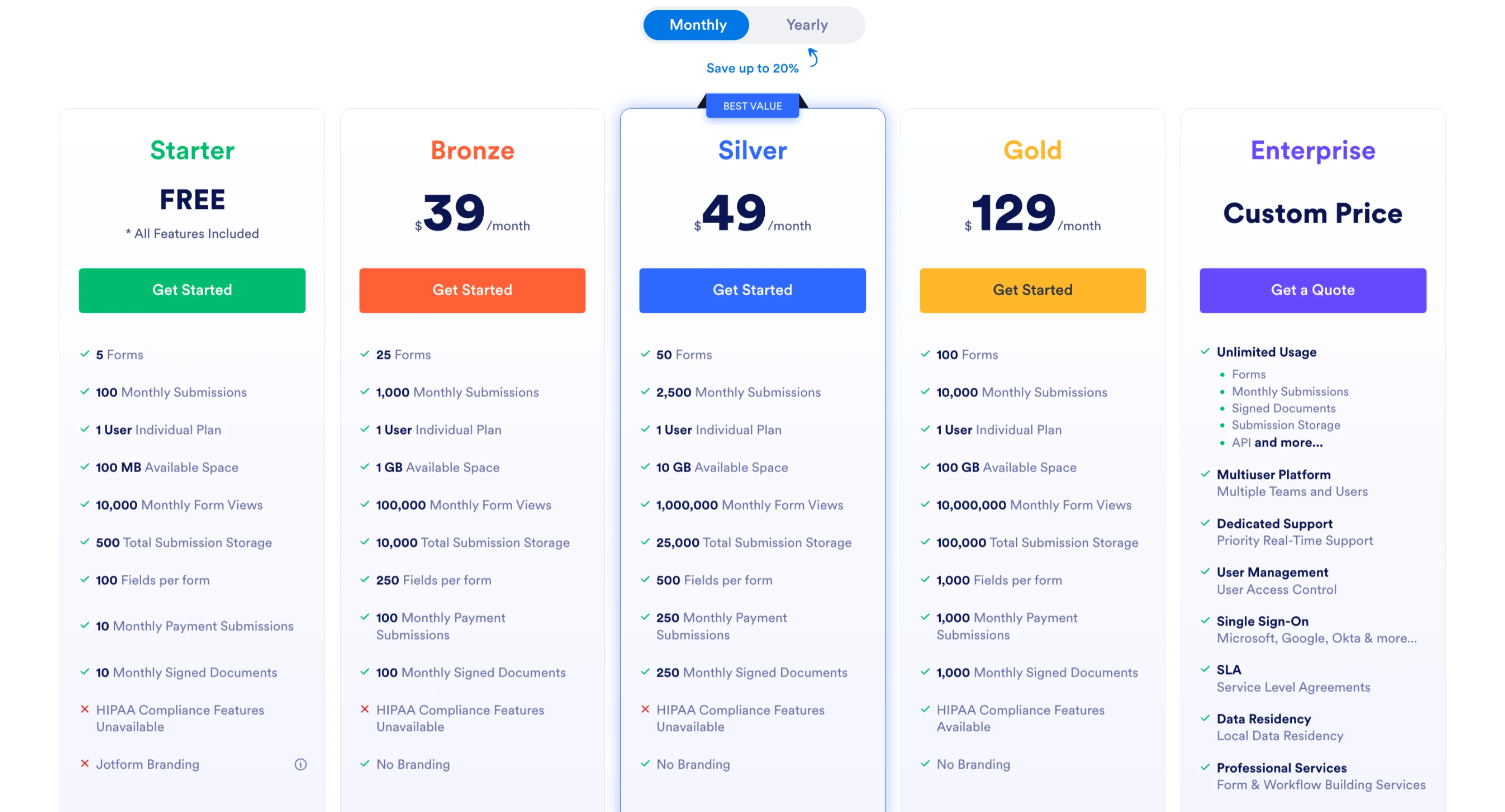
Jotform offers a free plan and paid tiers starting at around $39 per month, but each plan comes with submission and usage limits. For teams collecting larger numbers of leads, this can mean upgrading plans as campaigns scale.
Pros
- AI builder, templates, and the scratch option for when you get started
- Form builder with very flexible drag-and-drop
- A large template library is available
- A wide range of form elements can be used
- Strong integration ecosystem, which is nice
Cons
- AI-generated forms may still require manual logic adjustments (at least based on my experience)
- Interface can feel slightly dated compared to newer tools
- Usage limits can require upgrading plans as response volume increases
How to Choose the Best Quiz Funnel Software
The right platform really depends on how quizzes fit into your broader marketing strategy.
So, ask yourself a few things:
- Do you need AI to generate the complete funnel automatically? Questions, logic, and landing page?
- Do you want to run A/B tests to try to improve conversion rates?
- Do you need integrated analytics and lead tracking?
- How important are CRM integrations to your workflow normally?
If you are just running surveys or internal questionnaires, a standard form builder will probably do the job just fine.
But if your goal is a high-converting quiz funnel for lead generation, especially in competitive industries like insurance or finance, you will need a platform built for that purpose.
Why Quiz Funnels Work for Lead Generation
A quiz funnel for lead generation works because, instead of filling out a form, which feels pretty passive, you make the process active by answering questions to get a personalized result.
Instead of just immediately asking visitors for their email, you try to engage them first.
Each question builds their investment. By the time they get to the lead capture step, they have already committed to the process. And the conversion rates do reflect that.
A typical lead generation quiz funnel might ask things like:
- Do you own your home or rent?
- ZIP area code (to qualify)

And then, depending on the answers you get, the system will qualify the lead and route accordingly.
Either continuing the flow, presenting them a quote, or disqualifying them before they end has them reach out to your sales team.
Platforms such as LanderLab make it possible to generate quiz funnels or landing pages for affiliates in seconds just by using AI.
Cutting launch time down from days to just minutes.
Final Verdict
After testing all five platforms using the same exact funnel, LanderLab, in my opinion, is the strongest choice if your team’s focus is lead generation.
Typeform and Jotform are excellent form builders overall, but they are designed specifically for collecting responses, not for running full marketing funnels the way we were.
Heyflow and Perspective offer better funnel experiences but still require significant manual setup and work.
LanderLab can generate the entire quiz funnel, from start to finish, in a single prompt.
The questions, the conditional logic, and that crucial lead capture, all from a single prompt given, make it a pretty good choice.
For marketers who need to move quickly, test things often, and optimize for conversions, it is clearly the most complete solution, at least of the ones we tested here.
Ultimately, the best quiz funnel software depends on your marketing goals, traffic volume, and the level of automation you need.
Try LanderLab free and build your first quiz funnel for lead generation
If you’re looking for the best quiz funnel software for lead generation, LanderLab allows you to generate entire quiz funnels and landing pages with AI.