
Personal Injury Quiz Funnel: Qualify Leads Before You Pay
A personal injury lead is one of the most expensive things you can buy in performance marketing. Rankings.io puts the 2026 average around $284 per lead across paid channels. Mohr Marketing’s benchmark has the median personal injury cost per lead at $325 on Google Ads and $180 on Meta, with “car acci

A personal injury lead is one of the most expensive things you can buy in performance marketing. Rankings.io puts the 2026 average around $284 per lead across paid channels. Mohr Marketing’s benchmark has the median personal injury cost per lead at $325 on Google Ads and $180 on Meta, with “car accident lawyer” clicks passing $150 in competitive markets.
A lead your buyer rejects costs exactly what an accepted one costs.
That is the whole problem. In most verticals you optimize a funnel for conversion rate. In this one, a personal injury quiz funnel has to pass two separate tests: the buyer’s intake screen, and a consent audit that might happen two years later in a courtroom. Most funnels in this vertical are built for the first test only.
What the funnel has to do
- Disqualify people before they reach the contact step, not after
- Collect the six facts every intake team checks
- Confirm the phone number belongs to a real person
- Produce a consent record you can hand to a buyer or a lawyer
- Deliver the lead in real time, while the claimant is still on the page
The rest of this guide is how to build that, step by step. If you would rather skip the clicking, there is a copy-paste prompt further down that builds the whole flow for you.
This is a marketing guide, not legal advice. Consent rules change and they vary by state. Have a lawyer review your disclosure language before you spend money.
Why This Vertical Punishes Sloppy Funnels
Two things make personal injury different from solar or home services.
The first is price. Legal is one of the most expensive lead categories there is, and mass tort sits higher still. Mass Tort Ad Agency’s live benchmark, built from their own Meta spend, showed a blended $128.05 per qualified lead across 11 active tort campaigns as of mid-2026. Individual torts in their data ranged from a few dollars to $347.
When a lead costs that much, a 10% rejection rate is not a rounding error. For a wider view of what different verticals pay, see our breakdown of cost per lead by industry.
The second is legal exposure. The TCPA is one of the most litigated consumer statutes in the country. WebRecon data reported by Shipkevich counted 1,709 federal TCPA filings through July 2026, up 24.7% year to date against 2025. Class actions made up 61% of July’s filings and 76.4% of June’s.
Statutory damages run $500 to $1,500 per violation with no cap. Legal services is a named target, sitting third among sued industries behind insurance and debt collection.
So the consent record is not paperwork. It is part of the product you are selling.
What Happened To The One-To-One Consent Rule
Short version: it is gone, and it matters less than you think.
The FCC’s one-to-one rule would have required a consumer to consent to each named company separately. On January 24, 2025, the Eleventh Circuit vacated it in Insurance Marketing Coalition v. FCC, holding that the agency had exceeded its statutory authority. The FCC then removed the vacated language. The federal standard is back to prior express written consent, without the one-to-one constraint.
Two things did not go away.
The revocation rules took effect on April 11, 2025. You have to honor an opt-out made by any reasonable method, and process it within 10 business days. Only the “revoke-all” piece was delayed, most recently on January 6, 2026, to January 31, 2027.
And state law keeps tightening. Florida started the mini-TCPA wave in 2021, with Oklahoma, Connecticut and Maryland following. Several cap calls at three per 24 hours and close the calling window at 8pm. Texas sets statutory damages at $5,000 per call.
Most buyers also impose their own rules regardless of what the FCC says. Plenty still require named-seller consent and a certificate, because their own exposure did not change. Build to the stricter standard and you can sell to everyone.
The Six Facts Every Buyer Checks
Before you design a single step, look at what an intake team does with your lead. The criteria are consistent across published intake guides:
- Incident date. Is it inside the statute of limitations for that state?
- Fault. Was someone else at fault? A claimant who caused the crash is not a case.
- Injury and treatment. Did they see a doctor? Property damage with no medical treatment gets terminated on the first call.
- Representation. Are they already working with an attorney? This is a hard stop for ethical reasons, not just commercial ones.
- Insurance. Is there coverage to collect from? An uninsured defendant can kill an otherwise strong case.
- State. Does the buyer handle that jurisdiction?
Every one of those is a quiz question. That is the whole design brief. The same logic drives our debt consolidation quiz funnel guide, and the pattern carries across every regulated vertical.
The 7-Step Personal Injury Quiz Funnel
Here is the build. The order matters more than the wording. Cheap questions first, expensive ones last. If you are new to the format, start with our guide to building a multi-step quiz funnel.
Step 1: Accident Type
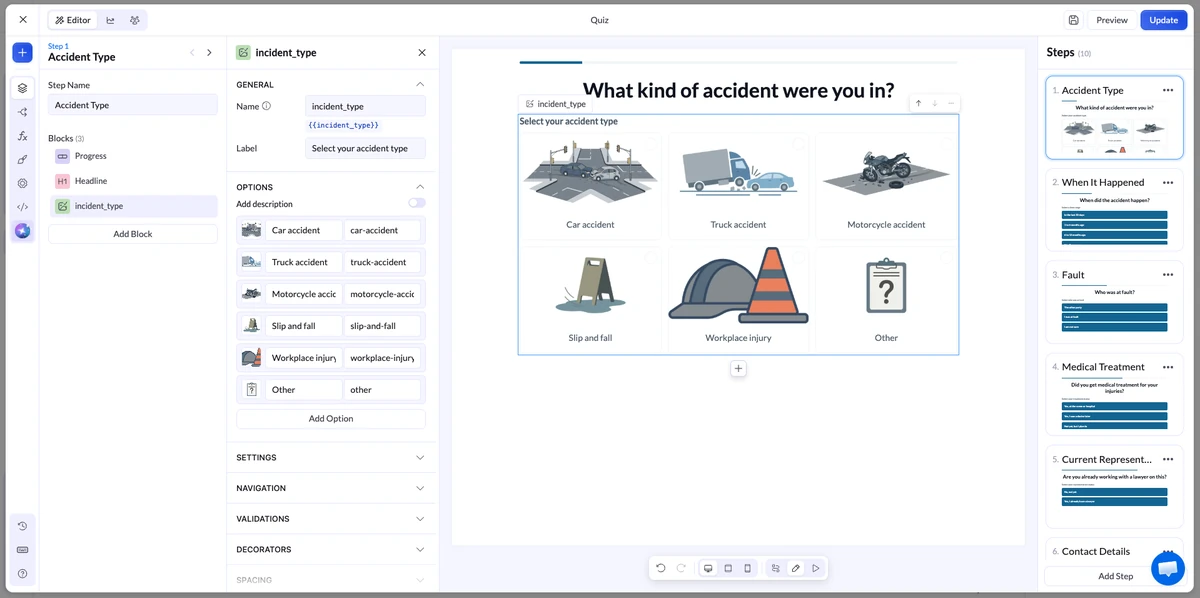
Image choice block. Car, truck, motorcycle, slip and fall, workplace, other.
This is the commitment step. It is visual, it takes one tap, and it costs the visitor nothing. Set the navigation so different accident types route to different follow-up questions. A slip and fall needs to know about the property owner. A car crash needs to know about the police report.
Use Advanced Logic on the block if you need more than a simple one-answer-one-destination rule.
Step 2: When Did It Happen
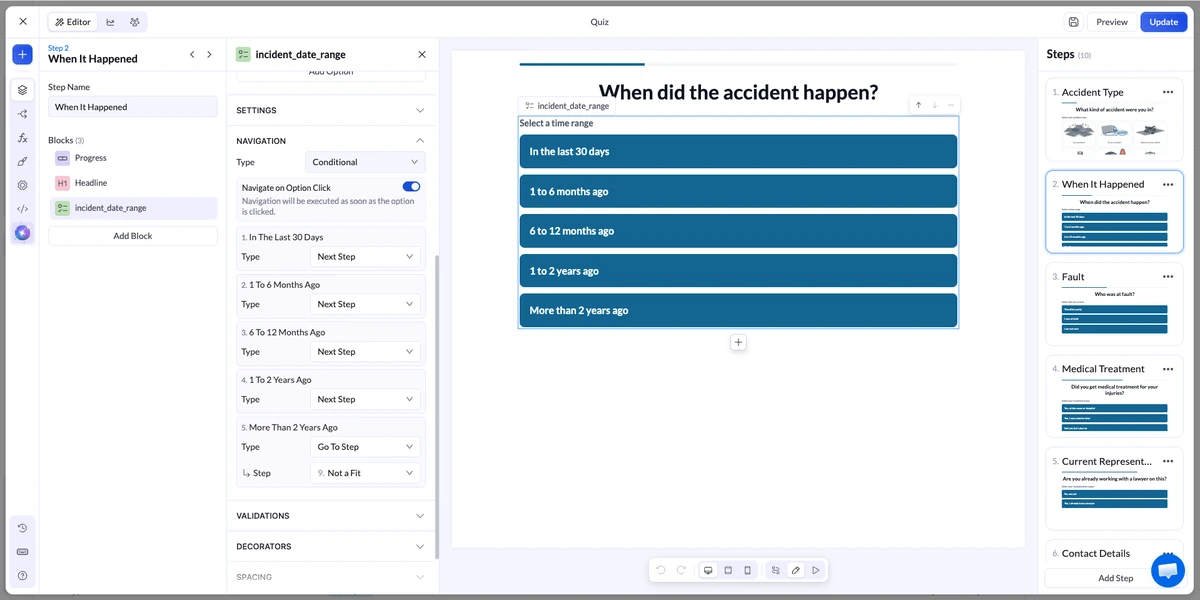
Multiple choice with date ranges, not a date picker. “In the last 30 days”, “1 to 6 months ago”, “6 to 12 months”, “1 to 2 years”, “more than 2 years ago”.
Ranges are faster to answer on a phone and they map cleanly to routing rules. Anything past the state’s filing window routes to a dead end, not to the contact form.
Step 3: Who Was At Fault
Three options: the other party, me, not sure.
“Not sure” should continue. Intake teams can work with uncertainty. “Me” should not.
Step 4: Did You Get Medical Treatment
Yes, at the scene or hospital. Yes, later. Not yet. No.
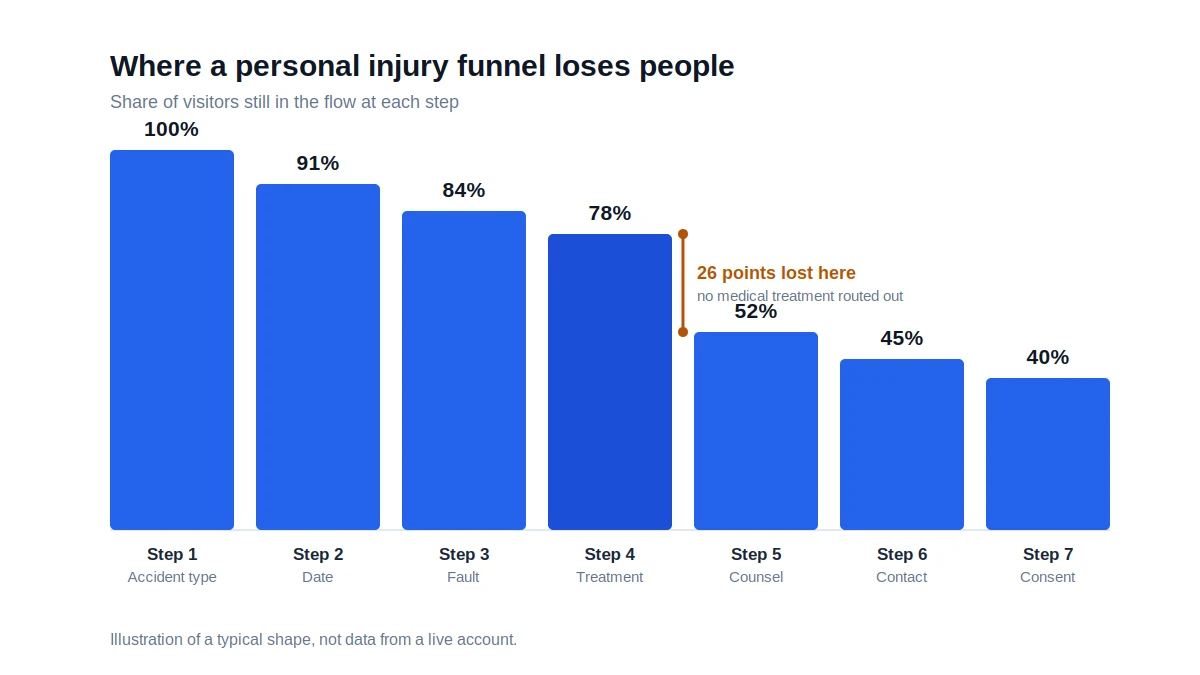
A “no” here is the single most common reason a lead gets rejected downstream. Route it out or flag it so you are not paying to send it.
This is also the natural place for a file upload block if your buyer wants documentation. It accepts images and PDFs up to 30MB per submission, so a police report or a discharge summary fits.
Step 5: Are You Already Working With A Lawyer
Yes or no. “Yes” ends the funnel with a polite message and no contact capture.
Do not soften this one. A represented claimant is not a lead, and collecting their details creates a problem rather than a sale.
Step 6: Your Details
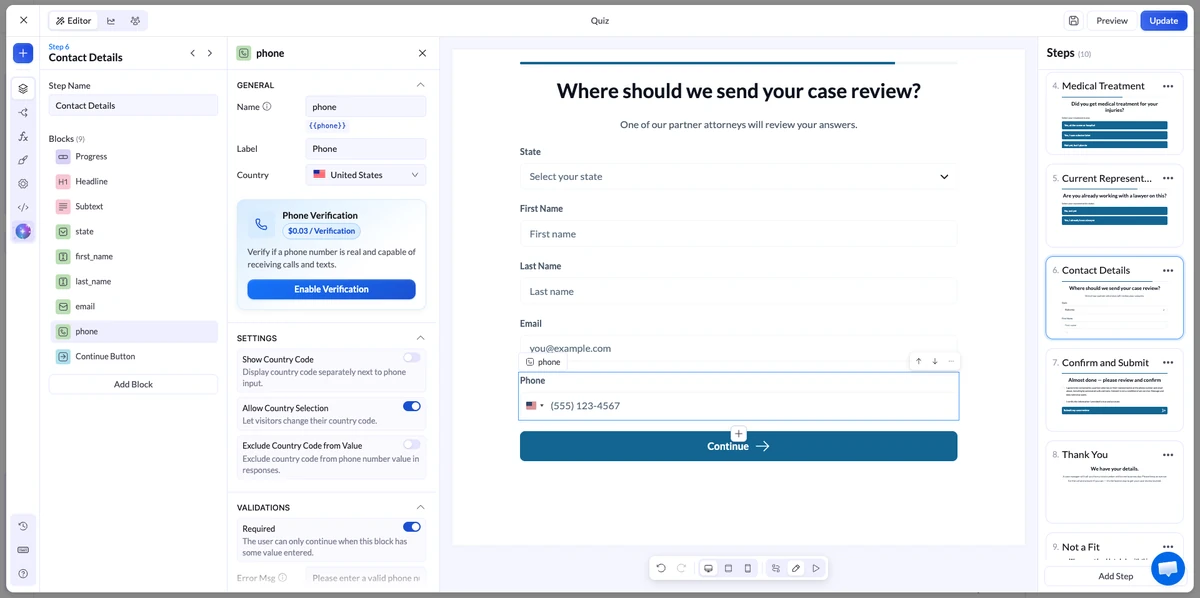
State first, then first name, last name, email, phone. Turn on phone validation and email verification on the input blocks.
You have now asked five questions that cost nothing and disqualified the people who would have been rejected anyway. The visitor has invested five taps. Contact details are the easiest ask in the funnel at this point, not the hardest.
Step 7: Consent, Verification And Signature
The last step does three jobs.
Consent. One checkbox, not pre-checked, with disclosure language your lawyer wrote. It should name who will contact them and say that consent is not a condition of service.
Phone verification. Add an OTP block after the phone field. LanderLab sends an SMS code and the visitor enters it. It costs $0.09 per verification on paid plans. If the OTP block sits on its own step after the phone step, the code sends automatically and you do not need a send button.
Signature. The signature block saves a drawn or typed signature as an image and links it on the lead record. Pair it with a line like “I certify the information above is true and accurate.” For buyers who want a stronger paper trail, this is a cheap addition.
Build The Whole Flow From One Prompt
You do not have to place seven steps by hand. LanderLab’s quiz AI builds the flow from a plain description, and the description is everything you just read.
Open a landing page in the editor, drag the Quiz element onto the canvas, choose Create with AI in the modal that opens, and paste this:
Build a 7-step personal injury lead qualification quiz for US paid traffic.

Step 1, image choice: accident type (car, truck, motorcycle, slip and fall,
workplace, other). Step 2: when it happened (last 30 days, 1-6 months,
6-12 months, 1-2 years, over 2 years). Step 3: who was at fault (the other
party, me, not sure). Step 4: did you get medical treatment (yes at the
scene, yes later, not yet, no). Step 5: are you already working with a
lawyer (no, yes). Step 6: state, first name, last name, email with
validation, phone with validation. Step 7: a required unchecked consent
checkbox naming partner attorneys and automated calls and texts, a second
checkbox certifying the answers are accurate, then submit.

Conditional logic: "over 2 years", "me" and "no" on treatment all go to a
"Not a fit" dead end with no contact fields. "Yes, I have a lawyer" goes to
an "Already represented" dead end.

Calm plain tone. No legal promises, no settlement figures. Mobile first,
progress bar on.
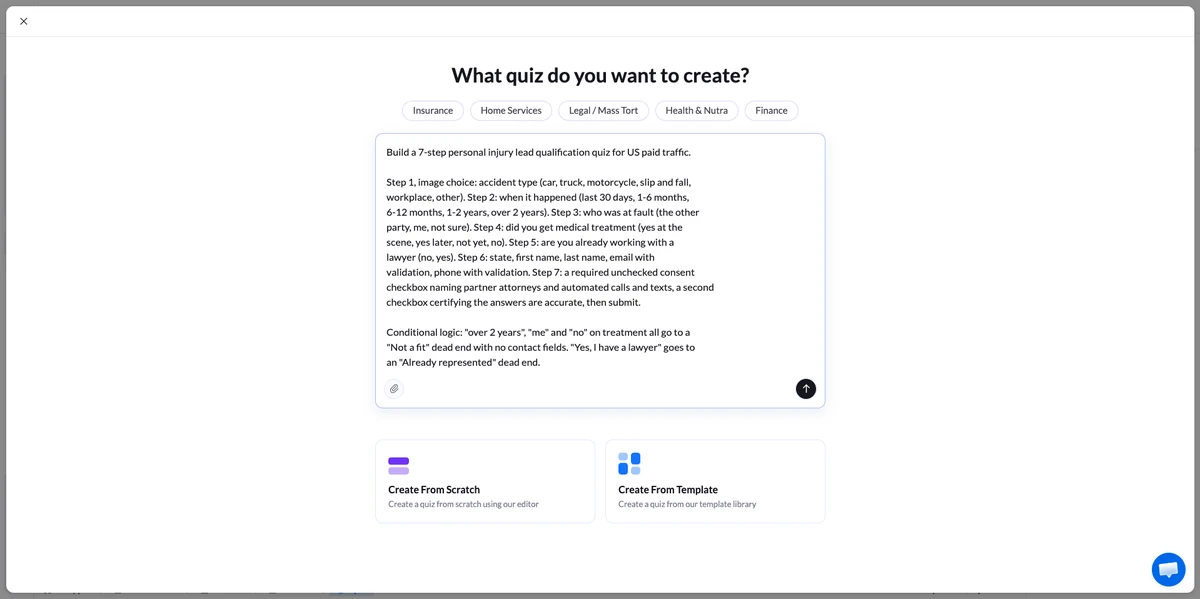
About a minute later you have the steps, the questions, the field types and the routing rules. That is a funnel you can look at and argue with, which beats a blank canvas.
Check three things before you touch anything else.
Open Navigation on steps 2 through 5 and confirm every disqualifying answer points at the right dead end. This is the part the AI most often half-does.
Make sure the consent checkbox is its own checkbox and is not pre-checked.
Cut any copy that promises an outcome. No settlement numbers, no “the compensation you deserve”. Your buyer’s compliance team will find it.
Swap the questions for your buyer’s actual criteria and the flow is done. What you do not have yet is the part that gets the lead accepted.
Build the funnel from one prompt
Paste the prompt above and get the steps, questions and routing back in a minute.
The Compliance Layer You Set Up Once
The prompt gives you the flow. It does not give you any of this, and this is the half your buyer is actually paying for.
Four settings do most of the work. You configure them per page and then forget them.
TrustedForm. Add it from the integrations panel. The script records the session and generates a certificate URL at submission, stored in the xxTrustedFormCertUrl field. That certificate captures the IP, browser, timestamp and the exact consent language shown on screen. It is independent proof, which is what a buyer or a defense lawyer wants.
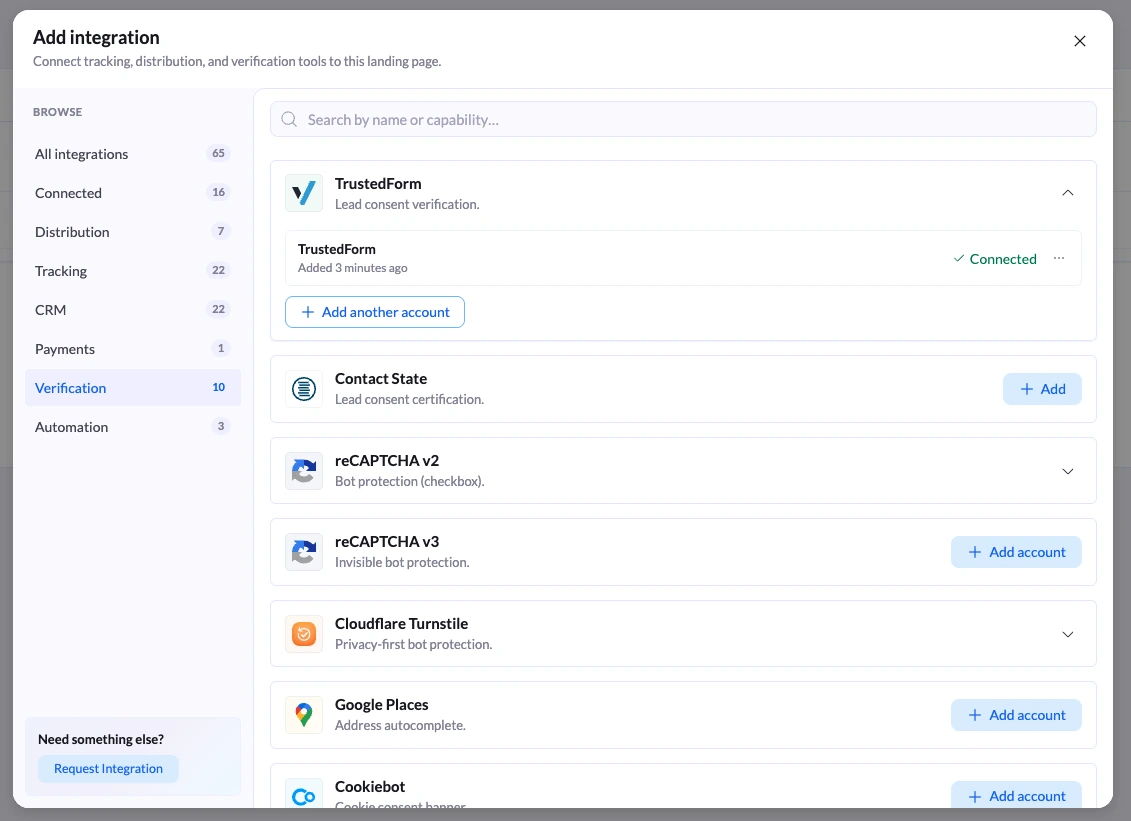
Two things people get wrong. First, pass the xxTrustedFormCertUrl field through to the buyer in your distribution integration, or it never reaches them. Second, an unclaimed certificate expires after 90 days.
Certificate generation is free. Retention past 90 days needs a paid ActiveProspect account. Jornaya is available too, and some buyers ask for one, some for the other.
Lead compliance delivery. In the page settings under Leads, this sends the lead straight to your CRM or buyer without LanderLab storing it. Useful when your buyer contract or your own privacy posture says you should not hold claimant data.
The trade-off is real. If the integration fails, the lead is gone, because it was never stored. Test the delivery before you turn this on.
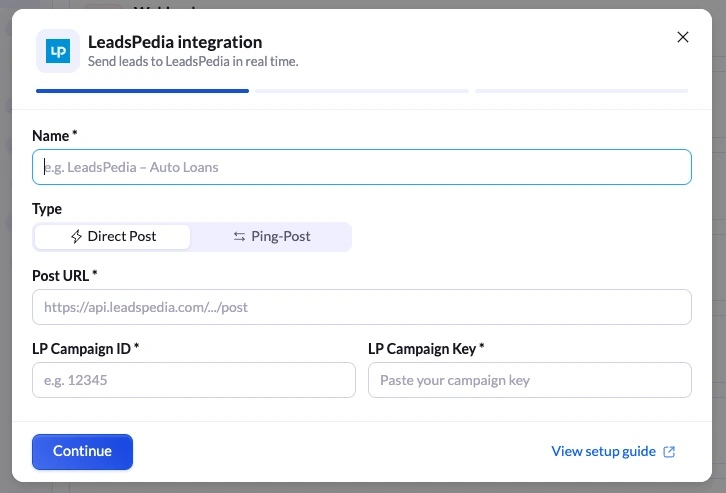
Ping-post. If you sell into a marketplace, the LeadsPedia integration supports it. A ping goes out with partial data, buyers bid, and the full post follows only if a bid comes back. LeadProsper and Phonexa are also native, and anything else takes a webhook. This is the same plumbing behind most pay-per-call lead generation setups.
Hidden fields. Capture the lander URL, visitor IP, user agent, submission time and variant ID and pass them with every lead. Buyers use them for validation. You will use them when a batch gets disputed.
Where These Funnels Leak
Asking for the phone number on step one. You pay the verification fee and the traffic cost for people you were going to disqualify on step three.
Pre-checked or bundled consent. A pre-checked box is not affirmative consent in several states. One checkbox covering consent, terms and privacy is exactly the language a plaintiff’s lawyer wants to find.
Silent disqualification. Dumping people on a blank page teaches you nothing and wastes traffic you already bought. Route them somewhere: a different offer, an informational page, a buyer with looser criteria.
Measuring the wrong number. Form fill rate is not your metric. Accepted leads divided by clicks is. A funnel that converts at 22% with a 40% rejection rate loses to one that converts at 15% and gets everything accepted.
Ignoring drop-off data. Partial leads and the drop-off view show you which step bleeds people. In a personal injury quiz funnel it is almost always the treatment question or the phone step. Check before you guess, and push your quiz events into Google Tag Manager so your ad platforms can see the same thing.
What To Test First
Run these as real A/B tests, and judge them on accepted leads, not submissions.
SMS verification on versus off. It will lower your completion rate and raise your acceptance rate. At $0.09 a verification, only your own numbers can settle it.
Question order. Move the fault question before or after the treatment question. Small change, measurable effect on completion.
Accident type as images versus a list. Images usually win on mobile, but they slow the page down. Test it. If you are still choosing a platform for this, we compared the options in our roundup of quiz funnel software.
Frequently Asked Questions
How Many Steps Should A Personal Injury Quiz Funnel Have?
Six to eight. Five qualification questions, one contact step, one consent step. Fewer than five and you are not screening. More than eight and completion drops without adding information the buyer will pay for.
Do I Still Need One-To-One Consent After The Rule Was Vacated?
Not under federal law. The Eleventh Circuit vacated it in January 2025 and the FCC removed the language. But plenty of buyers require named-seller consent contractually, and several states set a stricter bar than the FCC. Building to the stricter standard costs you almost nothing and keeps every buyer available.
Is TrustedForm Or Jornaya Required?
Not by law. By buyers, frequently. Ask each buyer which one they want before you build, because the field name has to match what their platform expects.
Does SMS Verification Hurt Conversion Rate?
Yes, on form fills. The question is what happens to accepted leads and payouts. Run it as a split test and compare accepted leads, not submissions.
Can AI Just Build This Funnel For Me?
It builds the flow. Paste the prompt above into LanderLab’s quiz AI and you get the steps, questions and routing back in about a minute. It will not add SMS verification, TrustedForm or your lead distribution, and it will not check your consent language against your state. Budget an afternoon for that part, not a minute.
Can I Buy Or Sell Personal Injury Leads At All?
Paid leads are generally permitted under ABA Model Rule 7.3 when the inquiry came from the prospect. Cold outreach to identified accident victims is not. Most states require disclosure. Check the jurisdiction and check with a lawyer.
Start With The Rejection Report
Ask your buyer for their rejection reasons from last month. Every reason on that list is a question that belongs in your personal injury quiz funnel.
Build the funnel around their screen, verify the phone, capture the certificate, and you stop paying for leads that were never going to be accepted. If you are mapping the wider journey first, our guide to lead generation funnels covers the stages around this one.
Launch your first qualifying funnel today
Conditional logic, SMS verification, TrustedForm and real-time lead distribution, with no code.


